Write WordPress meta titles and descriptions with AI, checked before you save
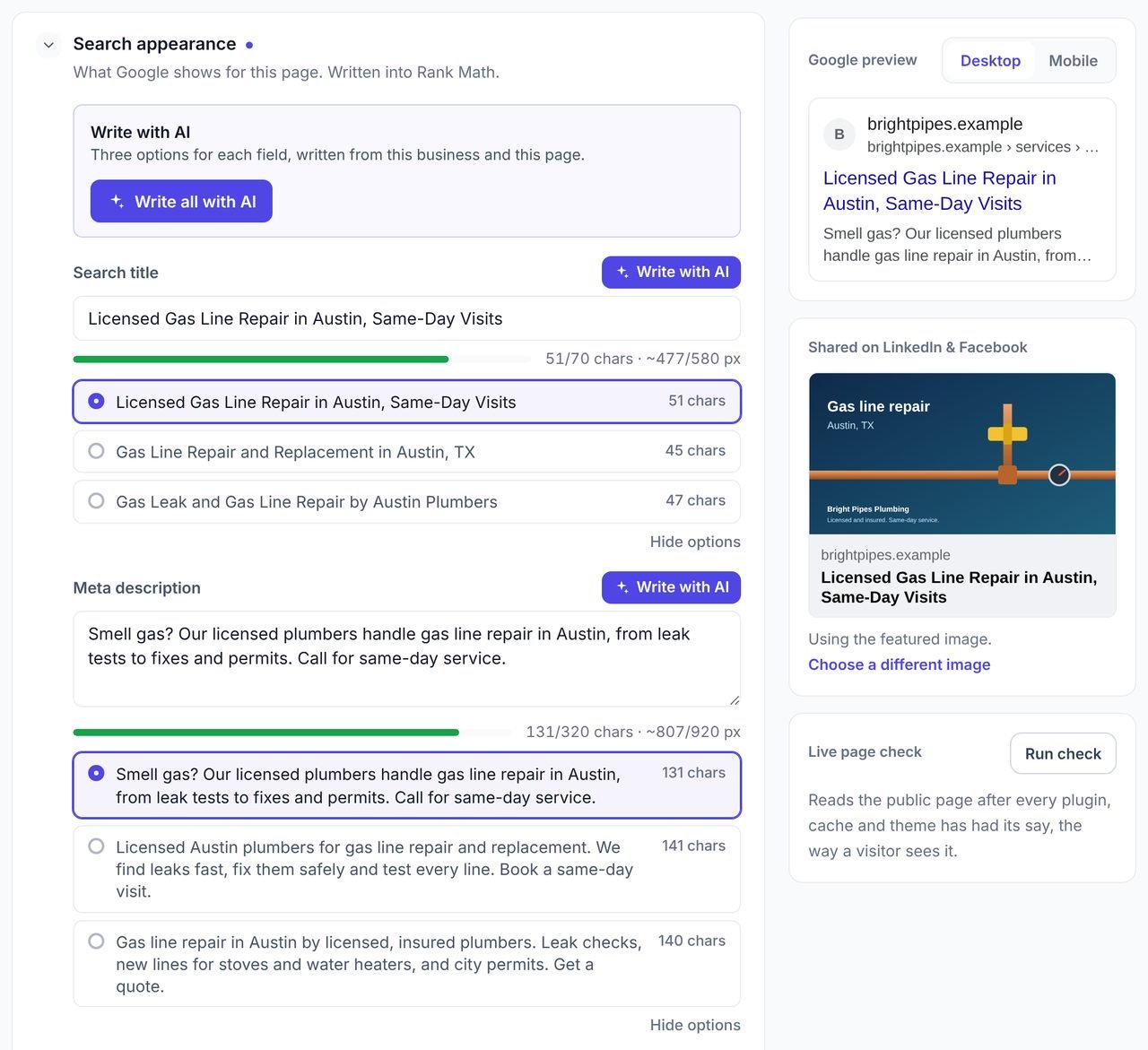
Press Write with AI on any page of any site you manage and get three titles, three descriptions and a focus keyword, written from the page itself. Every option is checked for length and duplicates before you see it, and nothing changes until you press Save.
Free during early access. Writing with AI uses AI credits.
Updated
What does an AI meta description generator do?
An AI meta description generator writes the title and description a page shows in Google results, from the page's own content. The best ones also check the result: that it fits the results page, uses the words people search for and does not copy another page.
WPCentrify's generator sits in the content editor for every WordPress site you manage. It writes three options for each field, checks every one, and saves your choice into the SEO plugin the site already runs. For editing titles, descriptions, social cards and schema by hand across sites, see on-page SEO management.
Write with AI at a glance
- Three options each for the search title, the meta description and the focus keyword.
- Written from the page's text (up to 6,000 characters), its headings and the business behind the site.
- Five checks on every option: width, keyword, keyword on the page, no duplicates, no site name on the end.
- Write one field, or press Write all with AI for all three.
- Nothing is saved until you choose an option and press Save.
- Writes into Yoast SEO, Rank Math, All in One SEO, SEOPress, The SEO Framework and Slim SEO.
- Uses AI credits; only fields that come back usable are charged.
- English only for now.
What WPCentrify reads before it writes
Good meta descriptions come from the page, not from a guess, so the AI is given the page and the business before it writes a word.
- The page's own text, up to 6,000 characters, and its headings
- Unsaved changes you have made in the editor
- The business behind the site: its name, what it does and where it works
- What the home page and main pages say, from the site's last crawl
- The other titles on the site, so a new title does not repeat one
- The site name your SEO plugin adds to every title
Five checks every suggestion has to pass
An option that fails a check is sent back to be rewritten once with the reason. If it still fails, you see the closest option marked "Could not be fixed", and that field is not charged.
| Check | What it means |
|---|---|
| Fits on the results page | The title is measured in pixels against about 580 pixels, minus the site name your SEO plugin adds to every title. The description is kept between about 100 and 160 characters. |
| Uses the focus keyword | The title and the description both contain the page's focus keyword, in any word order. |
| Keyword is on the page | A suggested focus keyword must be a phrase the page's own text already uses, so you never target words the page does not say. |
| Not a copy of another page | No option repeats the title or description of another page on the same site, which is how sites end up with ten pages called "Services". |
| No site name on the end | The title never ends with the website name, because the SEO plugin already adds it and Google would show it twice. |
Google explains how it chooses title links and snippets. Neither page sets a character limit; both are cut to fit the screen.
How to write a meta title and description with AI in WPCentrify
Open the page
In the website's Content tab, open the page in the editor and go to Search appearance.
Press Write with AI
Press it beside the title, the description or the focus keyword, or press Write all with AI to fill all three.
Read the three options
Each option shows its length. Compare them in the Google preview under the fields.
Choose one, or edit it
Pick the option you like. It fills the field, and you can change any word before saving.
Press Save
The change is written into the site's SEO plugin. Nothing reaches the live site before this.
Example: one page, before and after
A plumbing company's water heater page, with the same title as four other service pages and no description. Example data.
Before
Title: "Services | Bright Pipes Plumbing", the same title as four other pages on the site. Description: none. Focus keyword: none.
Suggested focus keyword
water heater repair
Three title options
- Water Heater Repair and Replacement, Same Day (45 characters)
- Water Heater Repair for Gas, Electric and Tankless (50 characters)
- Fast Water Heater Repair by Licensed Plumbers (45 characters)
Rank Math adds " | Bright Pipes Plumbing" to each one, and the pixel check allows for it.
Three description options
- No hot water? Licensed plumbers repair gas, electric and tankless water heaters, often the same day, with the price agreed before work starts. (142 characters)
- Water heater leaking or not heating? We find the fault, quote a fixed price and repair or replace it, usually on the first visit. Book online. (142 characters)
- Gas, electric or tankless, we repair every make of water heater and tell you honestly when a replacement makes more sense. Same-day visits. (139 characters)
Which SEO plugins it writes into
WPCentrify never writes beside a plugin it cannot read, so a page never ends up with two descriptions.
| SEO plugin on the site | Where the title and description go |
|---|---|
| Yoast SEO | Yoast's own SEO title and meta description fields |
| Rank Math | Rank Math's title and description fields |
| All in One SEO | AIOSEO's title and description fields |
| SEOPress | SEOPress's title and description fields |
| The SEO Framework | The SEO Framework's title and description fields |
| Slim SEO | Slim SEO's title and description fields |
| No SEO plugin | WPCentrify prints the tags itself |
| A plugin WPCentrify cannot read | Detected and reported; nothing is written beside it |
AI drafts straight from your SEO audit
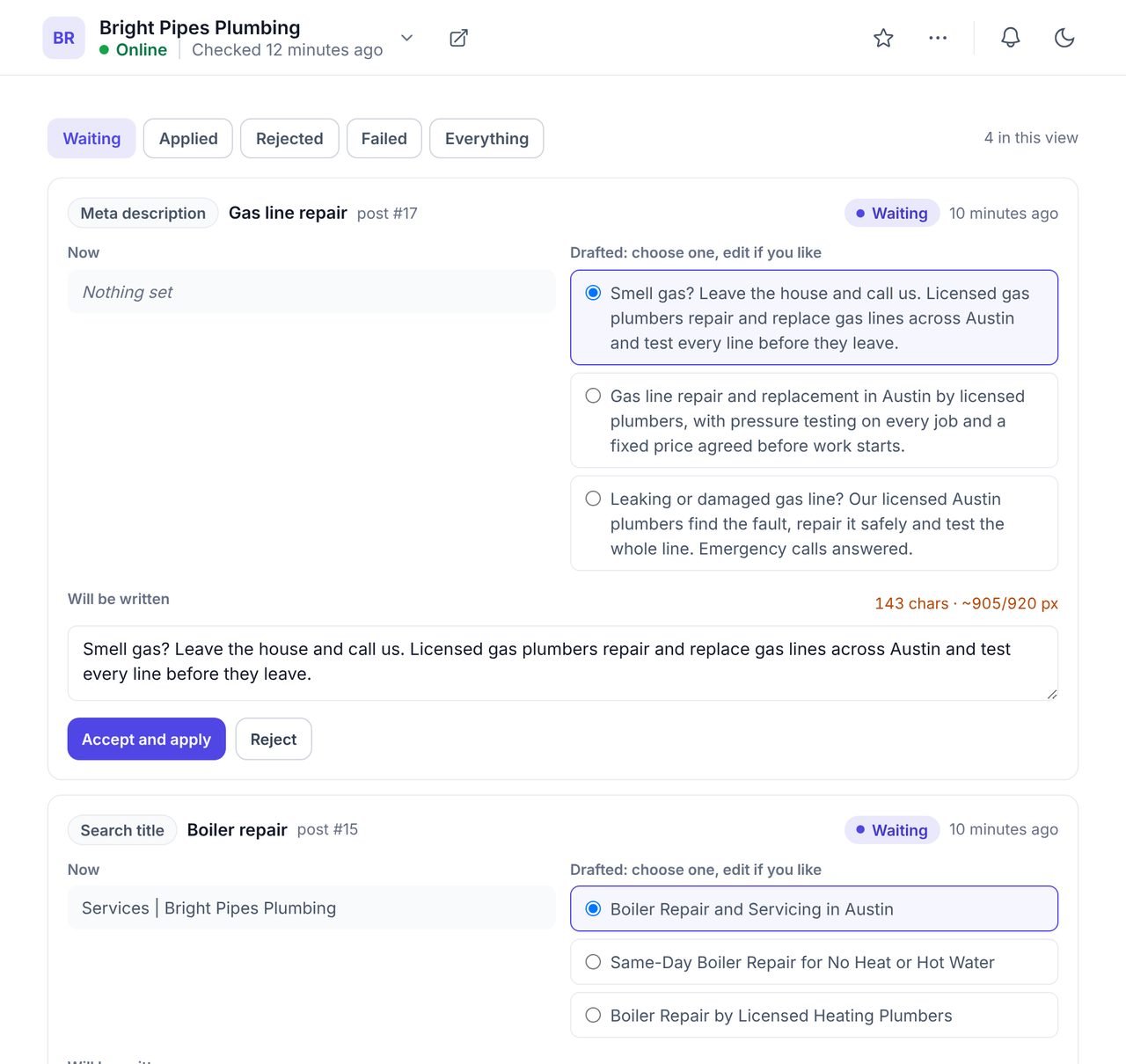
When the SEO audit finds pages with no title, no description or a title shared by several pages, you can draft the fixes in one go.
Drafts wait in a Suggestions queue. Accept one as written, edit it first, or reject it. Nothing is saved to a site until somebody accepts it. The same queue holds image descriptions drafted by the AI alt text generator. Up to 200 drafts can be made per workspace each day.
What it will not do
- It will not save on its own. Every option waits for you to choose it and press Save.
- It will not write in other languages yet. English only for now.
- It will not write social sharing text or excerpts. The Open Graph title and description and the post excerpt stay yours to write.
- It will not overwrite someone else's change. If the page was edited in WordPress after you opened it, the save is refused and you see the page as it is now.
Google's guidance on using AI-generated content asks for accurate, helpful text and a human check of titles and descriptions. Three options and a Save button are how WPCentrify builds that check into the job.
AI meta generator, writing by hand or an SEO plugin's AI?
| WPCentrify Write with AI | Writing by hand | AI inside an SEO plugin | |
|---|---|---|---|
| Sites covered | Every site you manage, one editor | One page at a time | One site per plugin licence |
| Reads the page | Page text, headings and business details | Whatever you remember | Varies |
| Checks before you see it | Pixel width, length, keyword, duplicates, site name | None | Varies |
| Writes into | Yoast, Rank Math, AIOSEO, SEOPress, The SEO Framework, Slim SEO | The plugin you are in | That plugin only |
| Setup on each site | None beyond the WPCentrify plugin | None | A paid plugin or API key per site |
Questions about AI meta titles and descriptions
What people ask before they turn it on.
Google sets no fixed limit. It cuts titles and descriptions to fit the width of the screen, so a title that fits about 580 pixels and a description of roughly 100 to 160 characters usually shows in full. WPCentrify checks titles by pixel width, allowing for the site name your SEO plugin adds, and checks descriptions by length.
Often, but not always. Google writes its own snippet from the page when it thinks that matches the search better, and uses the meta description when it describes the page well. A description written from the page's own text, with the words people search for, gives it the best chance of being shown.
Yes. When you save, the title, description and focus keyword are written into the SEO plugin the site already runs: Yoast SEO, Rank Math, All in One SEO, SEOPress, The SEO Framework or Slim SEO. On a site with no SEO plugin, WPCentrify prints the tags itself.
Writing with AI uses AI credits from your workspace balance. Only the fields that come back with usable options are charged, so a field the checks could not fix costs nothing. WPCentrify is free during early access, and plans with their credit allowances will be announced with pricing.
Not yet. The AI writer works in English only for now.
No, as long as a person checks them. Google's guidance is that AI-written content is fine when it is accurate and useful, and it recommends reviewing generated titles and descriptions before publishing. WPCentrify never saves an option until you choose it and press Save.
No. Write with AI fills the field in the editor with the option you pick. Nothing reaches the live site until you press Save, and the editor refuses to save over a page someone changed in WordPress after you opened it.
No. The writing happens in WPCentrify, so there is nothing to install on the site and no API key to manage. The WPCentrify plugin writes the saved result into the site's SEO plugin.
Related AI and SEO tools
SEO audit
Find every page with no title, no description or a duplicate, on every site
Read moreAI alt text generator
Image descriptions written from the picture and the words around it
Read moreContent brief generator
Titles, outline and terms for a new page, from what ranks today
Read moreSee every tool in one place: WordPress SEO tools for every site you manage.
Write the next title with AI
Connect a site, open any page in the editor and press Write with AI. Three checked options are ready in seconds.
Free during early access. Keep your data, export any time.