Keyword research for each WordPress site you manage
Find the searches each client's customers actually type, with how often each is searched, how hard it is to rank for and what the searcher wants. Then send the best ones to the rank tracker or turn them into a content brief.
Free during early access. Keyword searches use AI credits.
Updated
What is keyword research?
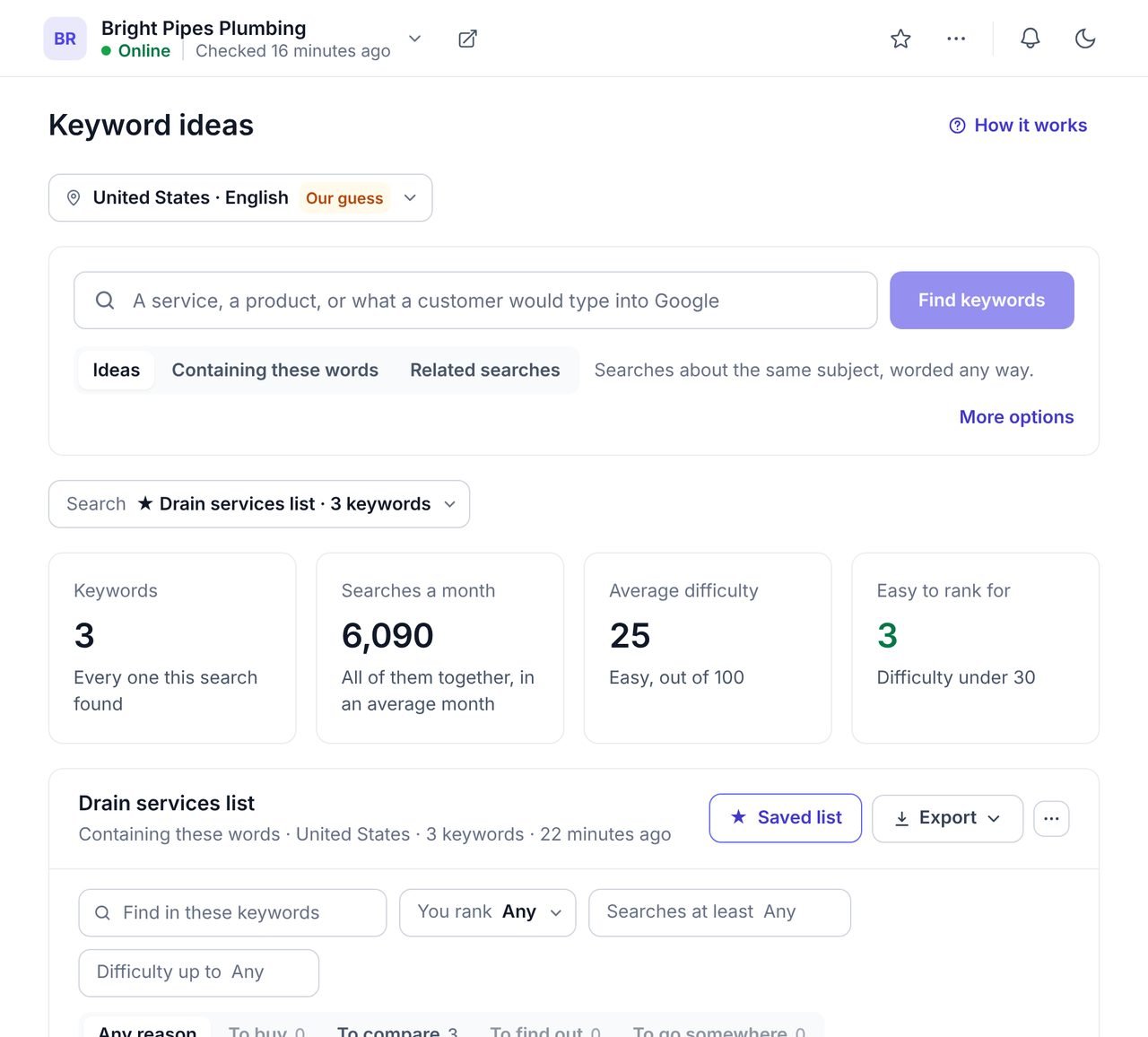
Keyword research is finding the words people type into Google when they look for what a business offers, and how often each is searched. It decides which pages a site needs and which words those pages should use.
WPCentrify does keyword research for every WordPress site you manage, in each site's own country and language. Every keyword shows its monthly searches, a year of trend, its difficulty, what the searcher wants and whether the site already ranks for it.
Keyword research at a glance
- Ideas, Containing these words and Related searches.
- Monthly searches with a 12-month trend.
- Difficulty from 0 to 100, and an Easy to rank for filter.
- Search intent: to buy, to compare, to find out or to go somewhere.
- Whether the site already ranks, and who is on page one.
- Saved lists per site, CSV and PDF export, up to 1,000 keywords a search.
- Google traffic estimate for any site, without Search Console.
- Uses AI credits; the same search within a week opens free.
Three ways to find keyword ideas
Type a service, a product or what a customer would type into Google, and choose how wide to look.
Ideas finds searches about the same subject however they are worded. Containing these words finds searches that include your words, like Google's own suggestions. Related searches lists what Google itself shows as related. Each result is counted for the country and language you choose for the site.
- Monthly searches, with a year of trend for each keyword
- Difficulty from 0 to 100, and an Easy to rank for count
- What the searcher wants: to buy, to compare, to find out or to go somewhere
- Whether the site already ranks for it
Every keyword, with the numbers that decide whether to write
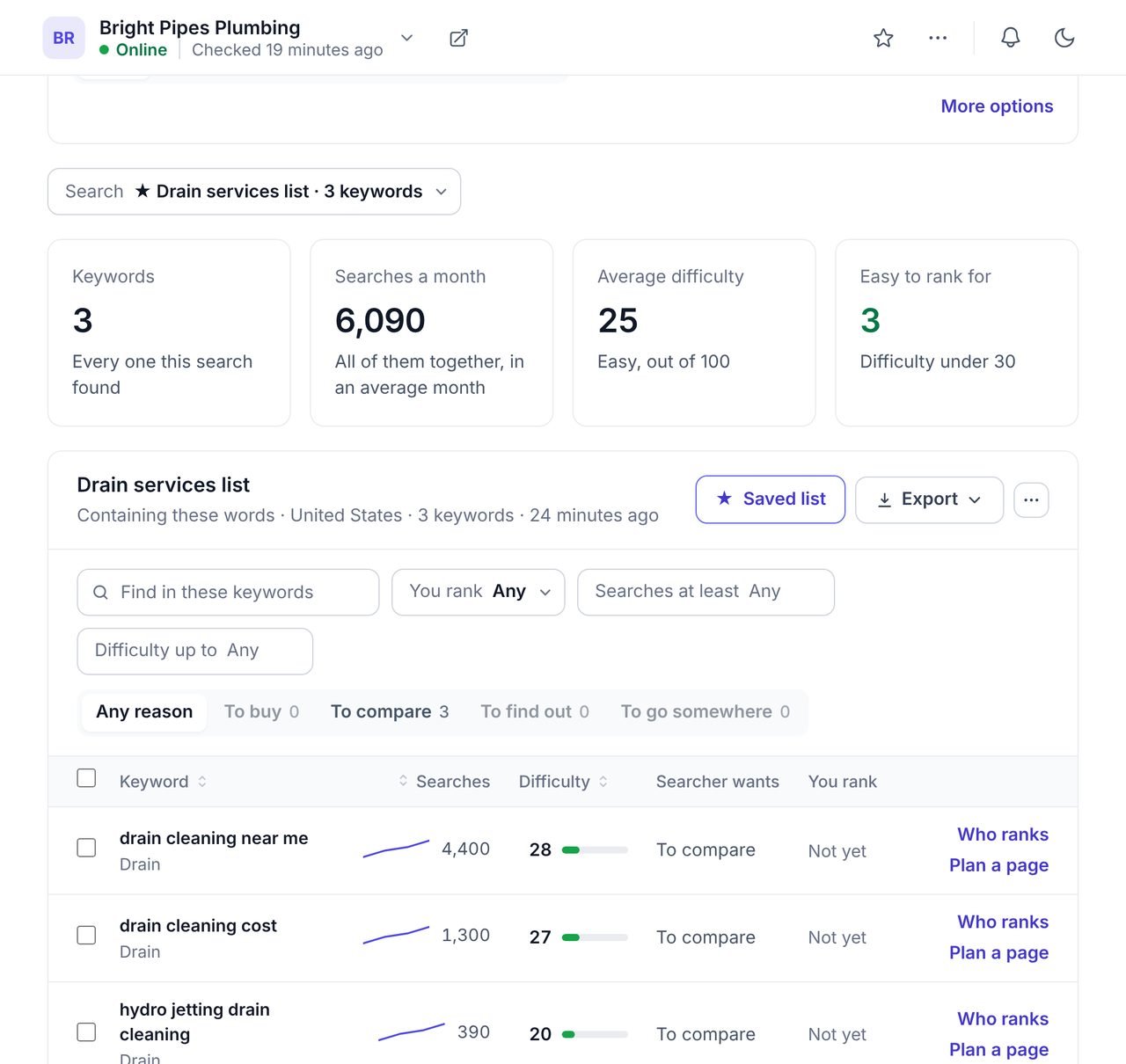
The keywords worth a page are searched often, are possible to rank for, and come from people who want to buy or compare.
Filter by any of those in a second. "You rank" says whether the site already shows up, so you do not write a second page for a search an existing page covers. "Who ranks" opens the ten websites on Google's first page. "Plan a page" turns a keyword into a content brief.
- Filter by searches, difficulty, intent and whether you rank
- Cost per click, for what advertisers pay for the search
- Saved lists per site, and CSV or PDF export
- Track on Rankings sends keywords to the rank tracker
See a site's Google traffic without Search Console
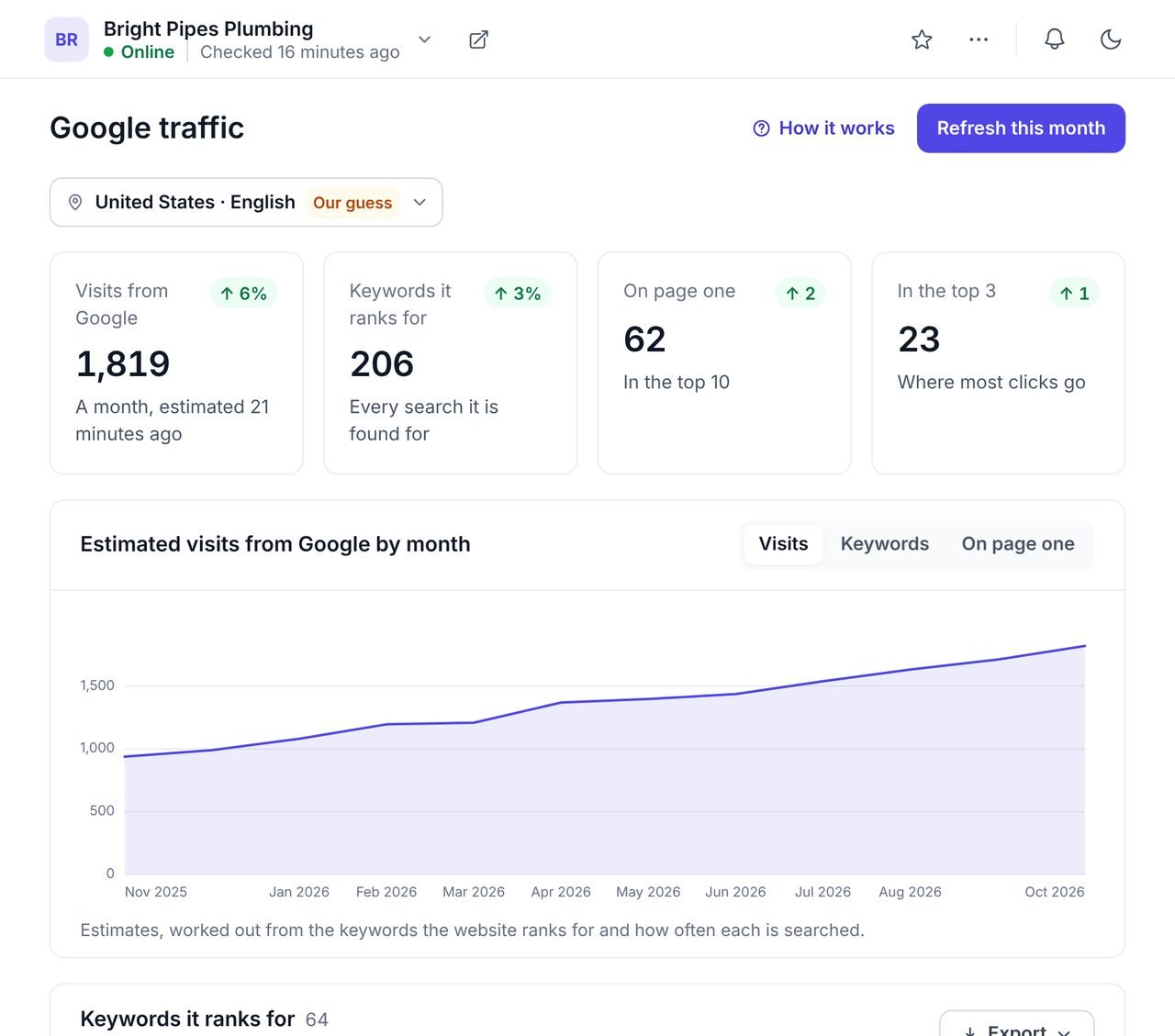
The Google traffic view estimates the visits a site earns from Google each month and lists every keyword it ranks for, worked out from search data rather than from the site itself.
It works for any website, including a new client whose Search Console nobody can find, and a year of months shows whether the site is growing. It is an estimate: where Search Console is connected, that is Google's own count, and the two will not match exactly.
- Estimated visits from Google by month, for 12 months
- Keywords it ranks for, on page one and in the top 3
- Works with or without Search Console
How to do keyword research for a local business
Set the market
Choose the country and language the site's customers search in. WPCentrify suggests one from the site itself.
Start from a service
Type what the business sells, the way a customer would say it: "drain cleaning", not "drainage solutions".
Filter to the openings
Show keywords that are easy to rank for and come from people who want to buy or compare.
Check what already ranks
Use "You rank" to skip searches a page already covers, and "Who ranks" to see what Google rewards.
Plan or track
Turn a keyword into a content brief, or send it to the rank tracker to watch it from then on.
What a keyword research tool can and cannot tell you
Monthly searches are averages, and seasonal searches swing well above and below them; the trend line shows when. Difficulty is a guide to effort, not a promise, and a strong local business can rank for harder searches in its own area. To see the searches competitors win that a site does not, use the keyword gap, and to watch positions for the keywords you choose, use the rank tracker.
- Google only. Searches are Google's, not Bing's or YouTube's.
- One market per search. Compare two countries by running the search twice.
- No guesses. A keyword with no recorded searches shows a dash, not a nought.
Questions about keyword research
What people ask before they turn it on.
Keyword difficulty is a score from 0 to 100 for how hard it would be to reach the first page of Google for a search. Under 30 is easy, and higher scores usually need a stronger website and better links. WPCentrify shows it beside every keyword, and a filter shows only the easy ones.
It is what the person searching wants: to buy, to compare, to find something out, or to go to one website. A page that matches the intent ranks more easily, so WPCentrify labels each keyword with one of those four.
Search Console shows the searches a site already appears for. Keyword research shows searches it does not appear for yet, with how often each is searched, so you can decide what to write next. WPCentrify shows both, and marks the keywords a site already ranks for.
You choose the country and language for each site, and WPCentrify suggests one from the site itself. Searches are counted for that market, so a plumber in Texas sees United States figures.
Up to 100 at first, and up to 1,000 when you load more. Every search is kept, so opening, filtering, sorting and exporting it again costs nothing.
Yes. Tick the ones you want and press Track on Rankings, and the rank tracker checks them from then on.
A new search, loading more and seeing who ranks use AI credits from your workspace balance. The same search again within a week opens for free. WPCentrify is free during early access, and plans with their allowances will be announced with pricing.
Related AI and SEO tools
Keyword gap
The searches competitors win and the site does not
Read moreContent briefs
Turn a keyword into a plan for one page
Read moreRank tracker
Watch the keywords you chose, daily or weekly
Read moreSee every tool in one place: WordPress SEO tools for every site you manage.
Find what each client's customers search for
Connect a site, set its market and type the first service it sells.
Free during early access. Keep your data, export any time.