About 3 per 1,000 words
Counting the links a page already has. Suggestions beyond it are marked, not dropped.
WPCentrify finds the places in your writing where a link to another page belongs, shows each one in its sentence, and adds it to the live page when you say yes. It also lists the pages nothing links to, on every site you manage.
Free during early access.
Updated
An internal linking tool finds places on a website where one page should link to another, and adds those links for you. Good internal links help visitors find related pages and help search engines understand which pages matter.
WPCentrify's internal linking works on every WordPress site you manage, with no linking plugin on the site. It is built on rules rather than AI, so every suggestion can be explained, and nothing is added until you approve it.
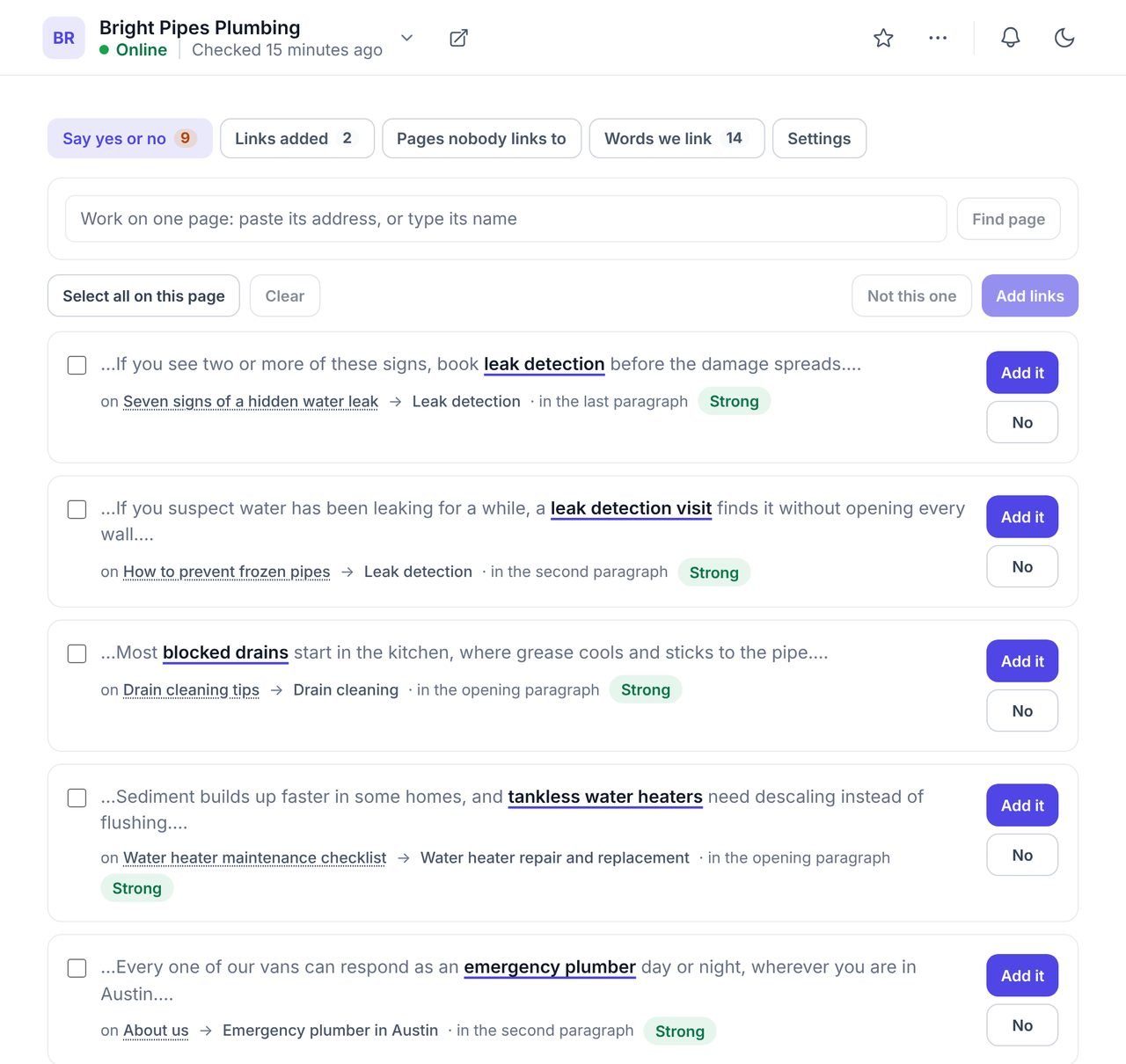
Every suggested link is shown inside the sentence it would sit in, with the words that would become the link and the page it would point to.
A keyword and a URL in a table cannot be judged, so people approve everything or nothing. A sentence can be read in a second. Say yes and the link is added to the live page; say no and it is not offered again. Suggestions beyond the usual number for that page are marked "Above the usual" rather than hidden, because some pages, like a list of your services, should link more.
Each page is known by a set of phrases. WPCentrify gathers them from seven places, and you can see and edit the whole list.
| Source | What it adds |
|---|---|
| Rules you type | Your own phrase for a page, such as "emergency plumber" for the emergency page. A rule you typed always wins. |
| Words other links already use | The words existing links on the site already use to point at the page. |
| The focus keyword | The keyword set in the page's SEO plugin. |
| The page title | What the page calls itself. |
| The page address | The words in its URL, when they are real words. |
| Google searches | Searches the page already gets clicks and impressions for, when Google Search Console is connected. |
| Phrases from the writing | Phrases found in the page's own text. Off until you turn them on. |
Words WPCentrify works out for itself must be specific, so a generic word like "services" is only used when you or the page itself chose it.
Every rule exists to stop a site looking over-linked to readers and to search engines.
Counting the links a page already has. Suggestions beyond it are marked, not dropped.
In one pass, so no page turns blue in a single press. Lists and table cells that name your pages get up to 12 more.
Across the whole site, so forty pages never link to one page with identical words.
A page everything already links to does not need the forty-first link.
Two links in running text are kept about 300 characters apart.
Never inside a heading, an existing link, a button, code or image text, and never on a page under 200 words.
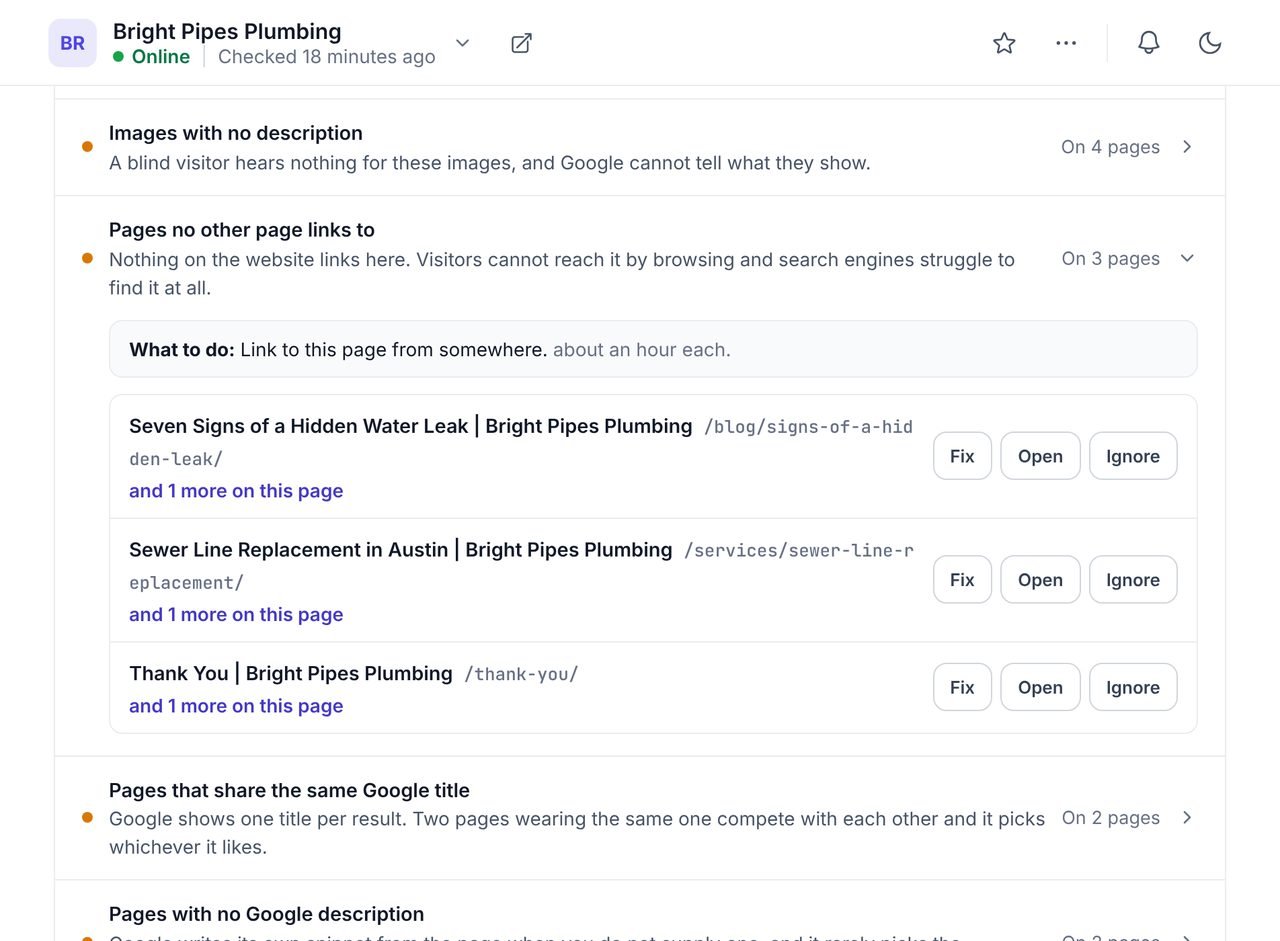
The weekly crawl lists every published page that no other page links to, so the pages you forgot about are the first ones you fix.
Press Fix beside an orphan page and WPCentrify looks for the pages most likely to mention it, reads only those, and shows the sentences where a link to it would fit. Pages you keep out of Google on purpose, like a thank-you page, can be left out of the list.
By default nothing is added until a person says yes. If you trust the rules on a site, a second switch lets WPCentrify place the strongest suggestions on its own, a few each day. It stays inside every limit above, counts only links it actually placed, and never places a link marked "Above the usual". The switch is off until you turn it on, site by site.
Links are added inside the writing on the page, wherever the editor keeps it, and the layout is left exactly as it was:
Pages built with Divi 5 or Oxygen are read, so their links count, but not changed. The dashboard says which builder to use to add a link there, rather than skipping the page in silence.
Links WPCentrify added are listed separately from links people wrote. Remove one, or press once to take out every link it ever added to a site. Links somebody wrote by hand are never touched.
Internal links are how search engines discover pages and how they learn what each page is about. Google asks for crawlable links with descriptive anchor text: words that tell a reader what they will find, not "click here". Pages that many relevant pages link to are easier to find and easier to understand.
For a business site that means the pages that earn money, such as service pages, should be linked from the articles and pages that mention them. That is the job this tool does across every site you manage. To fix links that lead nowhere, see the broken link checker; to see every SEO problem on a site, see the SEO audit.
What people ask before they turn it on.
Google does not set a number. It asks for links that make sense to a reader, with descriptive words. As a working rule, WPCentrify suggests about 3 links per 1,000 words of writing, counting the links already there, and marks anything beyond that as "Above the usual" so you decide.
An orphan page is a published page that no other page on the site links to. Visitors can only reach it from a menu, a search or a bookmark, and search engines may find it late or treat it as unimportant.
It is when the links are few, relevant and varied. That is why WPCentrify shows every suggestion in its sentence for you to approve, limits how many links a page gains, and never sends the same words to the same page more than three times across the site. Placing links on its own is a separate switch, off until you turn it on.
No. Suggestions come from rules: the words each page is known by, where those words appear in your writing, and limits that keep linking natural. You see exactly why each link was offered.
No. Internal links connect pages within the same website. Linking one client's site to another's is a decision for a person, not a tool.
It can add links to pages built in the block editor, the classic editor, Elementor, Divi 4, WPBakery, Beaver Builder and Bricks. Pages built with Divi 5 or Oxygen are read but not changed, and the dashboard says so.
Yes. Remove any single link it added, or every link it ever added to a site, in one press. Links somebody wrote by hand are never touched.
Orphan pages are one of 30 checks the weekly crawl runs
Read moreFix the links that lead to a missing page
Read moreEvery post and page across your sites, searchable in one place
Read moreSee every tool in one place: WordPress SEO tools for every site you manage.
Connect a site, pick a kind of page and review the suggestions. Most sites have a dozen good links waiting.
Free during early access. Keep your data, export any time.