Search Console for every WordPress site, with the pages to fix first
Connect one Google account and see clicks, impressions, click-through rate and average position for every WordPress site you manage, with the pages and queries worth working on named for you. Read-only: nothing is ever changed at Google.
Free during early access. Reading Search Console uses no AI credits.
Updated
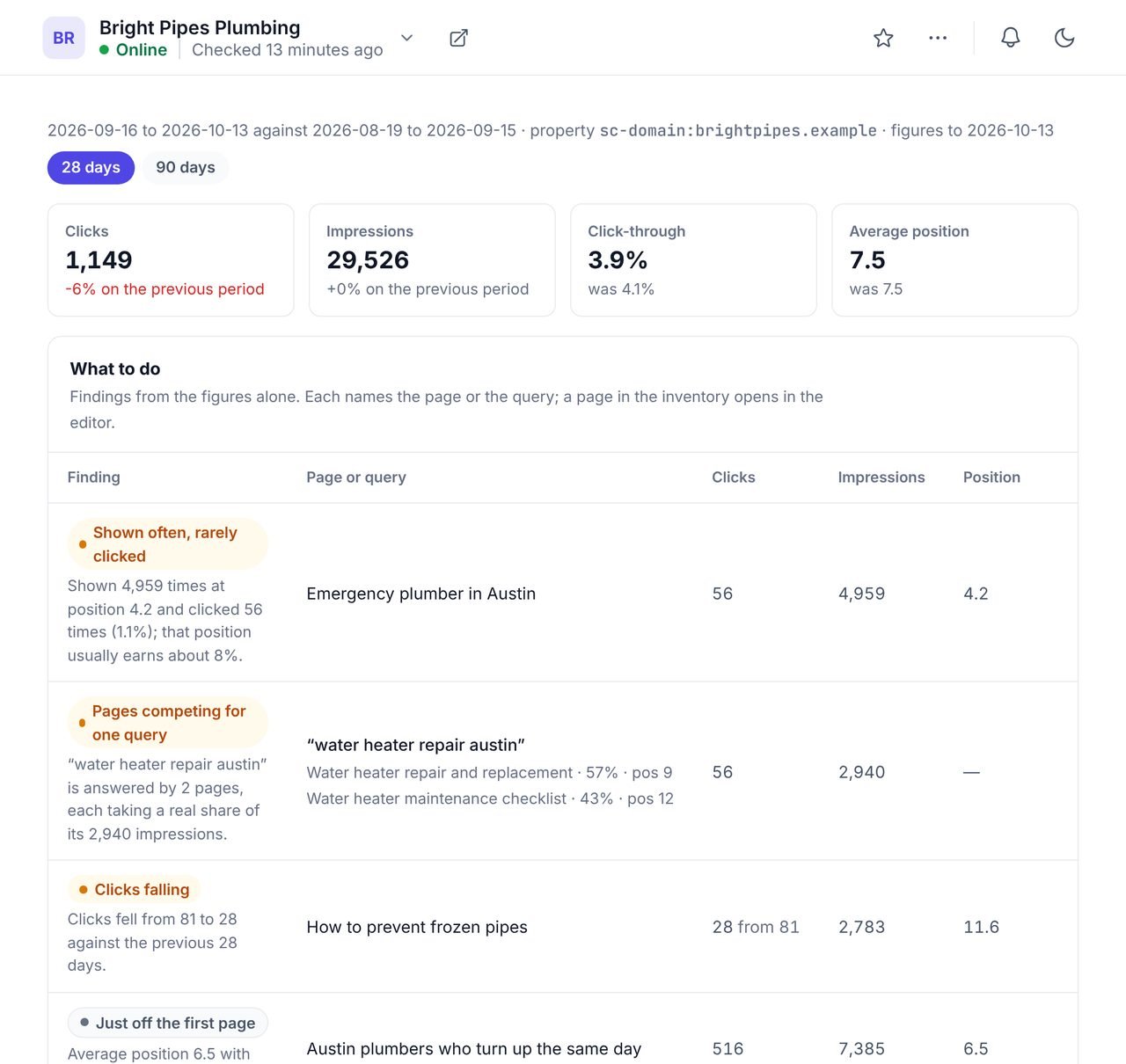
What does WPCentrify do with Google Search Console?
WPCentrify reads each website's Google Search Console figures into one dashboard and turns them into a short list of pages and queries to work on. It is for anyone who manages several sites and does not want to open a separate Search Console property for each one.
It connects with a read-only grant, matches every WordPress site you manage to its property automatically, and shows clicks, impressions, click-through rate and average position for 28 or 90 days against the period before. Four findings name what to fix first.
Search Console in WPCentrify at a glance
- One read-only Google connection for every property it can read.
- Each website matched to its property automatically.
- Clicks, impressions, click-through rate and average position.
- 28 or 90 days, compared with the period before.
- Findings: shown often but rarely clicked, pages competing for one query, clicks falling, just off page one.
- Never submits, removes or changes anything at Google.
- Disconnecting deletes the figures read.
- No AI credits needed.
Four findings that tell you which pages to work on
Search Console shows thousands of rows. WPCentrify reads them and names the pages and queries worth your time, each with the numbers behind it.
| Finding | What it means | What usually helps |
|---|---|---|
| Shown often, rarely clicked | A page or query with many impressions and a click-through rate well below what its position usually earns. | Rewrite the title and meta description. |
| Pages competing for one query | Two or more of your pages each take a real share of the impressions for the same search. | Merge them, or make each one clearly about something different. |
| Clicks falling | A page or query earning noticeably fewer clicks than in the period before. | Check what changed on the page or in the results. |
| Just off the first page | A page averaging just below position 10 with real impressions. | Improve the page and link to it from related pages. |
A finding about a page in the site's inventory opens that page in the WPCentrify content editor.
Every site, one Google connection
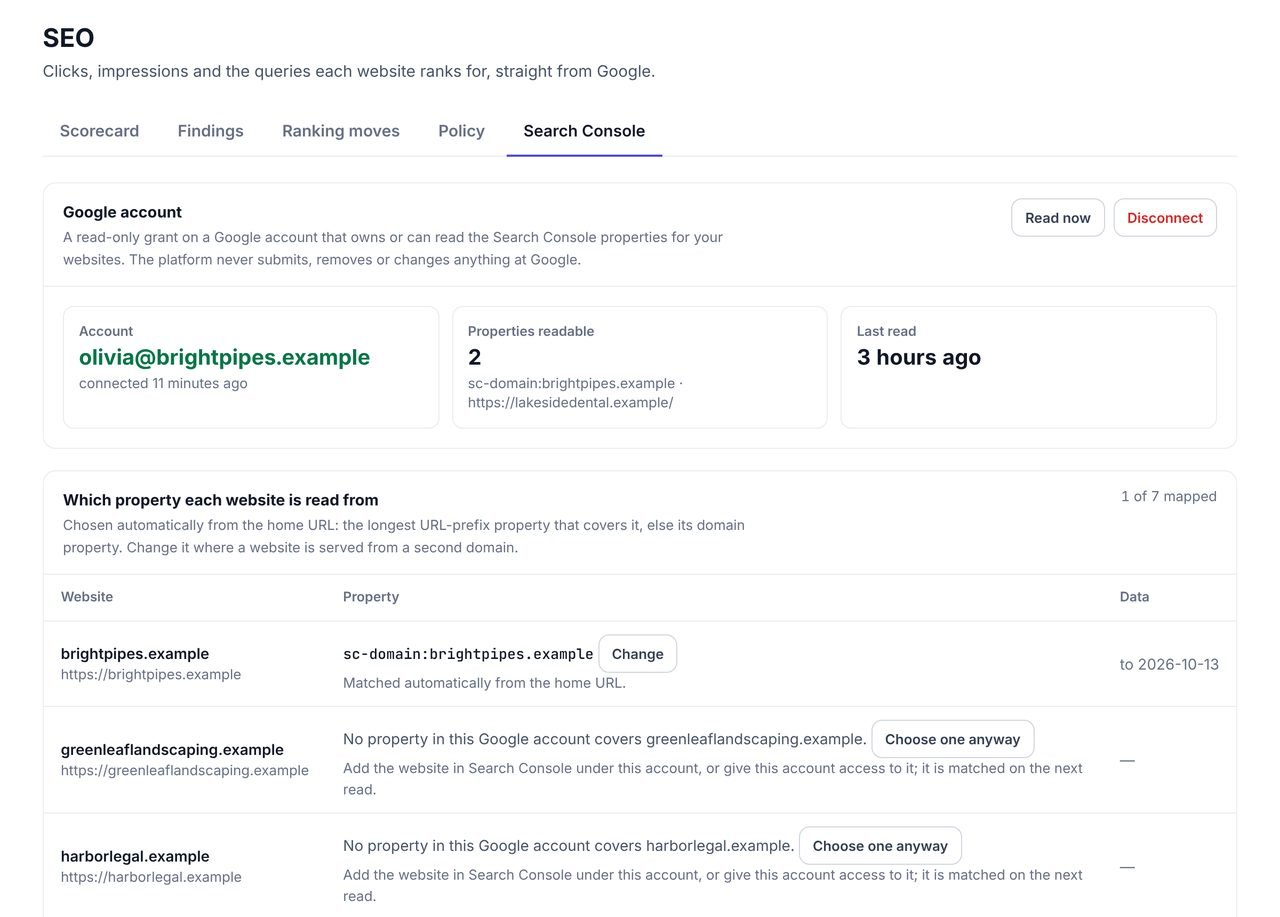
Connect one Google account and every website it can read is matched to its Search Console property automatically.
A site with no property in that account says so and tells you what to do: add it in Search Console under that account, or give the account access, and it is matched on the next read. You can change a match where a site is served from a second domain. Nothing is ever written to Google.
- A read-only grant on one Google account
- Each website matched to its property automatically
- Clear notes for a site with no property
- Disconnecting deletes every mapping and every figure
How to use Search Console across many WordPress sites
Connect once
The workspace owner connects a Google account with read access to the properties.
Check the matches
Make sure each website reads from the right property, and fix any that need a second domain.
Open a site
Pick 28 or 90 days to compare with the period before.
Work the findings
Start with "Shown often, rarely clicked" and "Just off the first page"; they move fastest.
Track what you change
Send the queries that matter to the rank tracker to watch them daily or weekly.
Search Console figures, explained
Google's performance report counts four things. Clicks are visits from Google Search. Impressions are the times a page was shown in results. Click-through rate is clicks divided by impressions. Average position is the mean of the positions a page held across every search that showed it. WPCentrify shows all four for 28 or 90 days, against the same length of time before.
Google keeps about 16 months of Search Console data. Average position in Search Console is not the same as a rank check, which is one search from one place on one device; the rank tracker explains the difference and checks both ways.
Search Console feeds the rest of the toolkit
- The rank tracker can add the searches a site already gets as keywords to track.
- Internal linking uses the searches each page gets as words to link it with.
- "Shown often, rarely clicked" leads straight to AI meta titles and descriptions, which write three checked options for the page.
- The SEO audit covers what Search Console cannot show: pages Google is told not to index, broken links and missing tags, found by crawling the site.
What it does not do
- Write to Google. No sitemap submissions, indexing requests or removals.
- Replace Search Console. Index coverage and manual actions are still read in Google's own tool.
- Show sites with no property. A site needs a property in the connected account.
Questions about Search Console
What people ask before they turn it on.
The workspace owner connects a Google account that owns or can read the sites' Search Console properties, with a read-only grant. WPCentrify then matches each website to its property automatically.
Yes. One Google account connection covers every property it can read, and each website you manage shows its own clicks, impressions, click-through rate and average position, with the pages to fix first.
No. The grant is read-only. WPCentrify never submits sitemaps, requests indexing, removes URLs or changes any setting at Google.
It is chosen automatically from the website's home address: the longest URL-prefix property that covers it, or else its domain property. You can change it where a site is served from a second domain.
Google publishes Search Console figures about two days after each day ends, and revises the latest days after that. WPCentrify reads them automatically and again whenever you press Read now.
Every website's mapping and every figure read from Google is deleted. Connecting again reads them afresh.
No. Reading Search Console and the findings it produces are included, and WPCentrify is free during early access.
Related AI and SEO tools
Rank tracker
Daily or weekly positions for the searches you choose
Read moreAI meta descriptions
Lift the click-through rate of pages shown often
Read moreSEO audit
What Search Console cannot show, found by crawling
Read moreSee every tool in one place: WordPress SEO tools for every site you manage.
See every site's Google figures in one place
Connect the Google account that reads your clients' properties. Each site is matched for you.
Free during early access. Keep your data, export any time.