Spam risk per website
Under 30 is low, and from 60 links look spammy. The count shows on the overview.
See every website that links to each site you manage, how strong those links are, which ones were won and lost since the last look, and how the profile compares with competitors. Download a disavow file when spam needs it.
Free during early access. Analyses use AI credits; the disavow file is free.
Updated
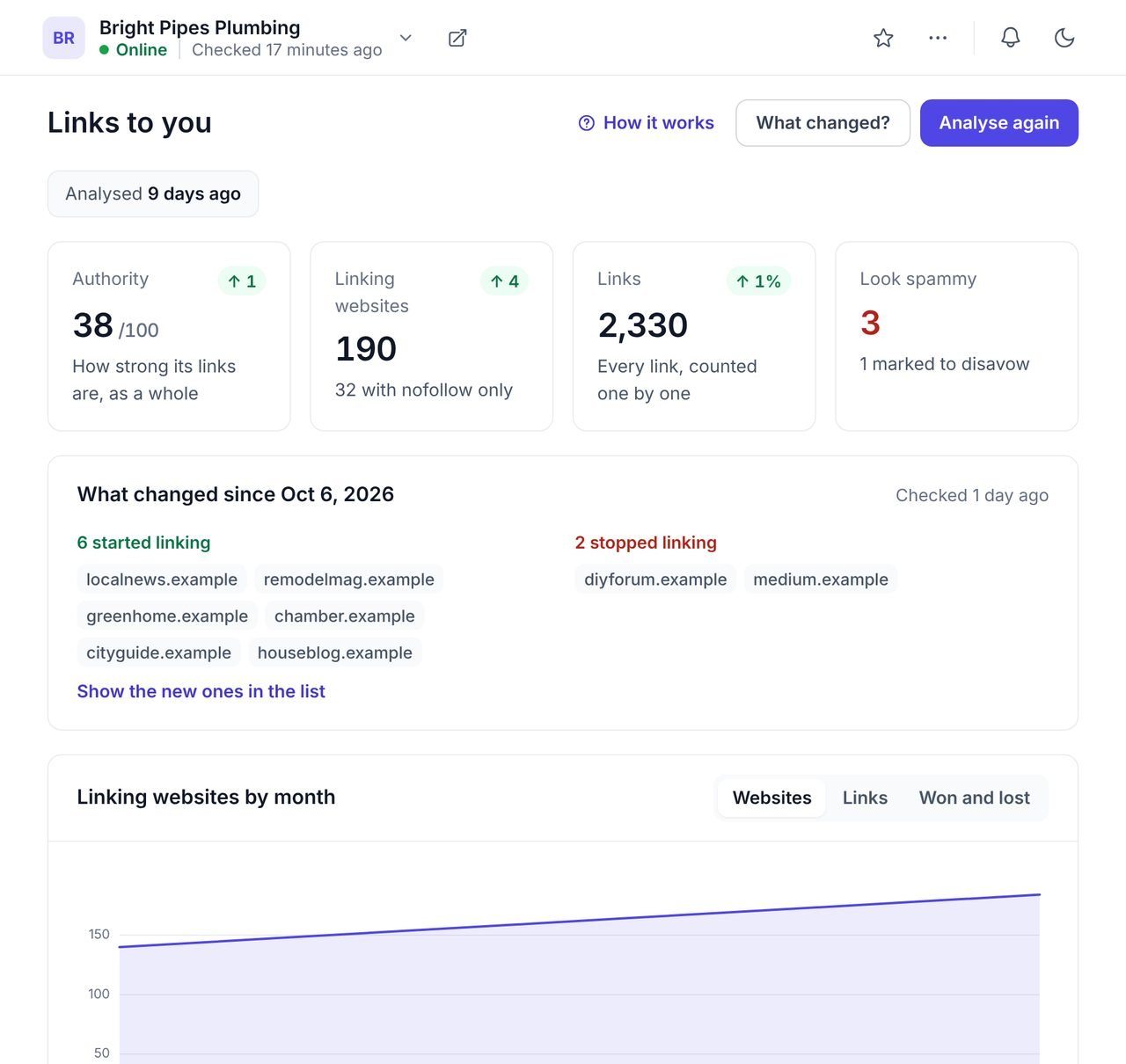
Backlink monitoring is keeping track of the websites that link to yours: which links you gain, which you lose, and whether any look like spam. It tells you whether a site's reputation on the web is growing, and warns you when an important link disappears.
WPCentrify monitors backlinks for every WordPress site you manage, from one dashboard and with no plugin. Each site shows its authority out of 100, its linking websites, links won and lost, thirteen months of history and how it compares with up to five competitors.
Every analysis compares the links a site has now with the last one, and names the websites that started and stopped linking to it.
A lost link from a local newspaper or a supplier is worth a phone call; a new link from a directory you never asked for is worth a glance. Authority, linking websites, links and the number that look spammy each show how far they moved, and a chart shows thirteen months of history.
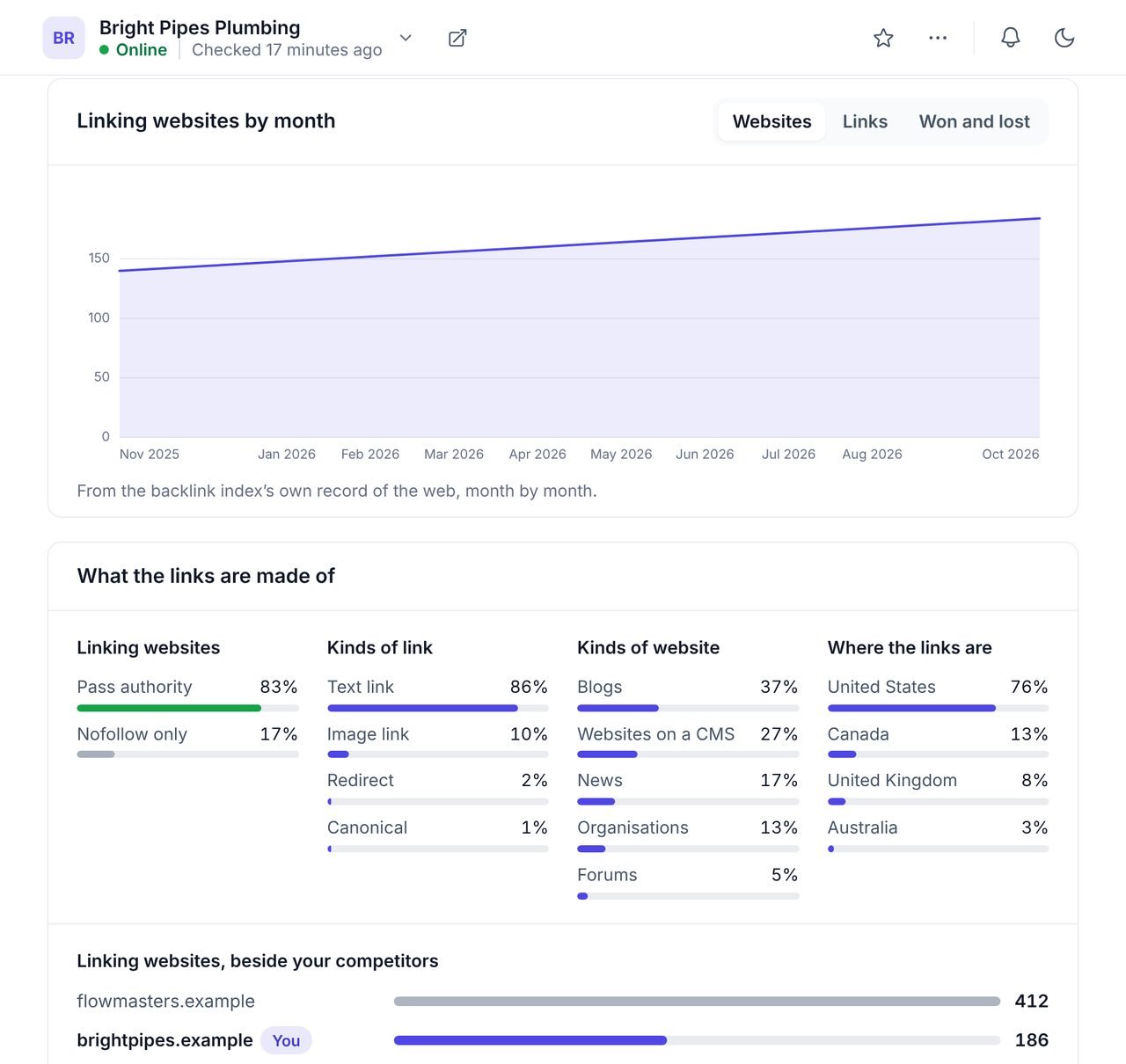
The profile breaks every link down by the kind of link, the kind of website it comes from and the country, and compares the site with up to five competitors.
A plumber with most of its links from blogs and local news is in good shape. One with most of its links from forums in other countries is not. The full list shows each linking website with its authority, its spam risk, the words it links with and the page it links to, and the most linked pages and anchor text sit beside it.
Most spammy links do no harm. For the ones that might, WPCentrify builds the file and leaves the decision with you.
Under 30 is low, and from 60 links look spammy. The count shows on the overview.
A website you know is genuine stays marked fine through every later analysis.
Adds the website to the disavow file. Your marks are kept from one analysis to the next.
A disavow file in Google's format, ready to upload. It is never sent anywhere for you.
Google acts only when somebody uploads the file to its disavow tool.
Up to 500 linking websites and 500 links, with anchors and the pages they point to.
Open Links to you on the site and press Analyse. The overview, history and full list fill in.
Look at the websites that started and stopped linking. Chase a lost link from a website that matters.
Open the websites that look spammy. Mark the ones you know as fine.
If links are clearly spam you never asked for, mark them, download the file and upload it to Google.
See how many websites link to each rival, and which kinds of website link to them.
Google uses links between pages to discover them and to judge how much other websites trust them. Its spam policies say links bought or exchanged to manipulate rankings break the rules, which is why a profile of real links from relevant local websites is worth more than a large number of weak ones. The disavow tool is for the rare case where unnatural links are a problem you cannot remove at the source.
Backlinks are one part of growing in search. To see the searches competitors win, use the keyword gap; to make sure Google can reach and read the site, use the SEO audit; and to see whether AI answers cite it, use AI search visibility.
What people ask before they turn it on.
A backlink is a link to your website from another website. Links from trusted, relevant websites are one of the strongest reasons Google ranks a page, and a few strong links beat many weak ones.
Authority is a score from 0 to 100 for how strong a website's own links are, as a whole. Higher is stronger. WPCentrify shows it for the site you manage and for every website linking to it.
Usually not. Google ignores most spammy links on its own. Disavow only links that look like spam and that you never asked for, especially after a manual action from Google. Disavowing a good link by mistake can lower rankings.
No. It builds the file from the websites you mark, and you download it. Nothing changes on Google until somebody uploads it to Google's disavow tool in Search Console.
Thirteen months of linking websites and links, from the backlink index's own record of the web, so you can see whether a site has gained or lost links over the last year.
Monthly is enough for most sites. "What changed?" is a quick check of the links won and lost since the last look, and a full analysis refreshes everything.
An analysis and a "What changed?" check use AI credits from your workspace balance, and a look under 12 hours old is free. Looking, filtering, marking websites, exporting and the disavow file are free. WPCentrify is free during early access, and plans will be announced with pricing.
Connect a site and run its first analysis. The next one shows what changed.
Free during early access. Keep your data, export any time.