Is it hacked?
Malware, hidden code, infections that come back after you delete them, spam shown only to Google, and blocklisting.
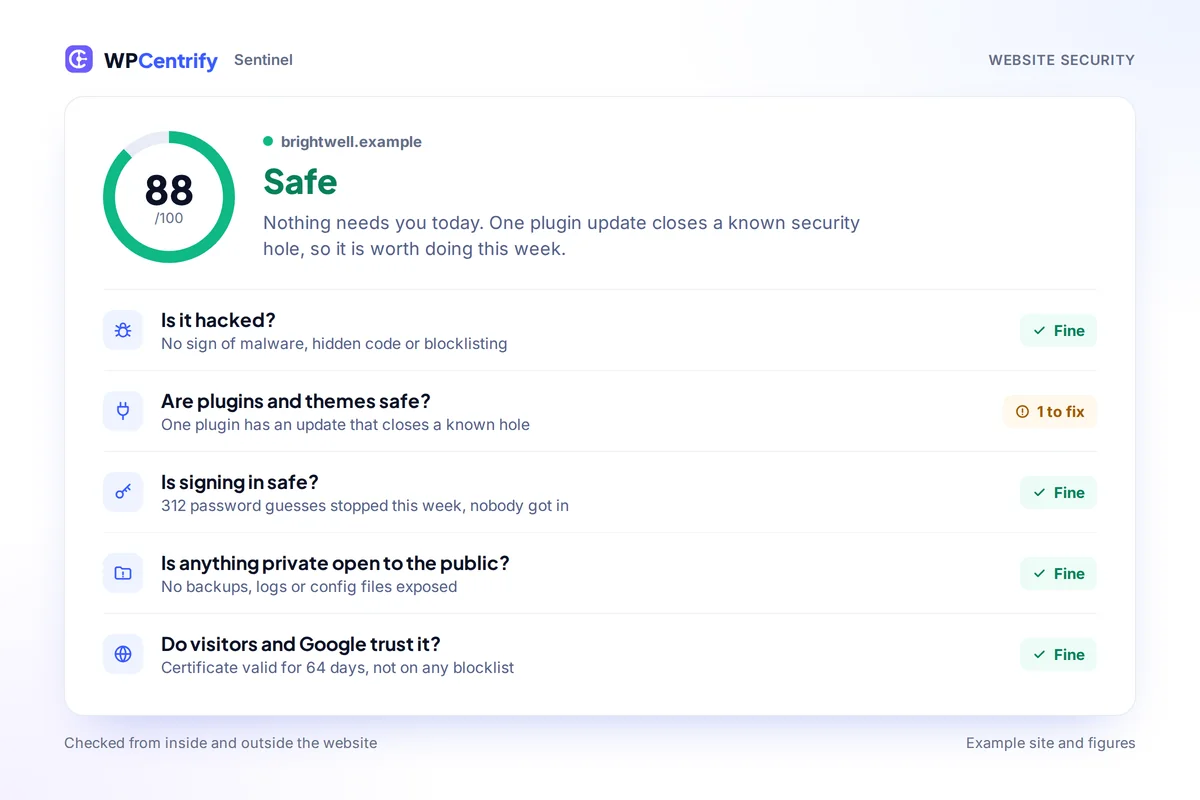
Sentinel is the WordPress security monitoring built into WPCentrify. For every site you manage, it answers five plain-English questions, gives one verdict and a score out of 100, and tells you exactly what to do. It is built to stay quiet when nothing is wrong.
Checks every site from inside and outside. Free during early access.
Updated
WordPress security monitoring is the ongoing check that tells you when a WordPress site has been hacked, has a security hole or is exposed to attack, so you can act before visitors, Google or the people who rely on the site notice.
A security plugin on one site shows warnings for that one site. When you look after five, twenty or two hundred sites, you need something different: one place that checks every site every day, explains what it found in words a client understands, and says nothing when there is nothing to do. That is what Sentinel is for.
Sentinel turns hundreds of technical checks into five questions anyone can understand. Each one is answered Fine, Something to look at, or Problem.
Malware, hidden code, infections that come back after you delete them, spam shown only to Google, and blocklisting.
Known security holes in plugins, themes and WordPress itself, tampered files, plugins pulled from WordPress.org and software nobody updates any more.
Password guessing, sign-ins from a new country, new or hidden administrators, stolen sessions and new app passwords.
Backup files, database dumps, config and log files, and open folders that anyone on the internet could download.
A secure connection, certificate expiry, browser protections, Google blocklist status and pages that show Google something different.
Every site gets one of four verdicts: Safe, Needs attention, At risk or Hacked. Next to it sits a security score out of 100 that never reads better than the sentence beside it.
It is the answer a site owner wants when they ring, and the answer your newest team member can act on without asking anyone. Status is always written in words, never shown by color alone.

Most security tools cry wolf. Sentinel was built the other way round: it is designed to recognize what normal, legitimate software does and leave it alone, so whatever it does raise is worth your time.
Host malware scanners, firewalls and caching plugins show up as protection, not as threats.
Sign-ins and accounts created through WPCentrify's one-click login are never flagged.
One odd signal is never enough. Sentinel needs real evidence before it uses that word.
A plugin updating its own files, or a cache file changing, goes into a quiet list of normal changes.
If something you cleared gets worse, Sentinel asks again. Otherwise it stays out of your way.
Grouped the way you think about them, and explained in plain English whenever something turns up.
Some problems can only be seen from inside a website, and some can only be seen from outside. Sentinel covers both. The WPCentrify plugin reports what is installed and who is signing in, and separate checks look at each site the way anyone on the internet can.
That matters on the day it counts: a hacked site can hide things from a plugin, but it cannot hide what it shows the world. Ranking known holes across your whole portfolio is covered in vulnerability monitoring.
To check one site by hand first, our guide to scanning a WordPress site for malware step by step shows what each kind of scan can and cannot see.

When the verdict is Hacked, that website's security page turns into a recovery plan, so you are not left with a list of findings and a sinking feeling.

One button signs every user out and removes app passwords. Passwords stay the same, so the owner and your one-click login keep working. Only the workspace owner can press it, with a typed confirmation.
Sentinel finds when the hack first showed real proof and offers the last backup taken before that moment. If that backup holds only the database or only core files, it says so plainly.
Change administrator passwords, update every plugin and reinstall anything that did not come from its maker. Sentinel keeps checking and tells you when the site is clean.
A timeline of what Sentinel saw around the first sign: findings, sign-ins, new admins and new plugins. Facts, not guesses, and every action lands in the activity log.
For malware that rebuilds itself, the order matters. Deleting the visible files first is how most clean-ups fail.
One switch creates an automation rule that applies the updates which close a known security hole, and only those.
For the full response, including who to tell and what to say, read what to do when a WordPress site is hacked.
Turn protections on for one website or all of them. Each website reports back what is actually in effect, not just what was asked for.
| Protection | What it does |
|---|---|
| Login lockouts | Stops an address after a few wrong passwords. The simplest WordPress brute force protection there is. |
| Hide login errors | Does not tell attackers whether it was the username or the password that was wrong. |
| Strong passwords | Requires strong passwords for anyone who can publish. |
| Block admin-style usernames | Refuses new accounts called admin, root or the site's own name. |
| Block PHP in uploads | Stops code running from the media folder, and checks that the server really honors it. |
| Turn off XML-RPC | Closes an old door attackers use for password guessing. |
| Stop username listing | Stops anyone listing your usernames. |
| Remove file editors | Removes the code editors from wp-admin, so a stolen admin password cannot be used to run code. |
Sentinel never changes a website without being asked. Protections stay off until you turn them on, for one site or the whole portfolio.
Your team signs in to every site with one-click login, so nobody shares passwords. Lockdown can then refuse normal password sign-ins for administrators altogether, which leaves password guessers with nothing to guess.
Sentinel was built for anyone who runs more than one WordPress site, whether the sites are your own, your company's or your clients'. Every site's security sits in one place, worst first, alongside security risk ranked across your portfolio.


Nothing to configure before it is useful. Connect a site and Sentinel starts checking straight away.
One lightweight plugin on each website. It runs in the background and does not slow the site down.
Each site is checked from the inside and from the outside every day, against a vulnerability database that is updated daily.
One verdict, five answers and plain next steps for every site. Anything urgent arrives by email.
Sentinel's checks keep improving on our side, so every connected site gets better protection without anyone updating a plugin.
Security is the one place an over-promise costs trust. Here is exactly where Sentinel stops.
Sentinel finds problems and helps you fix them. It is not a web application firewall, and it works well alongside one, such as Wordfence, Cloudflare or your host's firewall.
It shows exactly what to remove and in what order, and finds a clean backup. The cleaning is done by you, your host, or WPCentrify on request.
Some things can only be seen from inside a website, which is why the plugin and the outside checks work together.
It comes from login lockouts, strong passwords, one-click login and lockdown.
More on ranking security risk across a portfolio, and what to do if a WordPress site has been hacked.
What people ask before they connect their sites.
WordPress security monitoring is the ongoing check that tells you when a WordPress site has been hacked, has a security hole or is exposed to attack. Sentinel does it for every site you manage, gives each one a verdict and a score, and explains what to do in plain English.
Common signs are redirects to spam sites, administrator accounts you did not create, files that changed without an update, PHP files in the uploads folder, spam pages in Google results and a browser or Google warning. Sentinel checks every site you manage for signs like these and answers the question directly: is it hacked, yes or no.
It looks for proof, such as malware that rebuilds itself, a confirmed malware file, hidden spam shown to Google or a Google blocklisting. A single odd signal is never enough to call a site hacked.
Sentinel works alongside the security plugin you already use. It recognizes Wordfence, NinjaFirewall, MalCare, All-In-One Security and host scanners such as Monarx and Imunify as protection, and does not raise their files as threats.
No. The plugin reports in the background, and the heavy checks run on our servers rather than on your website.
No. Sentinel is built to stay quiet when nothing is wrong. Most findings are shown on screen, and only urgent problems, such as a guessed password, are emailed.
From a vulnerability database that is checked every day. For each plugin, theme or WordPress version with a known security hole, you see the hole and the version that fixes it.
Yes. Paid plugins are checked for tampering too, even though there is no public copy of them on WordPress.org. Your files and data are never copied off the site to do it.
Yes. Every finding is written in plain English, and the monthly report includes a security section that counts only real issues, never dismissed false alarms.
The security page becomes a recovery plan: sign everybody out, clean the site or restore the last backup from before the hack, then close the door. Sentinel keeps checking and tells you when the site is clean.
Sentinel is included on WPCentrify's team plans rather than sold as a separate product. Plans and prices are announced at launch, and early access is free while we build.
Look for one that checks every site every day, explains what it finds in plain words and stays quiet when there is nothing to do. Sentinel, WPCentrify's security monitoring, gives every site one verdict and a score out of 100, checks for vulnerable plugins, signs of a hack and risky sign-ins, and shows the way back if a site is hacked.
Yes. From a hacked site's recovery page, the workspace owner can sign everybody out of the site in one step: every session ends and every application password is removed. Passwords stay as they are, so the owner can sign straight back in.
Choose a protection level once for your workspace. In WPCentrify, Basic turns on sign-in lockouts, hides which part of a login was wrong, refuses obvious usernames such as admin and removes the file editors. Harden adds the rest, such as blocking XML-RPC and user enumeration, while keeping XML-RPC on where a plugin such as Jetpack needs it.
Known holes matched across your whole portfolio and ranked by how many sites they expose
Read moreSign in to any of your sites without sharing passwords, then lock the login page down
Read moreThe clean copy from before the hack, ready when Sentinel says you need it
Read moreMore on this topic: Security and vulnerability scanning
Connect your first website in minutes. Sentinel starts checking straight away, and every site's verdict, score and next steps appear in one place.
Free during early access. No credit card required.