Live chat for WordPress, on every client site you look after
A real person answering your visitors in real time, added by the WPCentrify plugin you already run. Answer every client site's chat from one desk, or let the client's own receptionist answer theirs.
No second plugin. Works on every site already connected to WPCentrify.
What is WordPress live chat?
WordPress live chat is a chat window on a WordPress website where a visitor types a question and a real person replies straight away, in the same window, while the visitor is still on the page. It is the quickest way for somebody who is about to buy, book or leave to reach a human.
Most live chat tools are built around one business and one website. WPCentrify is built for the people who look after many. It adds live chat to every WordPress site you manage through the plugin those sites already run, keeps each site's chat separate, and lets you decide, site by site, whether your team answers or the client's own staff do.
It works on its own, or behind the AI chatbot for WordPress, which can answer first and hand the conversation to a person along with everything the visitor has already said.
One plugin, every client site's chat in one place
Most live chat tools either treat every website as a separate account or share one set of settings across all of them. Here, live chat is part of the tool you already use to manage those sites: every site keeps its own settings, and your team answers them all from one desk.
Added by the plugin you already run
The WPCentrify connector adds the chat window with one script tag carrying that site's public key. There is no second WordPress live chat plugin to install, update or forget about. A site without the connector can paste the same snippet by hand.
Every site keeps its own look, hours and team
Colour, position, logo, light or dark theme, welcome message and quick-reply buttons are set per website, and so are business hours, time zone, holidays and who answers. A dental practice and a law firm never share a chat window.
Your team answers from one desk
Chats from every site you switch on arrive in one agency desk, each labelled with the website it came from. You see who is waiting, who is talking to whom, and which chat needs you first.
Every chat, every site, one agent desk
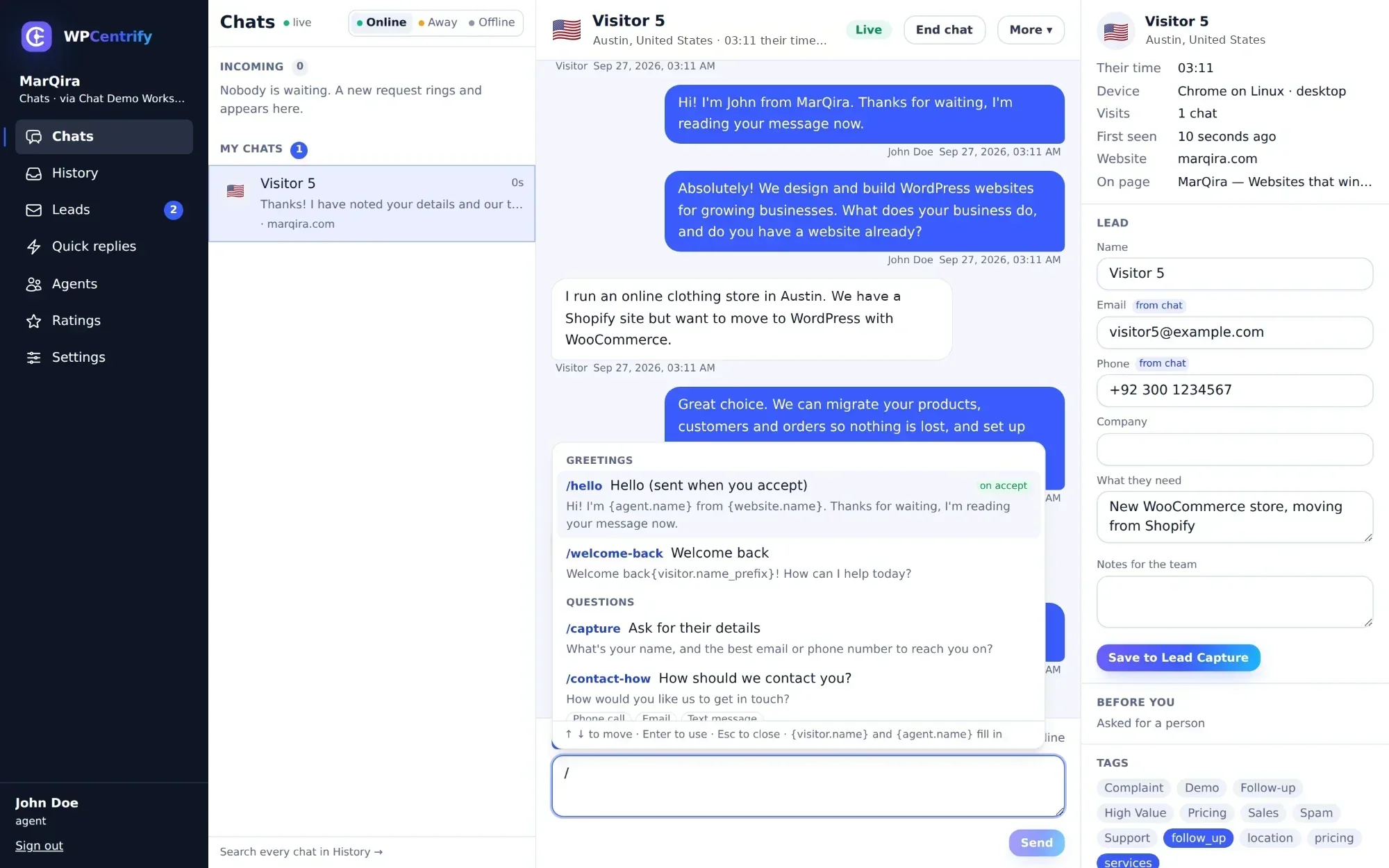
This is where your team spends its day. It is built for handling several conversations at once without losing track of any of them.
Incoming chats ring, and the timer changes colour
A new chat rings for a minute and shows how long the visitor has been waiting. The timer turns amber at 40 seconds and red at two minutes, and Accept sits right on the card.
Quick replies, one slash away
Type a forward slash to pick a saved answer. Placeholders such as {visitor.name} and {agent.name} fill themselves in, a greeting can send itself the moment you accept, and questions can offer the visitor answers to tap.
Who you are talking to
Name, country and city, device, their local time and the page they are reading right now, so you can answer about the page in front of them.
A lead card that fills itself
Email, phone and what the visitor needs are picked up from the conversation. One click saves the lead to Lead Captures, next to every contact form on the site.
Transfers, takeovers, notes and tags
Claim, assign or transfer a chat with a note for your colleague. Supervisors can take a chat over. Snooze, close, reopen, tag, add internal notes the visitor never sees, or block a visitor.
Nothing slips through
Sound and desktop notifications, keyboard shortcuts, and the chats waiting on you shown first. Your status, online, away or offline, stays accurate while the desk is open.
Let your client's receptionist answer their own chats
Some clients want their own people answering, because only the receptionist knows whether Tuesday at three is free. Hand that website's chat to the client, and new chats on it go to their team instead of yours.
A simpler desk of their own
Receptionists sign in at chat.wpcentrify.com to a cut-down desk: chats, quick replies, history, leads, their own team, ratings and settings. Nothing about your other clients, and nothing about managing WordPress.
The client decides what you can see
The client's owner chooses whether you can read their transcripts and whether you can see their team's ratings. With transcripts off, you can see that a chat happened, never what was said. Every change to these switches is logged.
You can read, never reply
Even when a client lets you read their chats, you cannot act in them. WPCentrify staff can only open a chat through a time-limited, logged grant with a written reason, read-only and invisible to the visitor.
Everyone who answers uses a seat
Your people and every client's receptionists each use an agent seat. Without one, a person can read chats but not reply. See team and client access for how roles work across the rest of WPCentrify.
Changed by Sara (owner) · logged
Can I get a same-day appointment? I've broken a tooth.
I'm sorry to hear that. I can't book appointments, so I'm bringing in someone from the team now. They'll see everything you've told me.
Emma has joined the chat- The whole conversation so far
- Who the visitor is and the details they already gave
- The page they are reading
- A short summary: broken tooth, wants a same-day appointment
The AI assistant answers first. A person takes over with the whole story.
Live chat works on its own, or behind the WordPress AI chatbot. Choose one of four modes for each website:
- Assistant only. The AI answers from the website's own pages.
- Live chat only. Every conversation goes to a person.
- Both. You choose who meets the visitor first while somebody is on shift: the assistant, or a person.
- Neither. The chat window stays off.
What a person receives at handover
The assistant hands over when the visitor asks for a person, or when one of your rules is met, such as a crisis message. The agent gets the full transcript, who the visitor is, the page they are on, the details they have already given and a short summary. Nobody has to ask the same question twice.
What your visitors see
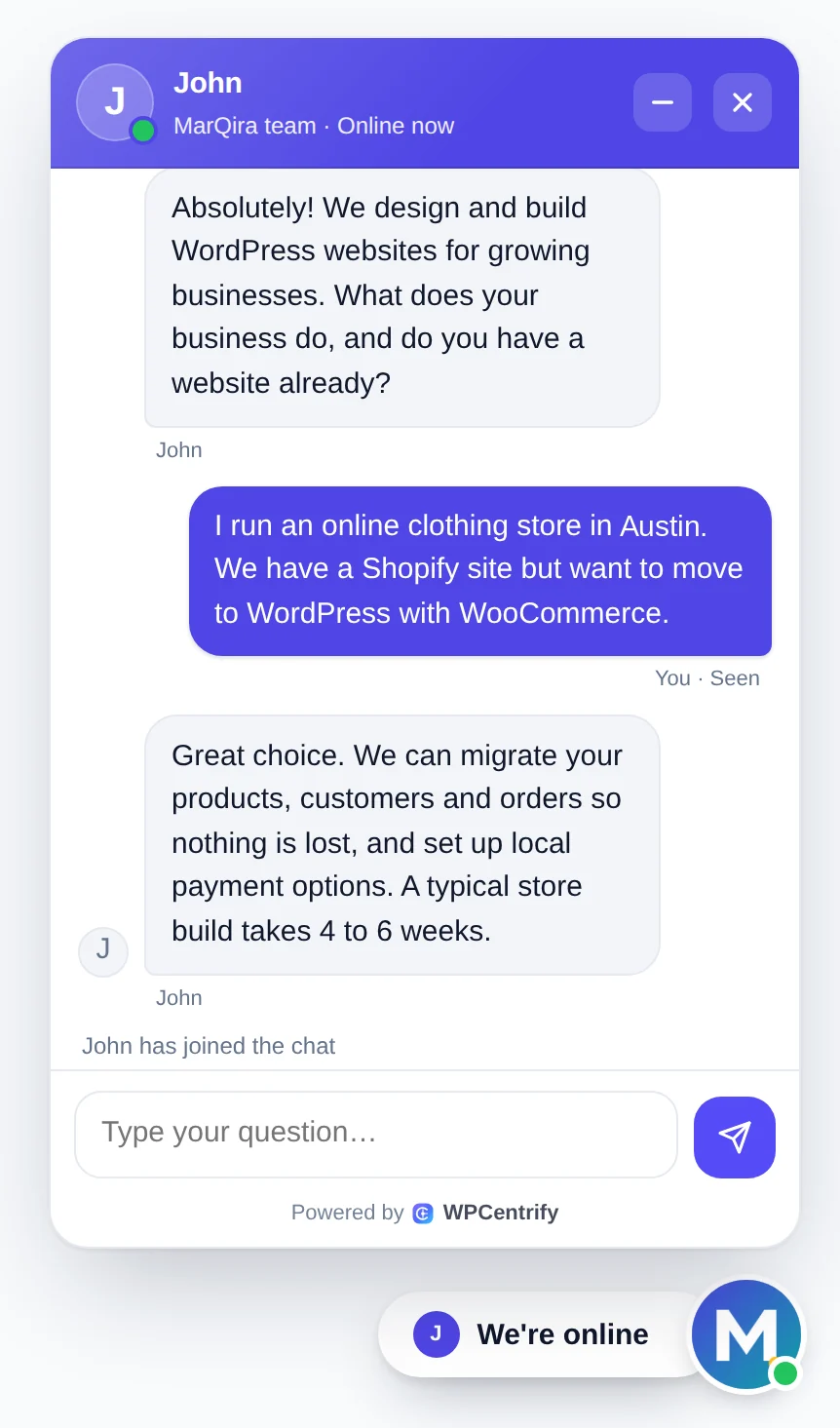
A chat window that feels like part of the client's website, and never leaves a visitor wondering whether anybody is there.
We're online, with a real name
The launcher and header show whether somebody is available. When a person takes the chat, the visitor sees their first name, initial and a live dot.
A button to talk to a person
Visitors can join the queue directly. On a person-first website, their very first message goes straight to your team.
Where they stand
Their place in the queue and the usual reply time, or a note that the assistant is covering while nobody is free.
Nobody on shift? Leave a message
Outside business hours the visitor leaves their details and a message, instead of waiting in a queue nobody is watching.
Typing and read receipts
Both sides see when the other is typing and when a message has been read.
Nothing lost on a reload
Messages survive a page reload or a dropped connection. They wait in the browser and send themselves when the connection is back.
Forms before and after
An optional pre-chat form for name and email, and a follow-up form that asks only for what is still missing. Leave the pre-chat form off and visitors can chat straight away.
A rating and a transcript
When the chat ends, the visitor rates it poor, okay or good, adds a comment if they like, and can have the transcript emailed to them.
It looks like the client's website
Colour, position, name, logo, light or dark theme, welcome message and quick-reply buttons, per website. The white label option removes the Powered by WPCentrify footer.
Does live chat slow down a WordPress site?
It is the first question anyone who cares about Core Web Vitals asks, and a fair one: a chat widget is a script on every page. This one is built to stay out of the way.
- A tiny loader. Only the round launcher button loads with the page.
- The chat loads when it is opened. Visitors who never click it never download it.
- Its own sealed box. The widget sits inside a Shadow DOM, so the theme's styles cannot break it and it cannot restyle the theme.
- Works behind caching and optimiser plugins, including WP Rocket, LiteSpeed Cache and Cloudflare Rocket Loader.
Check the live page
Caching and script optimisers are the usual reason a chat widget quietly disappears. The Check the live page button on each website's chat settings loads the real public page and confirms the widget actually appears to visitors, so you find out before the client does.
Performance monitoring keeps watching Core Web Vitals afterwards.
Wait time weighs most, so nobody is stuck at the bottom.
Who answers, and when
Business hours, time zones and holidays
Set hours per website in the client's own time zone, with holidays. Outside hours, a request to talk to somebody becomes a message they can leave.
A queue that puts the right chat first
The queue is ordered by a weighted score: how long they have waited, a crisis message, asking for a person, giving contact details, looking like a buyer, or being a returning visitor. The wait weighs most, so nobody is left at the bottom.
Routing that fits the team
Agents pick from the queue, or chats are assigned automatically, round-robin or to whoever is least busy. Group agents into teams per website and set how many chats each person can take at once.
Response targets
Set a first-response target and a waiting target. A missed target is flagged and raises that chat's priority.
After the chat: a summary and a rating
An AI summary of every chat
When a chat closes or the visitor leaves, WPCentrify's own AI model writes a short record: what the visitor wanted, what was answered or promised, and any next step. Nothing leaves our servers. History shows each chat's summary, so yesterday's list reads as a list of what people asked for, and anyone can press Summarise to bring it up to date.
Knowing the visitor has gone
The chat window checks in every 45 seconds and signals when the page closes, so the desk marks a chat as Left about 20 seconds later, instead of leaving you typing to nobody.
Ratings for every person who answers
An average per period with a poor, okay and good split, one row for each person plus a row for the assistant, and every visitor comment linked to its chat. Agents see their own ratings; owners and supervisors see their whole side.
- Wanted
- To move an online clothing store from Shopify to WordPress with WooCommerce.
- Answered
- Products, customers and orders can be migrated, and local payment options set up. A typical store build takes 4 to 6 weeks.
- Next step
- Send a quote by email.
“Quick and helpful, thanks John.”
Visitor privacy and security
Live chat carries people's names, email addresses and questions. It is built to keep as little as possible, and to keep each client's chats to itself.
Location without sending the IP anywhere
Country and city come from a location database on our own servers. The IP address is never sent to a web service and is not stored.
First names only
Visitors only ever see an agent's first name. Surnames and email addresses stay inside the desk.
Summaries stay on our servers
Chat summaries are written by our own AI model. Conversations are not sent to an outside AI service to be summarised.
Every workspace sealed off
Every list is limited to the signed-in person's own workspace or client. An ID from another workspace simply answers not found.
Typed text stays text
Everything a visitor types is treated as text, never as code, and links are checked before they are shown.
Clients kept apart
A client account can reach only a named list of actions. Each client sees only its own websites and chats.
How to add live chat to a WordPress website
If the website is already connected to WPCentrify, it takes a few minutes. There is nothing to install on the site that is not already there.
Connect the website
Install the WPCentrify connector plugin on the WordPress site, or open a site that is already connected. On a site without the connector, paste the chat snippet into the footer by hand.
Switch live chat on and choose the mode
In the website's chat settings, turn live chat on and choose how visitors reach a person: live chat only, or together with the AI assistant, answering first or stepping in behind a person.
Set the hours and the look
Add business hours, the time zone and holidays, then set the colour, position, logo, theme and welcome message so the chat window matches the website.
Choose who answers
Add your own agents and teams, or hand the website to the client so their receptionists answer from the client desk. Then set routing and response targets.
Check the live page
Press Check the live page to confirm the chat window appears to real visitors, even behind caching and optimiser plugins. Then say hello from another browser.
What it does not do yet
Better to hear it here than halfway through a client rollout.
- File attachments in chat.
- Proactive messages, where the chat window opens itself on a rule.
- A preview of what the visitor is typing before they press send. That one is left out on purpose, for the visitor's privacy.
- Limiting an agency agent to particular clients.
If one of these decides it for you, tell us, or see what is coming on the roadmap.
Looking for a tawk.to, Tidio, Crisp or onWebChat alternative for WordPress?
All four are established live chat tools, and for a single website any of them can be the right choice. The differences show up when you run chat across many client sites. This is how WPCentrify compares as a tawk.to alternative, a Tidio alternative, a Crisp chat alternative and an onWebChat alternative for agencies that manage WordPress.
| Capability | WPCentrify | tawk.to | Tidio | Crisp | onWebChat |
|---|---|---|---|---|---|
| Built around | Agencies and owners running several WordPress sites | Live chat for any website | AI customer service | AI customer support across channels | AI chatbot with live chat handoff |
| Several websites, each with its own settings | Yes, each site keeps its own look, hours and team | Yes, each website is a separate property | Sites share one set of appearance and behaviour settings | Organised by workspace | One account per client; sites in one account share one widget setup |
| A separate desk for the client's own staff | Yes, the client desk | Members invited per property | Not listed | Not listed | The client is added as a seat |
| The client decides whether the agency can read its chats | Yes, set by the client's owner | Not listed | Not listed | Not listed | Not listed |
| AI assistant | Built in, with four modes per site | AI Assist | Lyro AI | AI agent | AI chatbot |
| WhatsApp and other channels in the same inbox | Not yet: website chat only | Yes | Yes | Yes | Not listed |
| WordPress plugin | The WPCentrify connector you already run | Yes, 100,000+ active installs | Yes, 70,000+ active installs | Yes, 20,000+ active installs | Yes, 700+ active installs |
Checked 27 September 2026 against each vendor's own public pages and the WordPress.org plugin directory. “Not listed” means we could not find it on the vendor's public pages, not that it can never be done. Products change, so check each vendor before you decide. How we compare tools: research methodology.
Where WPCentrify fits best
You look after several WordPress sites, you want every site's chat answered from one place, and some clients want their own staff answering without seeing each other, or you, reading everything. Live chat sits in the same tool as your updates, backups and contact form leads.
Where they are ahead
tawk.to, Tidio and Crisp bring WhatsApp and other messaging channels into the same inbox as the website chat, and have large WordPress plugin install bases built over many years. onWebChat offers proactive triggers, file sharing and mobile apps, which WPCentrify does not have yet. If those matter most to you, they are worth a look.
How live chat is priced
Live chat is switched on per website, within the number of websites your plan allows. Everybody who answers chats uses an agent seat, your own people and every client's receptionists alike. The white label option that removes the Powered by WPCentrify footer is a paid add-on.
Live chat is free during early access. See pricing for what every plan includes.
Questions about WordPress live chat
WordPress live chat is a chat window on a WordPress website where a visitor types a question and a real person replies in real time, while the visitor is still on the page. WPCentrify adds it to every WordPress site you manage through the plugin those sites already run, and you can put the AI chatbot in front of it if you want.
Connect the site to WPCentrify with the connector plugin, switch live chat on in that website's chat settings, set the hours and the look, choose who answers, then press Check the live page to confirm the chat window shows. On a site without the connector, you can paste the chat snippet into the footer by hand.
No. On a site already connected to WPCentrify, the connector plugin adds the chat window with one script tag. There is no second plugin to install, update or keep compatible with the theme.
Only a tiny loader for the launcher button loads with the page. The chat itself loads when a visitor opens it, and it runs inside a Shadow DOM so it cannot clash with the theme. It works behind WP Rocket, LiteSpeed Cache and Cloudflare Rocket Loader, and the Check the live page button confirms the widget really appears.
Yes. Every website you switch on arrives in one agency desk, and each site keeps its own colour, logo, welcome message, business hours, time zone, holidays and team.
Yes. Hand the website's chat to the client and new chats on it go to their team, who answer from a simpler client desk at chat.wpcentrify.com. Each person who answers uses an agent seat.
Only if the client allows it. The client's owner decides whether the agency can read transcripts and see their team's ratings, and every change is logged. With transcripts off, the agency can see that a chat happened but not what was said, and even with them on, the agency can read but not reply.
With live chat a real person replies. A chatbot answers automatically. WPCentrify offers both: the AI chatbot answers from the website's own pages, and live chat puts a person on the other end. You can run either one, both together, or neither, per website.
Yes. The assistant hands over when the visitor asks for a person or one of your rules is met, such as a crisis message. The agent receives the full transcript, who the visitor is, the page they are on, the details they gave and a short summary.
Outside the business hours you set for that website, including holidays, a request to talk to somebody becomes a message the visitor can leave with their details, instead of waiting in a queue nobody is watching.
Yes. The pre-chat form is optional. If you switch it on it can ask for a name and email before the chat, and a follow-up form asks only for what is still missing.
Yes, with the paid white label add-on. It removes the Powered by WPCentrify footer from the chat window and the WPCentrify name from emailed transcripts.
You set a limit per agent. Chats can be picked from the queue by hand or assigned automatically, round-robin or to whoever is least busy, and agents can be grouped into teams per website.
Visitor location comes from a database on our own servers, and the IP address is never sent to a web service or stored. Visitors see only an agent's first name, chat summaries are written by our own AI model, and every workspace and client is kept separate.
It is a strong alternative if you run live chat on many client WordPress sites. Every site keeps its own settings, your team answers them all from one desk, and clients can have their own receptionists answer with control over what the agency sees. If you need WhatsApp and other messaging channels in the same inbox, tawk.to, Tidio and Crisp offer that today, and onWebChat offers proactive triggers and file sharing.
Live chat is free during early access. After that it is switched on per website within your plan, and everybody who answers chats uses an agent seat.
Put live chat on a client site this week
Switch it on for one website, answer from one desk, and hand it to the client when they are ready.
Free during early access. No credit card required.