Reusable WordPress templates for every site
Write a banner, pricing table or call to action once in WPCentrify, check it on a computer and a phone, and place it on any page of any of your WordPress sites with a shortcode, whatever page builder each one uses. Change it once, and every page that uses it changes too.
Available now. Included on Studio and up, from $69 a month.
Updated
What are reusable WordPress templates?
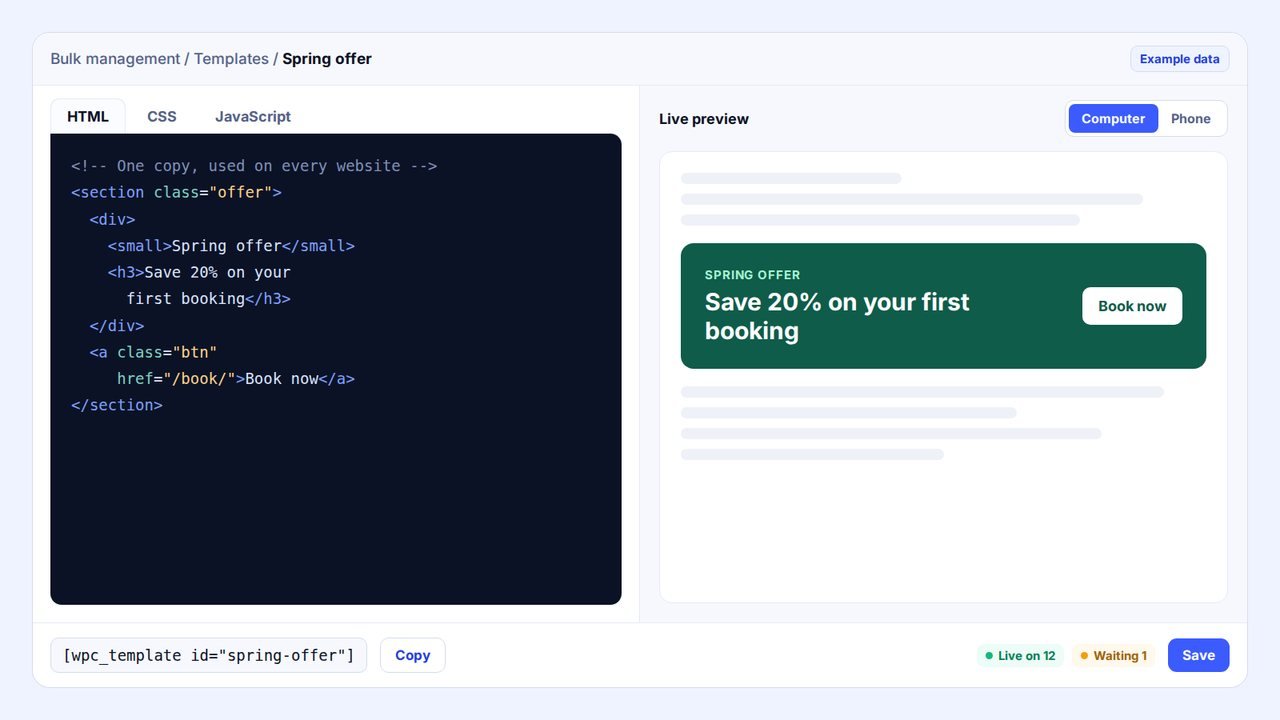
A reusable WordPress template is a section you write once, such as an offer banner, a pricing table or a call to action, and show on many pages. In WPCentrify one master copy lives in your dashboard, and every page on every website that uses it shows that copy, so one edit changes all of them.
Templates is part of Bulk management in WPCentrify. You write the section in HTML, CSS and JavaScript, choose which websites may use it, and drop a shortcode wherever it should appear. It works the same way in every page builder, because the WPCentrify plugin draws the template wherever the shortcode sits on the finished page.
It suits anything that should look the same in many places: a seasonal offer, an opening-hours box, a pricing table, a strip of reviews, a booking widget or a newsletter sign-up. If you look after several websites and the same block keeps turning up on all of them, this is the tool for it.
Templates at a glance
- One master copy of a section, shared by every website you choose
- Written in HTML, CSS and JavaScript, with a live preview on a computer and a phone
- Placed with a shortcode, so it works in Elementor, the block editor, Divi and every other builder
- Change it once and every page on every website updates, usually within about a minute
- Styles stay inside the template and a script error never stops the page
- Every saved version kept, with one-click restore
- Included on Studio, Agency and Scale, from $69 a month
Why the same section on many WordPress sites goes out of date
The offer ends on Friday. It sits on the home page and the booking page of eight websites, pasted in by hand over the last year, in three different page builders. Changing it means opening every website, finding every copy and hoping you did not miss one. Next month the price moves and you do it again.
WordPress has tools for this, but they stop at the edge of one website. A synced pattern updates every place it is used on that site. Elementor and Divi can store saved designs in the cloud for use on other websites, but each one is inserted as its own copy. None of them keeps one live section across separate websites, and none of them follows the section when a client switches theme or page builder.
Templates keeps one master copy in WPCentrify instead. Every website you choose shows that copy wherever its shortcode is placed, so the Friday change is one edit, not eight.
How to add one section to many WordPress sites
Four steps, from a blank template to a section live on every website you chose.
Write it
Open Bulk management, then Templates, then New template. Write the HTML, CSS and JavaScript in three tabs, with a live preview beside the editor that updates as you type.
Check it on a computer and a phone
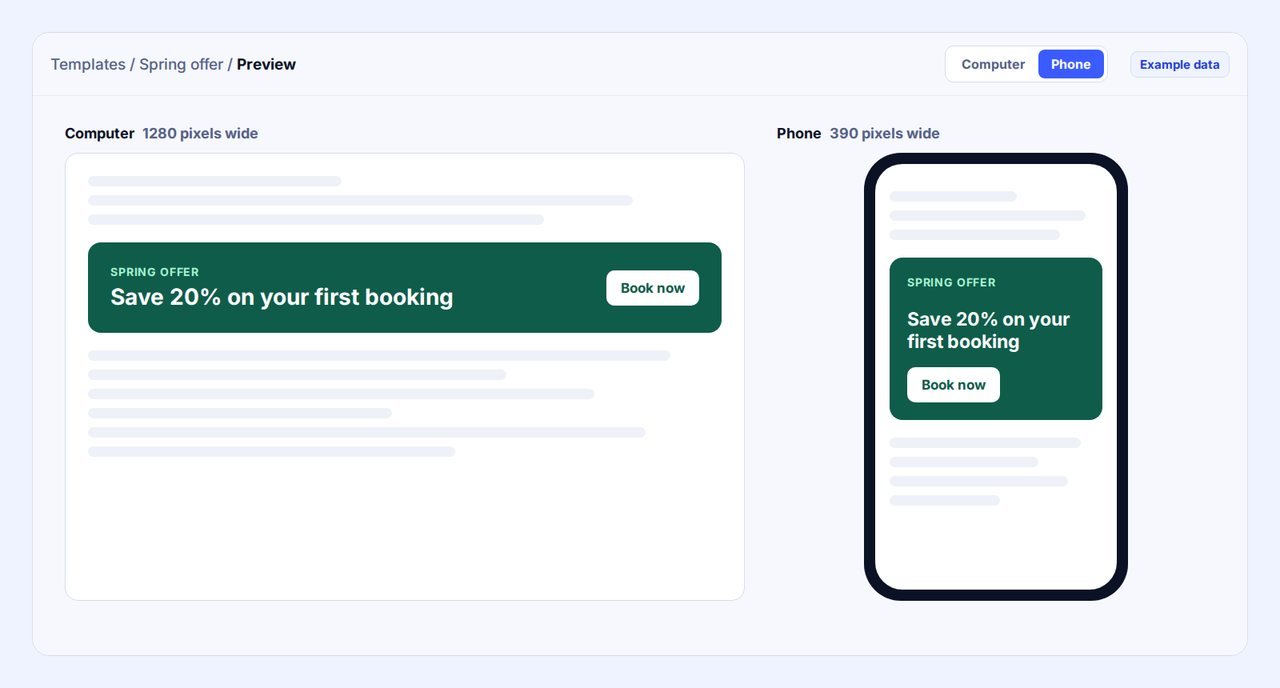
Switch the preview between Computer, a 1280-pixel screen, and Phone, a 390-pixel screen, to see both layouts before anything goes live.
Choose the websites
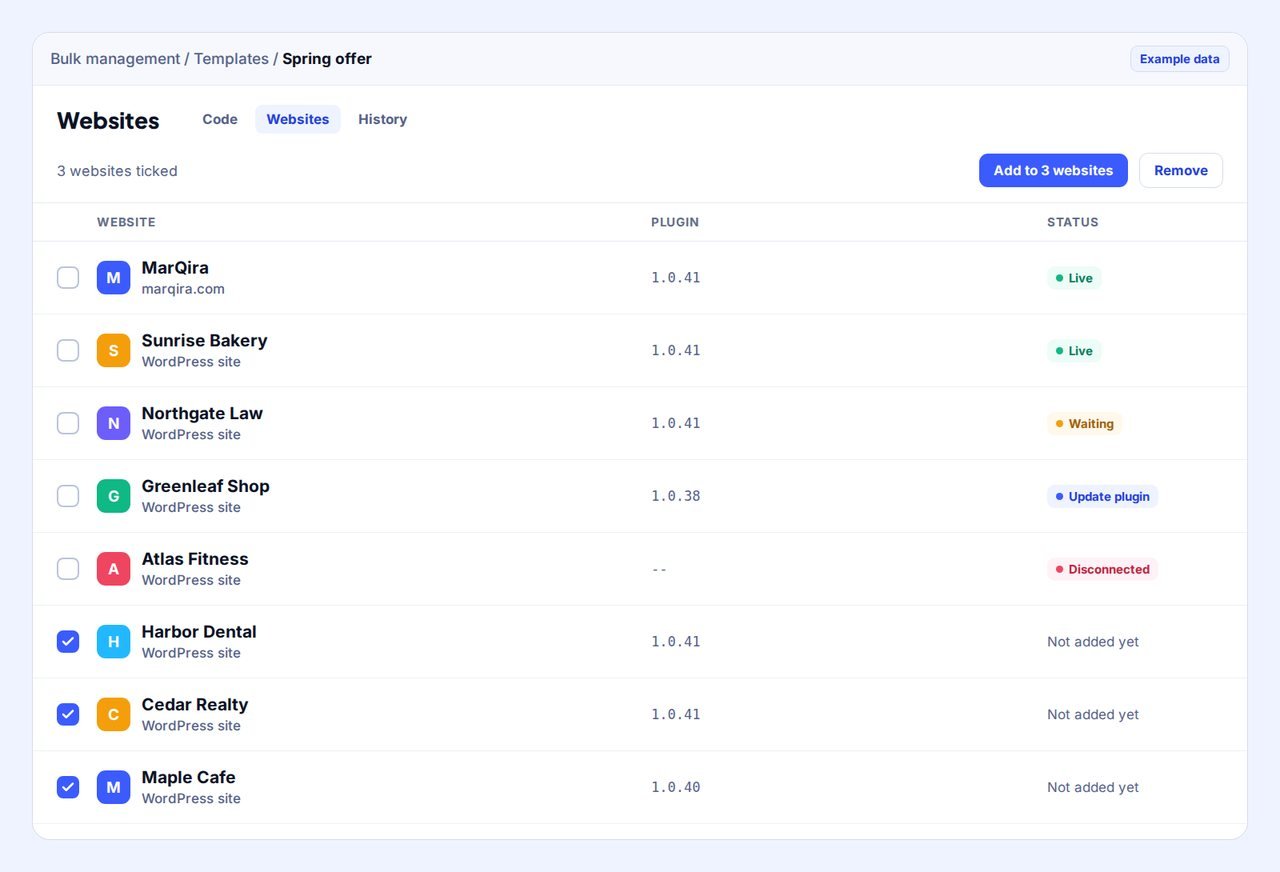
On the Websites tab, tick one website or many and press Add. Untick a website and press Remove to take the template off again.
Place the shortcode
Copy the shortcode, for example [wpc_template id="spring-offer"], and paste it into any page. Each website picks up the template within about a minute and shows as Live.
Preview the template on a computer and a phone
The editor shows the result as you type, so you never paste untested code into a live page.
- Computer shows the template on a 1280-pixel screen.
- Phone shows it on a 390-pixel screen, so you can see where a layout wraps or a button moves.
- The preview runs in an isolated frame with no access to your WPCentrify account, so a script you are testing cannot reach anything else.
A template takes on each website's own fonts unless its CSS sets them, so text can look slightly different from one website to the next. That is usually what you want: the section fits the site it sits on.
Does it work with Elementor, Divi and the block editor?
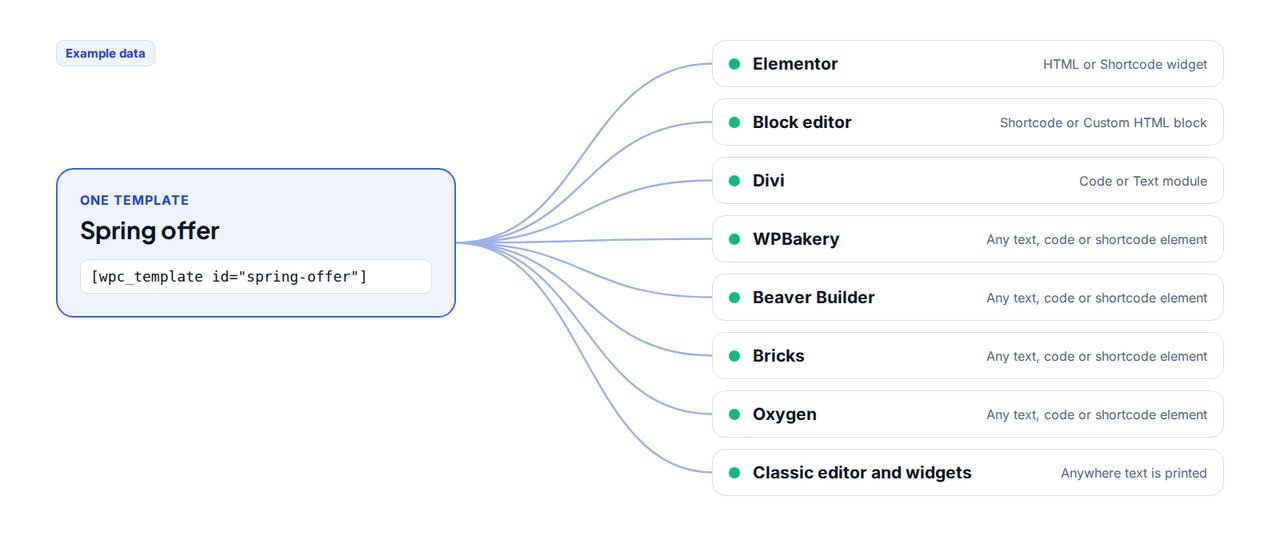
Yes. A template is placed with a shortcode, and every WordPress page builder can print one.
| Page builder or editor | Where to paste the shortcode |
|---|---|
| Elementor | The HTML widget or the Shortcode widget |
| Block editor (Gutenberg) | The Shortcode block or a Custom HTML block |
| Divi | A Code module or a Text module |
| WPBakery, Beaver Builder, Bricks, Oxygen | Any text, code or shortcode element |
| Classic editor, widgets and theme files | Anywhere text is printed |
There is nothing to install for each builder. If a client moves from one builder to another, paste the same shortcode into the new layout and the section comes with it.
What WPCentrify Templates does
Nine things that make a shared section safe to use on many live websites.
Live preview, computer and phone
See exactly what visitors will see, in both sizes, while you type.
One change, every page
Edit the template once and every page on every website that uses it updates.
Add to one website or many
Tick the websites and press Add. Remove it from any of them the same way.
Live status per website
Each website shows Live, Waiting, Update plugin or Disconnected, from what the website itself reported.
Styles that never leak
A template's CSS only affects the template, never the rest of the page, so simple class names are safe.
JavaScript that cannot break the page
Each template's script runs once per page, and an error in it never stops the rest of the website.
Version history
Every saved change is kept. Put any earlier version back in one click.
Copy the shortcode in one click
No typing ids by hand, and no typos in a shortcode on a live page.
Fast
Code is stored on each website, so pages never wait on WPCentrify. Pages without a template do no extra work.
Add a template to one website or many
The Websites tab lists every website you manage. Tick the ones that should have the template and press Add, or untick and press Remove. You can manage multiple WordPress sites this way from one screen, without signing in to any of them.
Each website then reports back on its own, so the status you see is what the website said, not what was sent:
- Live: the website has the template and will draw it wherever the shortcode is placed.
- Waiting: the template was added and the website has not picked it up yet. That usually takes about a minute.
- Update plugin: the website needs the WPCentrify plugin at version 1.0.40 or newer first.
- Disconnected: the website is not talking to WPCentrify right now, so it cannot fetch the template.
Is it safe to put the same code on many WordPress sites?
A shared section touches many live websites at once, so it was built to fail small and stay private.
- Only your websites can use your templates. A website holds only the templates you added to it. A shortcode copied onto any other website shows nothing.
- Signed delivery. Each website fetches its templates over a signed, encrypted connection and checks every byte against a fingerprint before using it.
- Visitors cannot use it. A shortcode typed into a comment, a review or a search box is shown as plain words, never drawn. Changing a page in the browser's developer tools changes only that person's own screen.
- Nothing can be slipped in through the shortcode. Only the template's id is read. Anything else typed beside it is ignored.
- Team permissions. Only colleagues allowed to manage code can create, change, add or remove templates. Others can view them.
- A record of every change. Every change is written to the activity feed, so you can see who changed which template and when.
Roles are set in team access, and the record lives in the activity log.
Will templates slow down a WordPress site?
No. The template code is stored on each website, so a page never waits on WPCentrify to load it, and pages without a template do no extra work at all. When a page does carry a template, the website draws it from its own copy, the same way it would draw any other shortcode.
The script inside a template runs once per page, even if the shortcode appears twice, and an error in it never stops the rest of the website. If you want to watch page speed across your websites, performance monitoring tracks Core Web Vitals for each one.
Templates or your page builder's global sections?
Every major page builder has a way to reuse a section. Here is how they handle more than one website, from each vendor's own pages, checked 21 October 2026.
| Option | Across separate websites | Page builders | When you change it |
|---|---|---|---|
| WPCentrify Templates | Yes, on every website you tick | Any, through a shortcode | Every page on every website that uses it updates |
| WordPress synced patterns | One website. Each website keeps its own patterns. | Block editor | Every place it is used on that website updates |
| Elementor Cloud Templates (Pro) | Available on any site connected to your Elementor Pro account | Elementor | Elementor's announcement describes inserting a template; it does not say later edits update pages that already use it |
| Divi Cloud | Saved items available on the websites you build with Divi. Free for up to 50 items for members. | Divi | Divi's page does not say a change updates items already placed on other websites |
Sources: WordPress documentation on synced patterns, Elementor's Cloud Templates announcement, Divi Cloud. Found something out of date? Tell us and we will correct it.
Templates or code snippets?
They do different jobs, and many people use both. Code snippets add code that runs across a whole site, in the header, after the opening body tag or in the footer, such as a tracking tag or a style fix. Templates are visible sections you place inside a page, exactly where the shortcode goes.
Templates or WordPress Multisite?
Multisite runs many sites from one WordPress installation, which suits a network of near-identical sites with one owner. Templates work across separate WordPress installations on any host, which is how most businesses, freelancers and agencies run their websites.
Good to know before you start
A few honest limits, so nothing surprises you.
- Templates need the WPCentrify plugin at version 1.0.40 or newer on a website. The Websites tab marks the websites that need the update.
- You write templates in HTML, CSS and JavaScript. There is no drag-and-drop designer, so it suits people comfortable with a little code.
- A template takes on each website's own fonts unless its CSS sets them, so text can look slightly different from site to site.
- Removing a template from a website leaves the shortcode in its pages. It shows nothing there until the template is added back.
- Templates are part of Shared code, on the Studio, Agency and Scale plans. They are not on the Solo plan.
Questions about reusable WordPress templates
What people ask before they put one section on many websites.
A reusable WordPress template is a section you write once, such as an offer banner, a pricing table or a call to action, and place on many pages. In WPCentrify one master copy is kept in your dashboard, and every page on every website that uses it shows that copy, so a single edit changes all of them.
Write the section once as a template in WPCentrify, tick the websites that may use it and press Add, then paste its shortcode into the pages where it should appear. Each website picks up the template within about a minute, and the Websites tab shows which ones have it live.
Yes. The shortcode works in the Elementor HTML or Shortcode widget, the block editor Shortcode or Custom HTML block, a Divi Code or Text module, and any text, code or shortcode element in WPBakery, Beaver Builder, Bricks and Oxygen. It also works in the classic editor, widgets and theme files. Nothing extra is installed per builder.
A synced pattern updates every place it is used on one website, inside the block editor. A WPCentrify template is shared across separate websites you choose, and works in any page builder because it is placed with a shortcode. Use synced patterns for one site; use templates when the same section belongs on several.
Elementor Cloud Templates and Divi Cloud make saved designs available on other websites, but you insert them on each website, and neither vendor says later edits update copies already placed. A WPCentrify template stays one master copy: change it once and every website that uses it shows the change.
Yes. Save the change once and every page on every website that uses the template shows the new version, usually within about a minute. Every saved change is kept in the version history, so you can put an earlier version back in one click.
No. The template code is stored on each website, so pages never wait on WPCentrify to load it, and pages without a template do no extra work at all.
It is built not to. A template's CSS only affects the template, never the rest of the page, so simple class names are safe. Its JavaScript runs once per page, and an error in it never stops the rest of the website.
The shortcode stays in the website's pages and simply shows nothing until the template is added back. Nothing else on the page changes.
It will show nothing there. A website only holds the templates you added to it, so a shortcode copied onto any other website draws nothing. A shortcode typed into a comment, a review or a search box is shown as plain words.
Code snippets add code that runs across a whole site, in the header, after the opening body tag or in the footer, such as a tracking tag or a style fix. Templates are visible sections you place inside a page with a shortcode, such as a banner or a pricing table. Many people use both.
Templates are part of Shared code, included on the Studio, Agency and Scale plans, from $69 a month. They are not on the Solo plan. Each website needs the WPCentrify plugin at version 1.0.40 or newer.
Related features
Code snippets
Tracking tags, CSS and scripts in the header or footer of one site or many, with no second plugin.
Read moreSearch and replace
Change words that were pasted by hand across a whole site, with a preview first and an undo after.
Read moreContent management
Every post and page across every site you manage, searchable from one dashboard.
Read moreMore on this topic: how to manage multiple WordPress sites from one dashboard, and how to find and replace text in WordPress when a section was pasted by hand.
One section. Every website. Change it once.
Write your first template, preview it on a computer and a phone, and place it on every website that needs it.
Included on Studio and up, from $69 a month. Keep your data, export any time.