Find and fix broken links on every WordPress site you manage
WPCentrify finds every broken link and 404 across the sites you manage and lists each missing address once, with every page that links to it. Fix the link where it sits, rewrite the sentence with AI, or add a redirect, and undo any fix that was wrong.
Free during early access.
Updated
What is a broken link checker?
A broken link checker finds links that lead to a missing page, an error or a website that no longer works, so you can fix them before visitors find them. On WordPress, broken links pile up quietly as pages are renamed, deleted and moved.
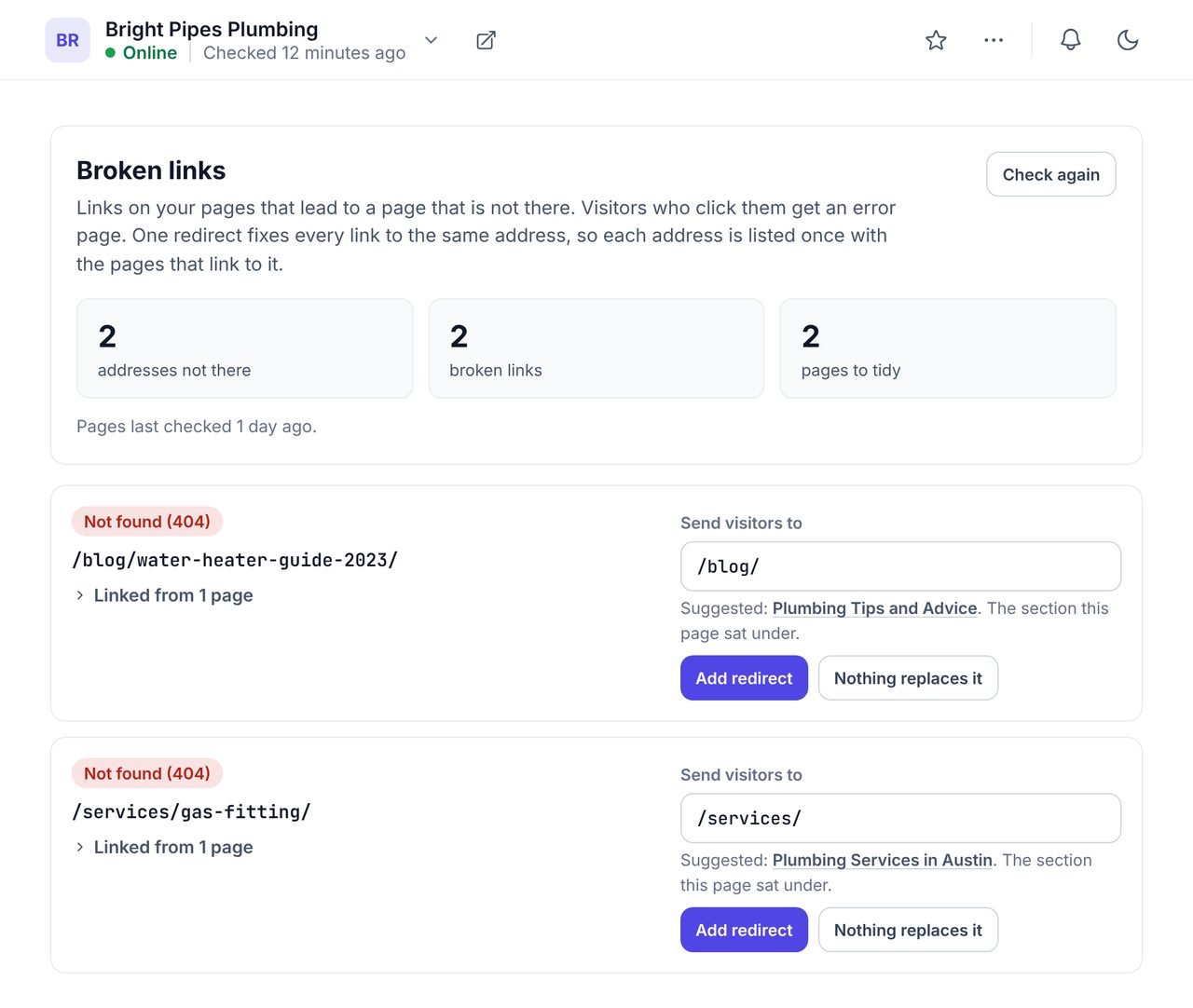
WPCentrify checks the links on every site you manage as part of its weekly SEO audit, keeps a log of the 404s visitors hit, and lets you fix each one from the dashboard: in place, with an AI rewrite of the sentence, or with a redirect. Link fixes use the same engine as Search & Replace.
The broken link checker at a glance
- Every internal and external link checked in the weekly crawl of each site.
- Broken links listed by missing address, with every page that links to it.
- A suggested redirect target on every row, with the reason in words.
- Three ways to fix: change it yourself, rewrite with AI, or add a redirect.
- Every new address is checked before it goes live, and every fix can be undone.
- A 404 log of up to 500 missing addresses per site, with one-click redirects.
- Redirects written into Rank Math or Redirection where a site uses them.
- Outside links are only called broken after two failed checks a day apart.
Every broken link, and every page that carries it
Broken links are listed by the address they point to, once each, with every page that links there, so one fix mends all of them.
A page that was deleted three months ago can still be linked from twelve blog posts. Seen one page at a time, that is twelve problems; seen by address, it is one job. Each row also suggests where the missing address should go, with the reason in words: the same page at a new address, the closest page by name, the section it sat under, or the home page.
- Internal links to missing pages, found by the weekly crawl
- Links to other websites that stopped working
- A suggested redirect target on every row, with the reason
- A page that is only unpublished can be published again from the row
Three ways to fix a broken link
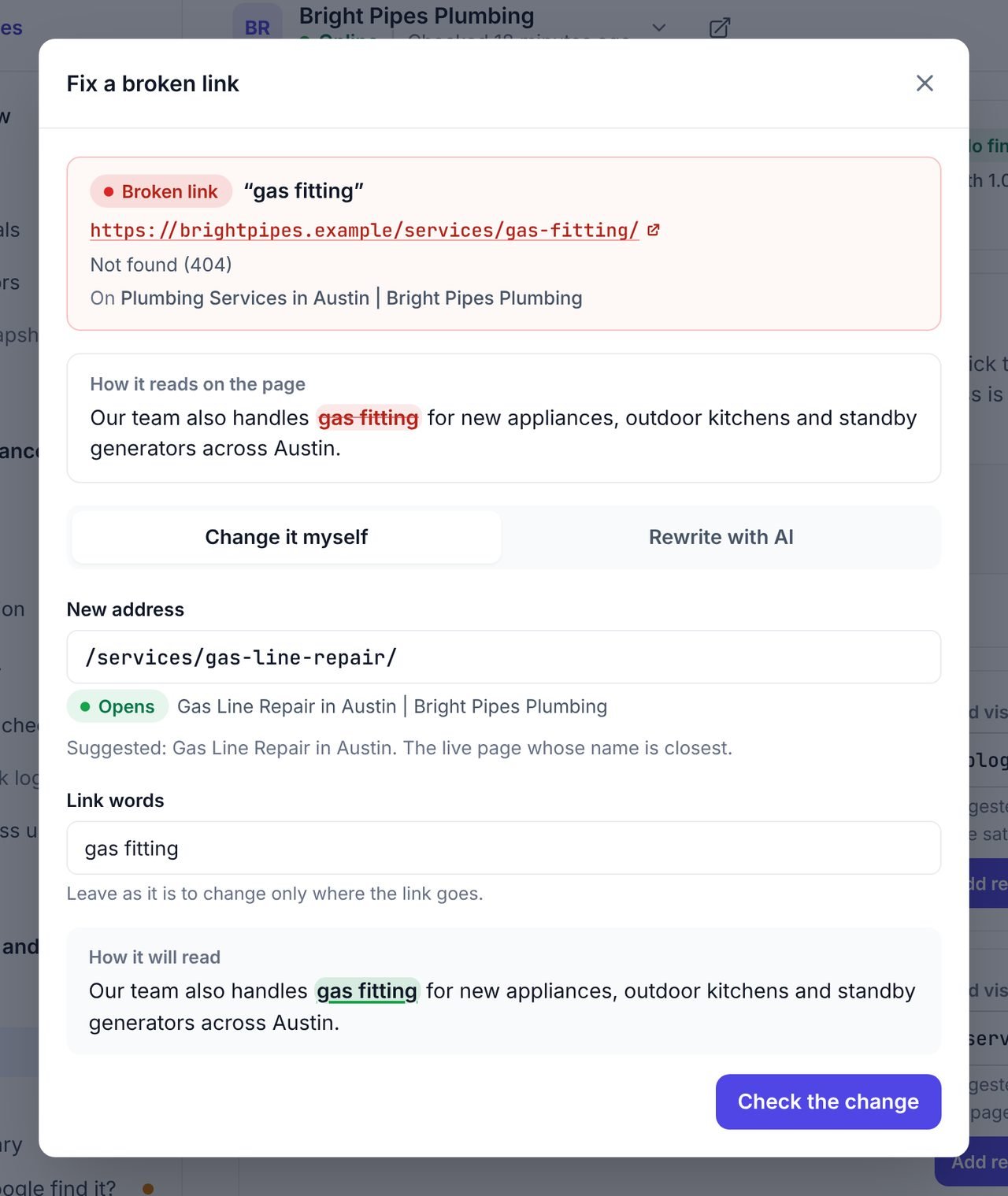
Press Fix link on any broken link. The dialog shows the sentence the link sits in and offers three ways to mend it.
| Way to fix it | When to use it | What happens |
|---|---|---|
| Change it myself | You know where the link should go now. | Type the new address and, if you like, new words for the link. The address is checked before it is saved. |
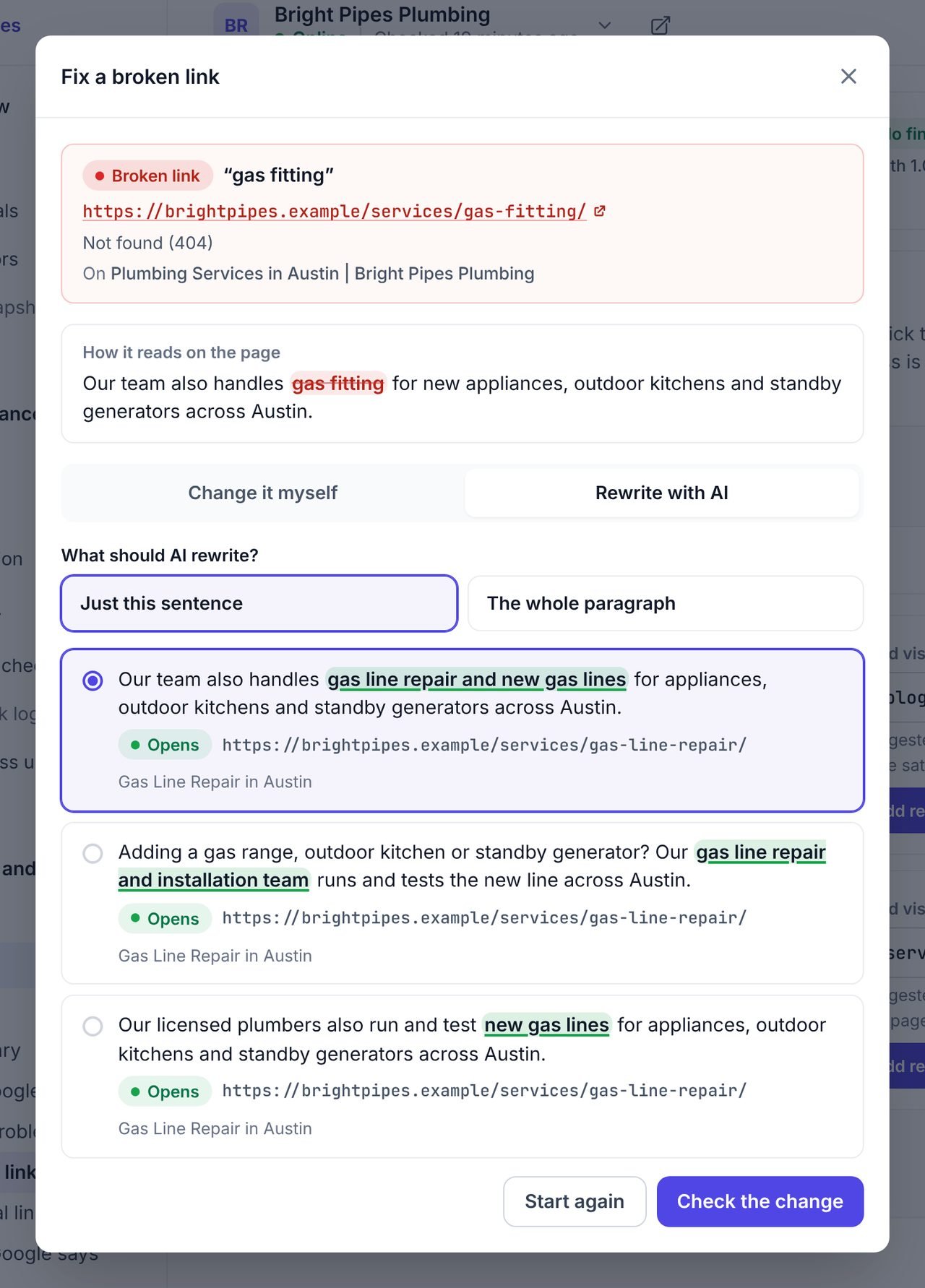
| Rewrite with AI | The page it pointed to is gone and the sentence needs to change too. | AI rewrites the sentence or the paragraph around the link three ways, pointing at a live page or a working outside page. You pick one. |
| Add a redirect | Many pages link to the missing address. | One redirect sends every visitor from the old address to the new one, wherever the links sit. |
Every new address is checked before it goes live. A broken one is refused; one that could not be checked asks you to confirm.
Rewrite the sentence with AI when the page it pointed to is gone
Sometimes a link cannot just be pointed somewhere else. "Read our 2023 price list" makes no sense once the price list is gone. Rewrite with AI offers three versions of the sentence or the whole paragraph, linking to a page on the site that is live today, or to an outside page that opens. The words around the link change, the formatting of the page does not.
The rewrite can only link to pages it was shown and that are live, and an outside page only if it opens when checked. If nothing usable comes back, nothing is charged. Rewriting uses AI credits from your workspace balance.
Built on the same engine as Search & Replace
A link is changed where WordPress stores it, by the same engine that powers Search & Replace. That matters on page builders, which often keep two copies of the same sentence. The fix changes every copy or none, so the page never shows one version to visitors and another in the editor.
It works on the twelve editors and page builders Search & Replace can change, including the block editor, the classic editor, Elementor, Divi, WPBakery, Beaver Builder and Bricks. If a link sits in a template, a menu or a reusable block, it is fixed there once and every page that shows it is mended. To change one address on every page of a site at once, such as an old phone number or a renamed page, use Search & Replace directly.
404s your visitors actually hit
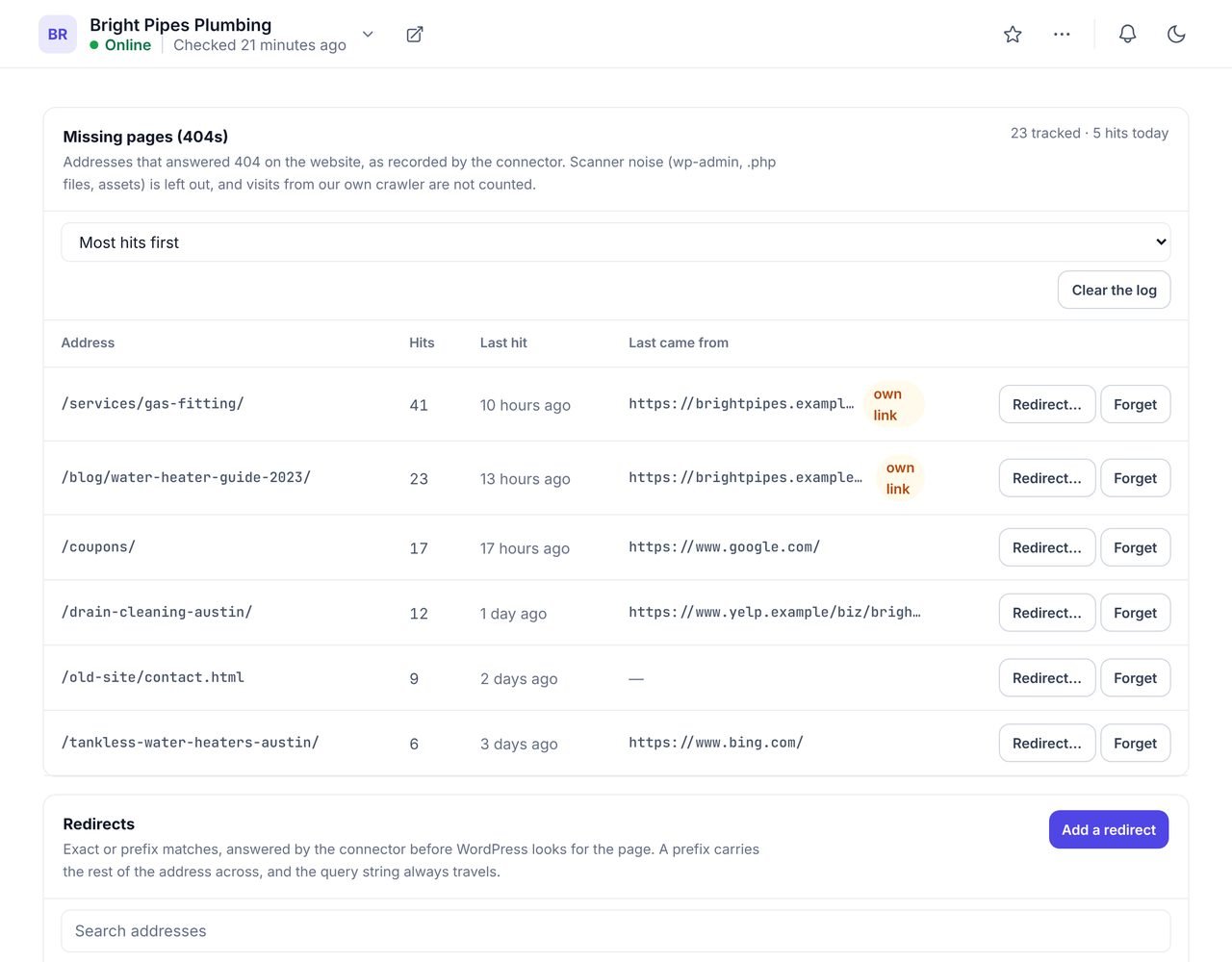
The 404 log keeps the addresses visitors asked for that did not exist, up to 500 per site, with how often each was hit and the page they came from.
It shows what the crawl cannot: old addresses still linked from other websites, typed addresses and old bookmarks. Press Redirect on any row to send that address to a live page in one click.
- Addresses that returned "not found", most hit first
- The page visitors came from, where the browser said
- One-click redirect from any row
Redirects that go into the plugin you already use
A site should keep its redirects in one place. When a site runs Rank Math or the Redirection plugin, WPCentrify writes new redirects into that plugin's own list, after checking that it would not overwrite a redirect someone already made. On other sites, redirects go into WPCentrify's own table, up to 500 rules per site.
- 301, 302, 307 and 308 redirects, and 410 for pages that are gone for good.
- Match one exact address, or every address that starts with a path.
- Loops are caught before they are saved.
- Only a redirect WPCentrify created can be removed from WPCentrify, so a redirect your SEO agency made inside Rank Math is never touched.
Pages you unpublish or move leave a redirect behind on their own. See changing page URLs for how a moved page keeps its visitors.
301, 302, 307, 308 or 410?
| Code | Meaning | Use it when |
|---|---|---|
| 301 | Moved permanently | A page has a new address for good. Search engines move their record to it. |
| 308 | Moved permanently, same method | As a 301, for addresses that receive form posts. |
| 302 | Found (temporary) | A page is somewhere else for now and will come back. |
| 307 | Temporary, same method | As a 302, for addresses that receive form posts. |
| 410 | Gone | A page has been removed and nothing replaces it. |
Google's own guide to redirects and Google Search explains how it reads each kind.
Links to other websites that stopped working
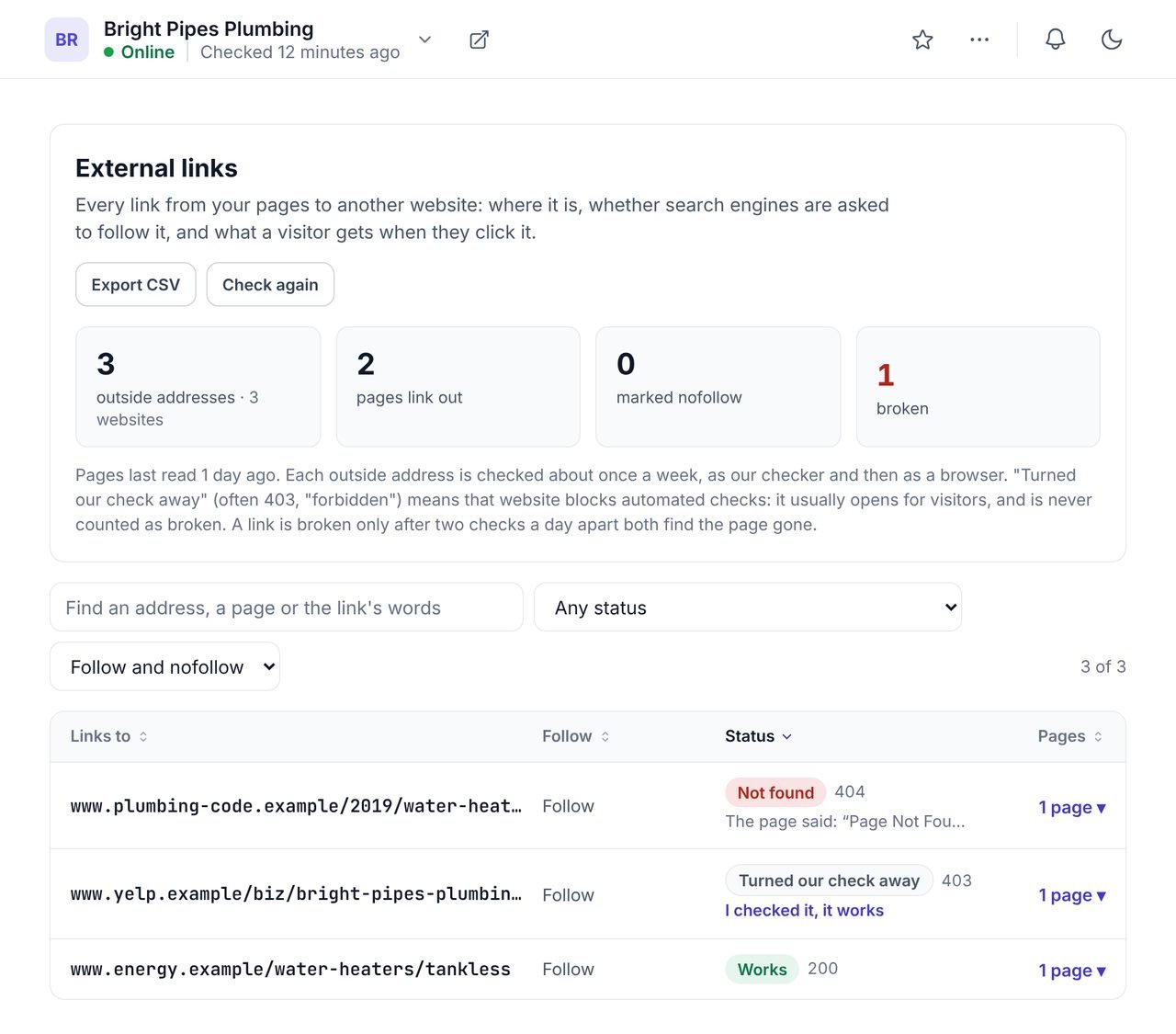
External links are listed by address, with the pages that carry them, the words people click and whether each link is follow, nofollow, sponsored or ugc.
A link is only called broken after it fails two checks a day apart, and the second check is made the way a browser would open it. Websites that turn away automated checks are marked "Could not check", never broken, and you can mark one as checked after opening it yourself. The full list downloads as a CSV.
What it cannot reach
- Widgets and theme settings. A link stored in a widget or a theme option cannot be changed from WPCentrify. A redirect from the missing address fixes it anyway.
- Links in content that only appears after JavaScript runs. The crawler reads the HTML each page sends.
- Some link shapes. An image link, a button, or a link whose words carry their own formatting can have its address changed, but the AI rewrite is not offered.
- Removing a link entirely. A link is pointed somewhere new or rewritten, not deleted.
Questions about broken links and redirects
What people ask before they turn it on.
Google treats a page that answers "not found" as normal when the page really is gone, and a few 404s do not hurt the rest of a site in search. The real cost is to visitors, who click a link and land on an error page, and to the page the link was meant for, which stops getting the visit and the link. Fixing broken links on pages you care about is worth the few minutes it takes.
Use a 301 when a page has moved for good, so search engines move their record to the new address. Use a 302 or 307 when the move is temporary. Use a 410 when a page is gone and has no replacement. A 308 is a permanent redirect like a 301 that also keeps the request method.
Every link on every page is checked during the weekly crawl of each site. A link to another website is only called broken after it fails two checks a day apart, so a website that was down for an hour is not reported.
No. WPCentrify checks links from outside, by crawling each site, so there is nothing to install beyond the WPCentrify plugin and nothing slowing the site down while checks run.
Yes. A link is changed where it is stored, using the same engine as WPCentrify Search & Replace, which can make changes in the block editor, the classic editor, Elementor, Divi, WPBakery, Beaver Builder, Bricks and five more page builders.
Yes. A fix can be undone as long as the page still holds what the fix wrote. If someone has edited that part of the page since, WPCentrify will not overwrite their change.
WPCentrify also looks for the link in templates, menus and reusable blocks, where one fix covers every page that shows it. A link that sits in a widget or a theme setting is out of reach, and you are told so. A redirect from the missing address fixes it wherever it sits.
Some websites turn away automated checks with a security challenge or a block. WPCentrify never calls those links broken. If you have opened the page yourself and it works, you can mark it as checked.
Related AI and SEO tools
Search & Replace
Change words or an address on every page of a site, with a preview and undo
Read moreSEO audit
Broken links are one of 30 checks the weekly crawl runs on every page
Read moreInternal linking
Add links to the pages nothing links to, approved one by one
Read moreSee every tool in one place: WordPress SEO tools for every site you manage.
Fix the broken links on every site this week
Connect a site and the first crawl lists every broken link by address. Most take a click to mend.
Free during early access. Keep your data, export any time.