
WordPress Traffic Analytics You Can Trust
Ask three tools how many people visited and you get three answers. Real visitors, page views and sources, counted without cookies.
WPCentrify is a WordPress management platform that handles core, plugin and theme updates behind an automatic safety net: a rollback point before every update and instant recovery if a site breaks. It brings uptime monitoring, traffic analytics, WordPress user management, custom code snippets, on-page SEO and content management together for your whole portfolio, from one dashboard.
Free during early access. Works with any host. No credit card.
Hosting neutral. Connects to WordPress wherever it already lives.
WordPress maintenance does not get harder as a portfolio grows. It multiplies: more logins, more update queues, more inboxes to watch. The trouble starts in the places nobody is looking.
Twenty or more plugins per site means releases you never scheduled. Delay them and you stay exposed. Rush them and a checkout breaks.
A backup plugin on every site is not the same as a recovery plan. Until a restore has actually been tested, it is a guess.
A month of patching and monitoring looks exactly like a month of nothing, right up until the renewal conversation.
The work is the same whether the sites are yours or your clients'. What changes is which part of it costs you the most.
Your sites stay patched, backed up and online without a developer on call, with a plain monthly summary of what was done.
For business ownersUpdate every client site in one pass, send branded reports automatically, and see which retainers actually pay for your time.
For freelancersRoles instead of shared passwords, approval before a rollout, and hours and margin tracked against every care plan.
For agenciesThis is the actual shape of the product. Click through the areas you would use most.
WPCentrify ranks the portfolio by actual operational risk: known vulnerabilities, failed jobs, ageing backups, repeat downtime and breached response targets.
Not every update deserves the same caution. A patch release from a plugin you run on twenty sites with a clean history is not the same risk as a major version that touches checkout. WPCentrify scores each one and applies the policy you set.
Backups are the part of maintenance most likely to be quietly broken. WPCentrify takes incremental encrypted copies off-site, then periodically spins one up and checks it actually boots, so you find out about a bad backup on a Tuesday instead of during an outage.
Vulnerability feeds are noisy because most of what they publish does not apply to you. WPCentrify filters the feed against the exact plugin and theme versions running in your portfolio, so an alert always means something you can act on.
Reports fail when they read like a changelog. WPCentrify writes the month in plain business language, leads with uptime and incidents avoided, and attaches the evidence underneath for anyone who wants the detail.
The last three are where a portfolio stops being a liability.
Core, plugin and theme updates across every site in one pass, with per-site rules and scheduling windows that respect business hours.
Bulk updatesEncrypted off-site backups that get restore-tested, plus malware scanning, file integrity checks and a one-click way back.
Backups and restoreUptime, response time, Core Web Vitals, SSL expiry, PHP errors and vulnerability exposure, checked continuously.
MonitoringPolicies that decide what happens without you: approve low-risk updates, escalate the rest, retry failures, alert the right person.
AutomationReports, activity logs, signed change evidence and per-client profitability, so the work is visible and defensible.
Client reportsWPCentrify decides whether it is safe to change it, proves the result, and undoes it if the proof fails. Press the button and watch a real update run.
Choose an outcome, then run it. This is the same seven-stage sequence that runs on every update in production, whether you are updating one site or three hundred.
Update policy is per site, per client or per care plan tier. Auto-approve security patches on low-risk sites, require sign-off on anything touching checkout, and freeze a store entirely during a sale.
You cannot log into forty WordPress sites every morning. Sentinel watches all of them continuously, the files, the plugins, the certificates and who is signing in, and surfaces only what changed and what needs deciding. One list across the whole portfolio, sorted by what matters, so you find out the same day and not when the client calls.
Monitoring tells you something happened. Automation decides what to do about it. Pick a trigger and an action to see how a rule is put together.
Rules can be scoped to a single site, a client, or a whole care plan tier, and every automated decision is recorded in the activity log with the rule that triggered it.
Monitoring only helps if you can see the whole portfolio at once. Traffic, uptime, updates and availability roll up across every site you connect, so you can answer a client question without logging into their dashboard to find out.


Traffic analytics sits alongside the operational picture rather than in a separate tool: uptime monitoring for whether a site is reachable, performance monitoring for how fast it responds, on-page SEO management for what search engines are told about each page, and client reports that turn all of it into something you can send without editing.
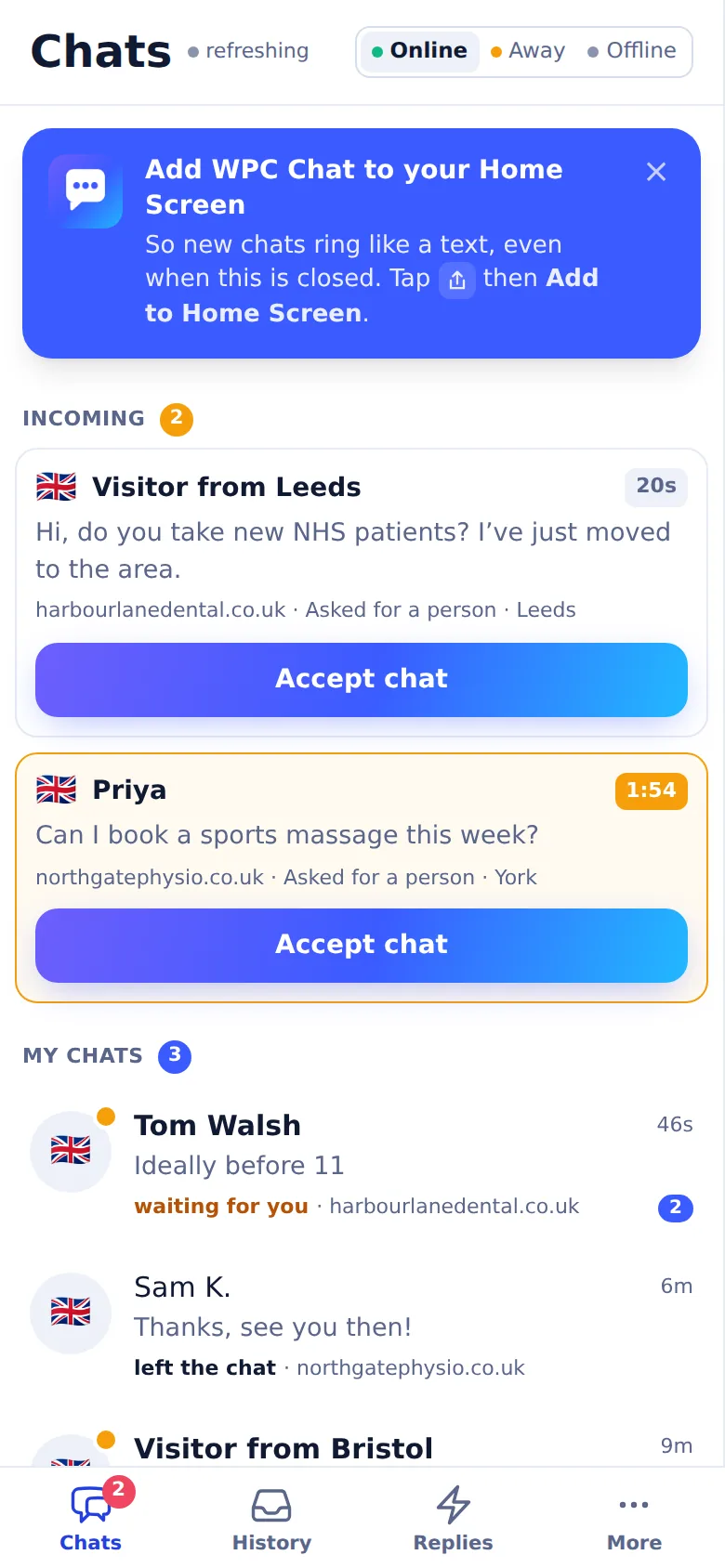
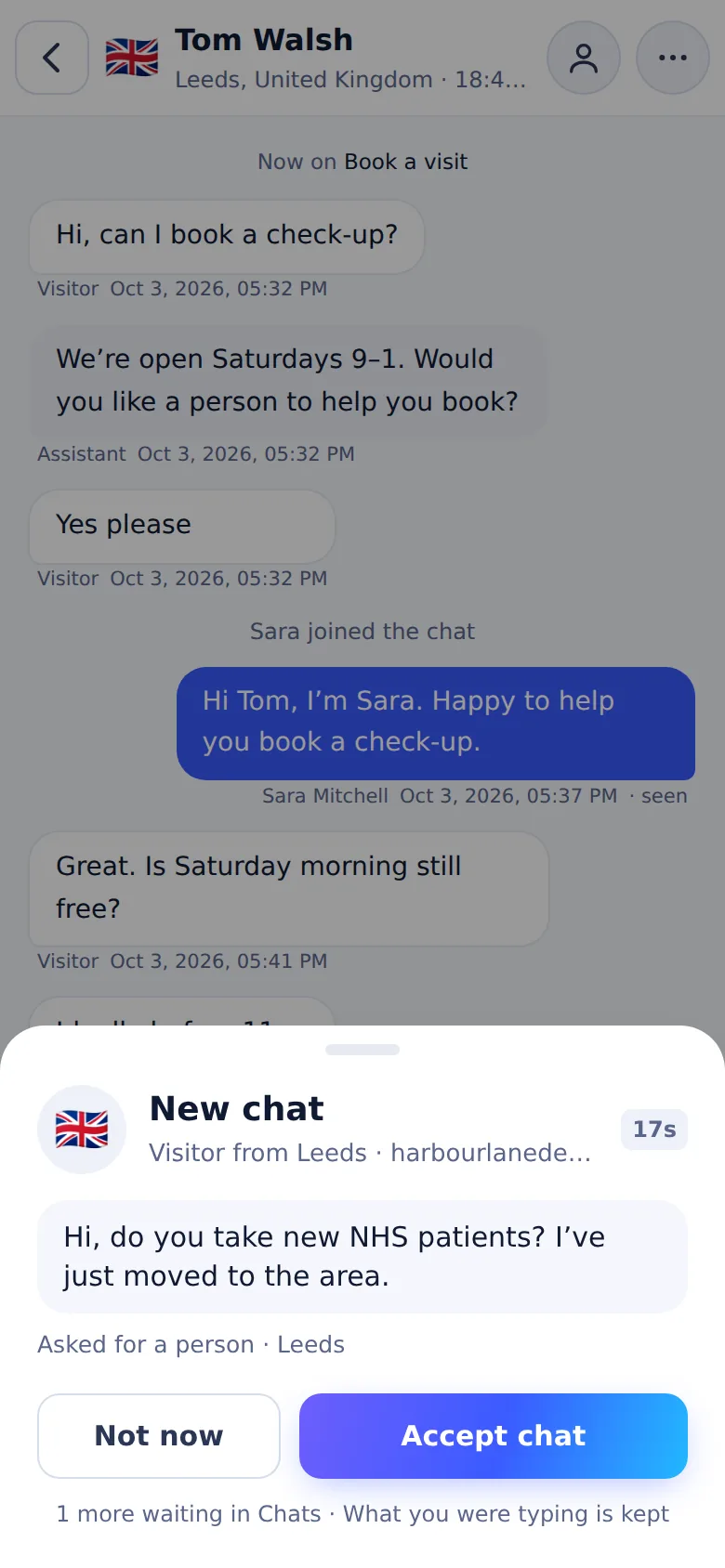
Live chat is now part of WPCentrify. The plugin your sites already run adds it, every site keeps its own look and hours, and your team answers all of them from one desk, at a laptop or on a phone.
Every plan includes the full management, monitoring and reporting toolkit.
Update core, plugins and themes across the portfolio in one action, with per-site exclusions.
Risk scoring, staging validation, visual regression and automatic rollback on every release.
Incremental encrypted off-site backups, restore-tested on a schedule you set.
Checks every 60 seconds from three locations, with email alerts.
Vulnerability matching against your installed versions, malware and integrity checks.
Core Web Vitals and PageSpeed tracked over time, per template, with regression alerts.
Scheduled white-label reports in plain language, with the technical log attached.
Your brand across the portal, reports, emails and the connector plugin.
Granular roles and per-site permissions. Nobody shares an admin password again.
Reach any site's wp-admin instantly, with every session recorded in the audit log.
Spin up a copy, test a change, push it live or throw it away.
Every action, every actor, every site, exportable and tamper-evident.
If this happens on that site, do this. Retries, escalation and quiet hours included.
A documented REST API, webhooks and exports. Your data stays yours.
Slack, Teams, Discord, email, Zapier, Make, and the tools you already run on.
Create, edit, re-role and remove WordPress users on any site, or across the whole portfolio at once.
Visitors, page views, sessions and traffic sources per site and fleet-wide, counted without cookies.
See what tracking is already on a site, then add header, body or footer code to one or forty, with no second plugin.
Change any page or post URL from your dashboard, and the 301 redirect is left behind automatically.
Every post and page across every site, with author, status, dates and real permalinks.
Titles, descriptions, share cards, headings and schema for any page, saved through the site's own SEO plugin.
Before and after screenshots of key pages, so an update that breaks a layout is caught, not shipped.
Every enquiry from every client site in one list, with a spam filter that shows its working.
A Virtual Assistant that answers visitors from the site's own pages and turns the chat into an enquiry.
Real people answering visitors on every client site, from one desk, with the AI chatbot handing over the whole conversation.
Change a phone number, a name or a price on every page at once, page builders included, with a preview and an undo.
Maintenance time scales almost linearly with site count when it is done by hand. That is the point at which the routine quietly stops getting done properly.
Routine work only: update checking and applying, verification, backup management, alert triage and report assembly. Judgement work and client conversations are excluded because they are not automatable.
A planning estimate, not a guarantee. Adjust the numbers to your own portfolio and see the coordination time you could get back.
Covers repetitive visibility and coordination work: checking updates, confirming backups, reviewing uptime and triaging alerts.
per month across your portfolio
This is coordination time, not a promise that every task is fully automated.
Try the full calculatorMaintenance is the most reliable recurring revenue in WordPress and the easiest to underprice. Move the sliders and see what your plan really returns once labour and tooling come out.
Reclaimed time uses a deliberately conservative 62 percent of routine portfolio maintenance, below the roughly 68 percent measured across early access portfolios: update checking, applying, verifying, backup management and report assembly. Judgement work, custom development and client conversations are not included. Open the full calculator.
Three steps. No hosting change, no DNS change, no rebuild. WPCentrify connects to WordPress where it already lives.
Install the lightweight connector plugin, or paste a list of URLs and let bulk connect handle it. Multisite networks, subdirectory installs and password-protected staging all work.
Typical time: 90 seconds for the first site, under 10 minutes for thirty.
Decide what gets updated automatically, what needs approval, when maintenance windows open, who gets alerted and what clients can see. Apply it per site, per client or per care plan tier.
Sensible defaults ship enabled. You can change one thing and leave the rest.
WPCentrify runs the routine. You get an alert when something needs a decision, a monthly report that writes itself, and a dashboard that tells you where to look first.
Most users touch the dashboard twice a week after the first fortnight.
WPCentrify is a hosted dashboard with a small connector plugin on each site. What sets it apart is update safety: rollouts start on one canary site, every pending update gets a risk score, and a plugin or theme update that breaks a site is rolled back on its own.
A hosted dashboard owned by GoDaddy, with premium features such as backups and white label sold as per-site add-ons.
Read the comparisonOpen source with a free core, but self-hosted: you run and secure the dashboard on your own WordPress install, with Pro add-ons on top.
Read the comparisonA hosted dashboard from a French company, priced per site per month, with paid add-ons for security and hourly backups.
Read the comparisonFacts about other products come from each vendor's own website, checked on 2 October 2026. Prices and features change.
Here is the short version of how the connection, the credentials and your backups are handled. The full detail, including the connector and access controls, is on the security page.
Each site connects with a rotating, scoped key instead of your admin password, and either side can revoke it at any time.
Every connection uses TLS 1.3. Stored backups and credentials use AES-256, with the keys held apart from the data.
Export sites, clients, history and backups whenever you like, or keep backups in your own S3-compatible or SFTP storage.
WPCentrify is in early access, so we do not publish testimonials yet. These are the numbers measured on the live portfolios connected today. Named customer stories follow once members agree to be quoted.
Of routine maintenance work absorbed by automation
Median time to roll a failed update back
Median portfolio uptime across early access
Average monthly admin time reclaimed at 20 sites
Figures are measured across early access portfolios between March and August 2026 and will be restated as public benchmarks after launch. How we will publish customer outcomes.
WPCentrify is the operations layer, not a replacement for your hosting, your page builder or your security plugin. It works with any host, exports everything, and talks to the tools your team already lives in.
Slack
Teams
Discord
SMS
Zapier
Make
Stripe
Webhooks
Any host
WooCommerce
REST API
WPCentrify is free while it is in early access, and plan prices are announced at launch. The model is already settled: you pay for the number of sites you run, not for which features you need. Backups, monitoring, security scanning and client reports are never add-ons.
Early access members keep the launch pricing for twelve months.
Practical writing on maintenance, care plans, security and the operational side of WordPress.
Ask three tools how many people visited and you get three answers. Real visitors, page views and sources, counted without cookies.
Titles, descriptions, social cards, headings and schema for every client site, written into the SEO plugin each site already runs.
Nine junk messages and one real patient. Why over-filtering costs more than spam, and the ten minute test for your own forms.
Everything people ask before connecting their first site.
WPCentrify is a WordPress management platform. It connects to every WordPress site you are responsible for and gives you one place to run updates, hold backups, watch uptime and security, and report on the work. It is built for anyone managing more than one site: business owners with a few company websites, freelancers looking after client sites, and agencies running care plans at scale.
It is hosting neutral, so your sites stay exactly where they are.
The short version: ManageWP is hosted and sells premium features as per-site add-ons, MainWP is self-hosted so you run the dashboard yourself, and WPCentrify is hosted with every feature included. The practical difference is update safety. WPCentrify starts each rollout on one canary site, scores every pending update for risk and rolls back a plugin or theme update that breaks a site. The full feature comparison goes row by row.
Yes. Any self-hosted WordPress site can connect, wherever it lives: managed WordPress hosts, cloud hosting, shared cPanel accounts or your own server. Nothing moves, so there is no DNS change or rebuild, and one portfolio can span as many hosts as you use.
There is no technical limit. Plans are sized by site count, from a single site up to several hundred, and the largest portfolios move to a dedicated arrangement. WPCentrify is free to use throughout early access, whatever the size of your portfolio.
Every update passes through seven stages: risk scoring, restore point, staging application, health checks, visual regression testing, functional testing of forms and checkout, then promotion or rollback. You set the policy for what runs automatically and what waits for a human. Low-risk security patches can ship within minutes of release; a major version touching a checkout page can require sign-off. Read the full detail on the safe updates page.
Backups are encrypted with AES-256 and stored off-site in the United States. You can bring your own S3-compatible bucket if you need backups inside your own infrastructure. Every backup can be downloaded directly, and restore testing runs on a schedule so you know the copy actually works before you need it.
No. The connector stays out of front-end page loads entirely: it answers the dashboard through the WordPress REST API, and uptime and performance checks run from outside the site. Visitors never load anything from it, so Core Web Vitals and server response time are unaffected.
Yes. Roles are granular and scoped per site or per client. A junior technician can be allowed to run approved updates but not delete a backup. A client can see their own uptime, reports and ticket history without seeing anything else in your portfolio. Nobody ever needs to share a WordPress admin password, and every action is recorded in the audit log against the person who took it.
WPCentrify is free during early access with the full feature set, not a trimmed-down version, and we are onboarding portfolios in waves. Plan prices are announced at launch, and there will be a trial that does not ask for a card.
Yes, at any time and without asking. You can export sites, clients, activity history, reports and backups in standard formats from the dashboard. There is no exit fee and no period where your data is held while an account winds down. The public API covers the same data if you would rather pull it programmatically.
No, and it is not trying to replace one. WPCentrify gives you portfolio-wide visibility of security posture: which sites run vulnerable plugin versions, which certificates are expiring, which files changed unexpectedly. It works alongside a dedicated firewall and malware scanner such as Wordfence rather than instead of them.
Connect your first site in under two minutes and watch a real update run through verification. Free during early access, no credit card, no contract, and your data stays exportable.
Works with any host.