Today's answer
Whether a page works comes from your website as it is today.
A link from another website is worth having. When the page it points to is deleted or moved, that link lands on not found and its value is lost, often for years. WPCentrify finds those links and fixes them with one redirect.
Included on Studio, Agency and Scale. Backlink analyses use AI credits.
Updated
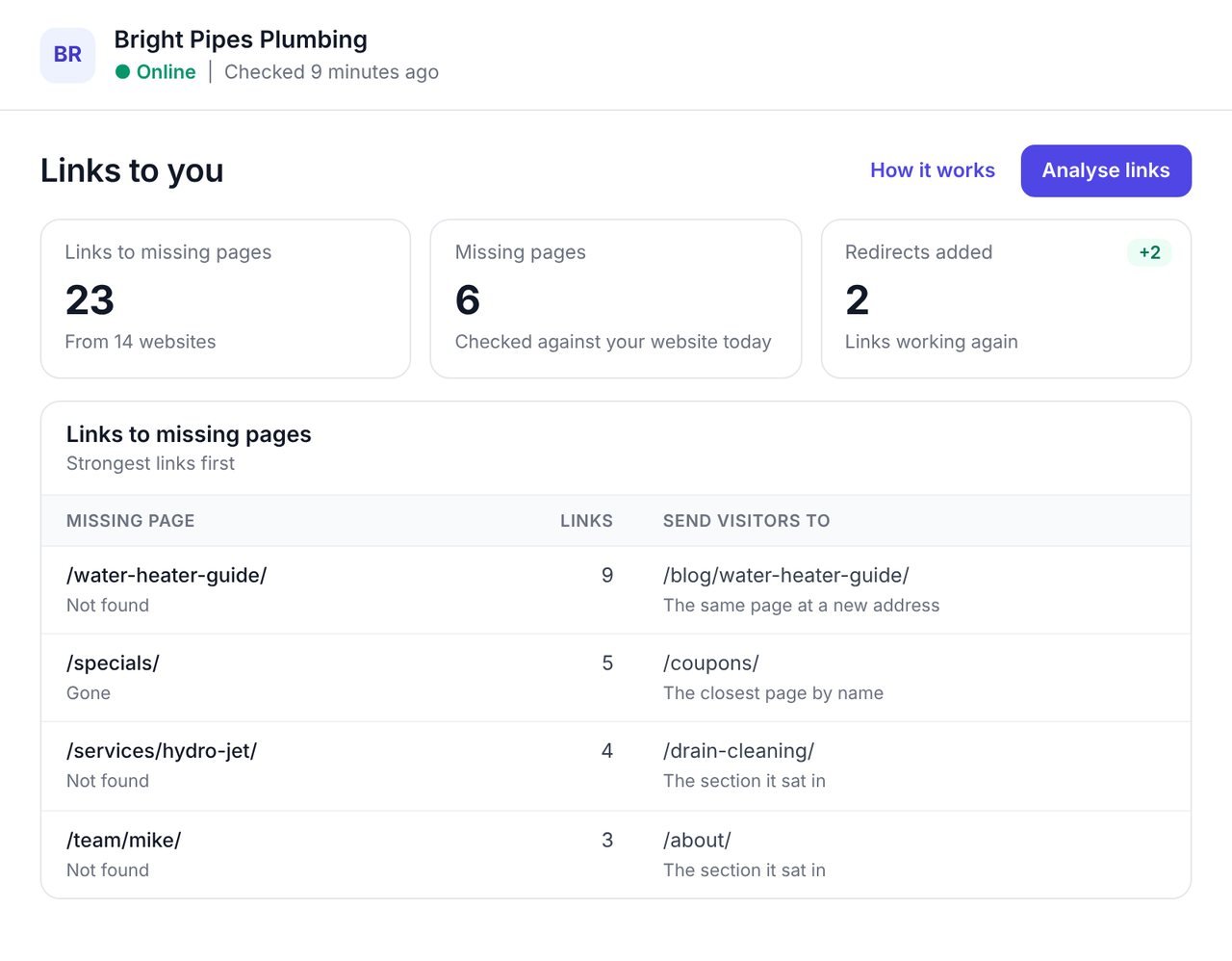
A broken backlink is a link from another website to a page on yours that no longer works, because the page was deleted or moved. A broken backlink checker finds them so you can redirect the old address and get the link working again.
The cheapest links to win are the ones you already have. Nobody connects the two facts, because one tool knows which pages other websites link to, and another knows which pages are gone. WPCentrify puts them side by side.
Whether each page works comes from your website as it is today, not from weeks-old data. Each missing page comes with a suggested place to send visitors, and one press adds the redirect on the WordPress site.
Each missing page suggests where to send visitors, and says why: the same page at a new address, the closest page by name, the section it sat in, or the home page.
Press Add redirect and the redirect is made on the website. Every link to that address works again, from every website that links to it. Choose another page if you know a better one.
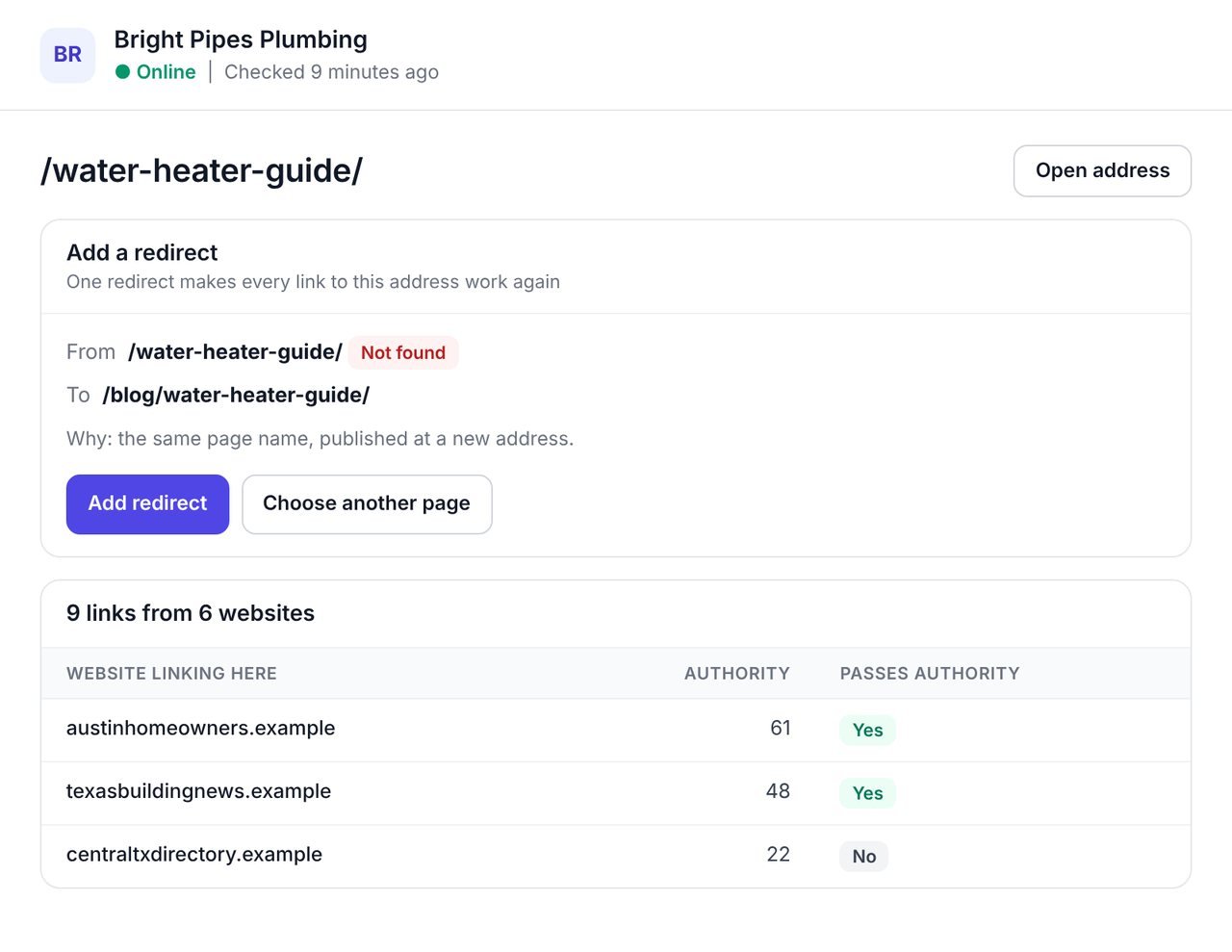
Not every lost link is worth the same. The list shows which linking websites carry the most authority and whether each link passes it.
Filter to the links still to fix, to the ones that pass authority, or by what the missing page answers: not found, gone or a server error. Every column sorts, and the list exports as a branded CSV or PDF.
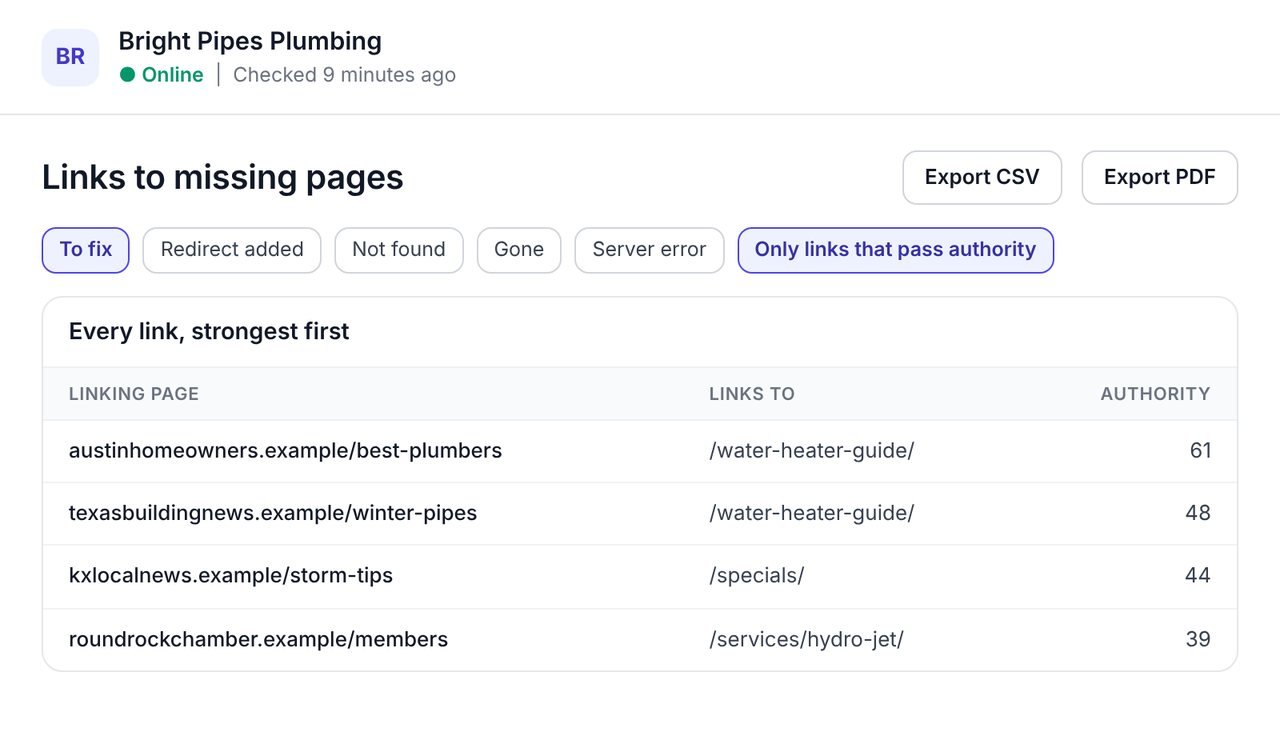
Winning back a lost link usually means exporting backlinks, checking each address by hand and asking a developer for a redirect. Here it is one list.
Whether a page works comes from your website as it is today.
Fix it from the list, with a suggested destination.
See which linking websites carry the most authority.
To fix or fixed; not found, gone or server error; links that pass authority.
Your website's own broken links list says when other websites link to the same address.
A CSV with your brand and the filters on screen, and a PDF of the view.
They sound alike and need different fixes. WPCentrify has a tool for each.
| Broken backlinks | Broken links | |
|---|---|---|
| Where the link is | On another website, pointing to yours. | On your own pages. |
| Why it matters | The link's value is lost until the address works again. | Visitors and Google hit a dead end on your website. |
| How to fix it | Redirect the missing address to the right page. | Change or remove the link on your page. |
| In WPCentrify | Broken backlink checker, in Links to you. | Broken link checker, in SEO. |
You need the website connected to WPCentrify and a backlink analysis run in Links to you.
Open Links to you and analyze the website's links.
The number of links to missing pages is shown above the lists.
Sort by authority and filter to links that pass it.
Check each suggested destination, choose another if you know better, and press Add redirect.
Fixed addresses move to Redirect added, and the links count again.
Link reclamation is the cheapest link building there is: the other website already decided to link to you. A redirect from the missing address to the right page sends visitors, and the link, to a page that works.
To find new links rather than win back old ones, use backlink gap analysis, and keep watch on links won and lost with backlink monitoring.
What people ask before they turn it on.
A broken backlink is a link from another website to a page on your website that no longer works, usually because the page was deleted or moved. The link's value is lost until the address works again.
Run a backlink analysis in WPCentrify and open the links to missing pages. Each page they point to is checked against your website as it is today, and the strongest links come first.
Redirect the missing address to the right page with a permanent redirect. In WPCentrify each missing page suggests a destination, and one press adds the redirect on the WordPress site.
To the same page at its new address if it moved, otherwise to the page about the same thing, or the section it sat in. The home page is the last resort.
No. A broken backlink is on another website and points to yours; a broken link is on your own pages. WPCentrify has a separate broken link checker for links on your pages.
A permanent redirect sends visitors and search engines from the old address to the new one, so the link points at a working page again.
Backlink records can be weeks old. A page that was missing may have been restored, and one that worked may be gone. WPCentrify checks what each address does now.
Yes. The CSV carries your brand block and the filters on screen, and the PDF shows the same view under your brand with White label.
A backlink analysis uses AI credits from your workspace balance. Reading, filtering, adding redirects and exporting are free. Each plan includes AI credit every month: $1 on Solo, $10 on Studio, $30 on Agency and $75 on Scale, and you can buy more in $15 packs.
Connect a site, run a backlink analysis and add the first redirect in a minute.
Plan prices to be revealed. Keep your data, export any time.