Two to four competitors
Your tracked competitors are chosen for you; change them any time.
The best link building prospects are websites already linking to businesses like yours. WPCentrify finds the ones that link to your competitors and not to you, and keeps track of who you asked and who said yes.
Included on Studio, Agency and Scale. Each look uses AI credits.
Updated
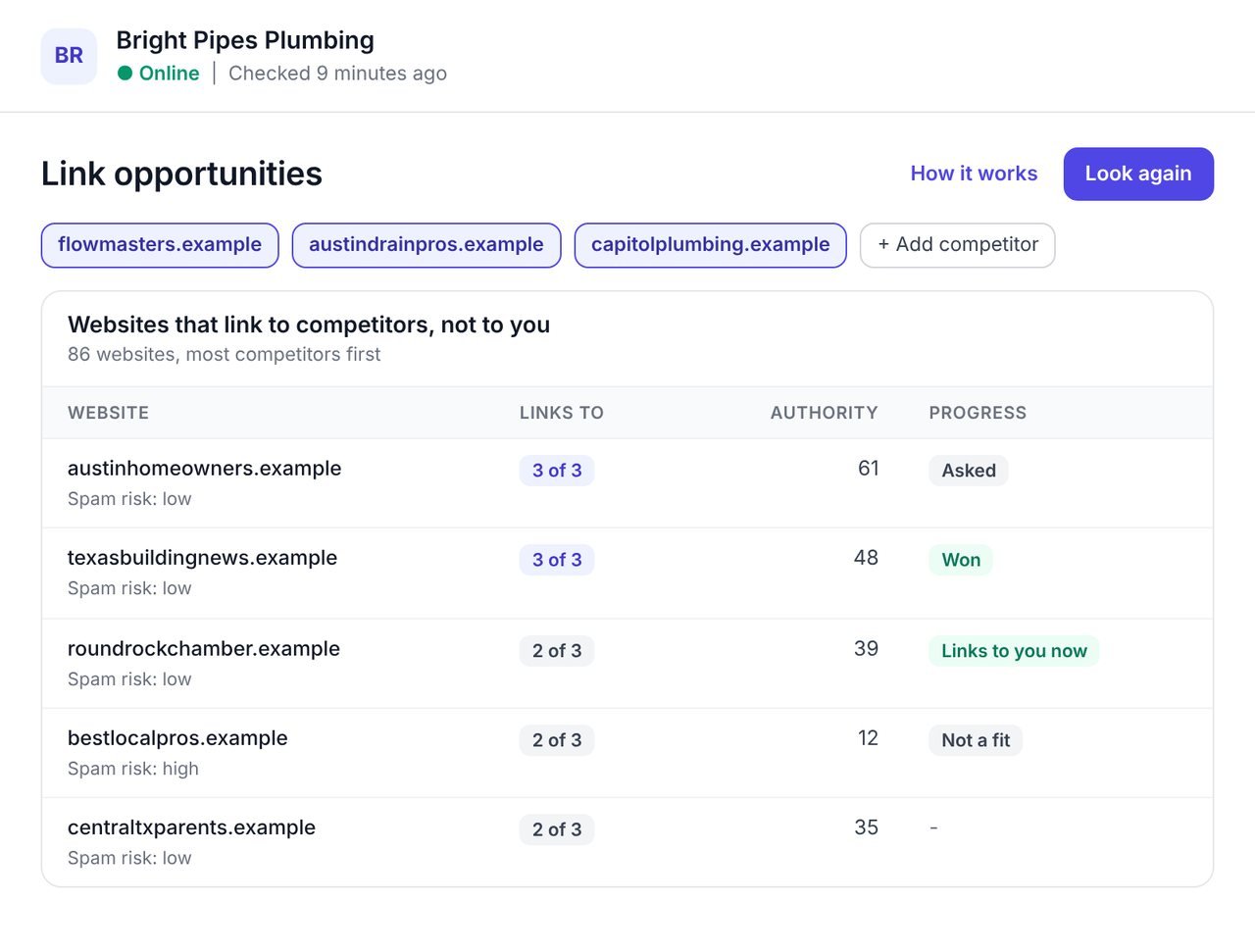
A backlink gap analysis finds the websites that link to your competitors but not to you. They write about your trade, list businesses like yours, or sponsor them, so they are the most likely to link to you too. Some tools call it a link intersect.
Link building usually starts with a cold list. Finding warm prospects by hand means exporting every competitor's backlinks and comparing spreadsheets. WPCentrify does it for you and finds every website linking to two or more of your competitors, which is a far longer and more useful list than those linking to all of them.
Websites already linking to you are left out, and a competitor's own subdomains never count as a linking website. Then you work through the list and mark each one.
Each website shows which of your competitors it links to and how many links it gives each, with its authority and spam risk.
A website linking to three businesses like yours has shown it links to your trade. Spend your time on the ones with real authority and a low spam risk, and leave the rest.
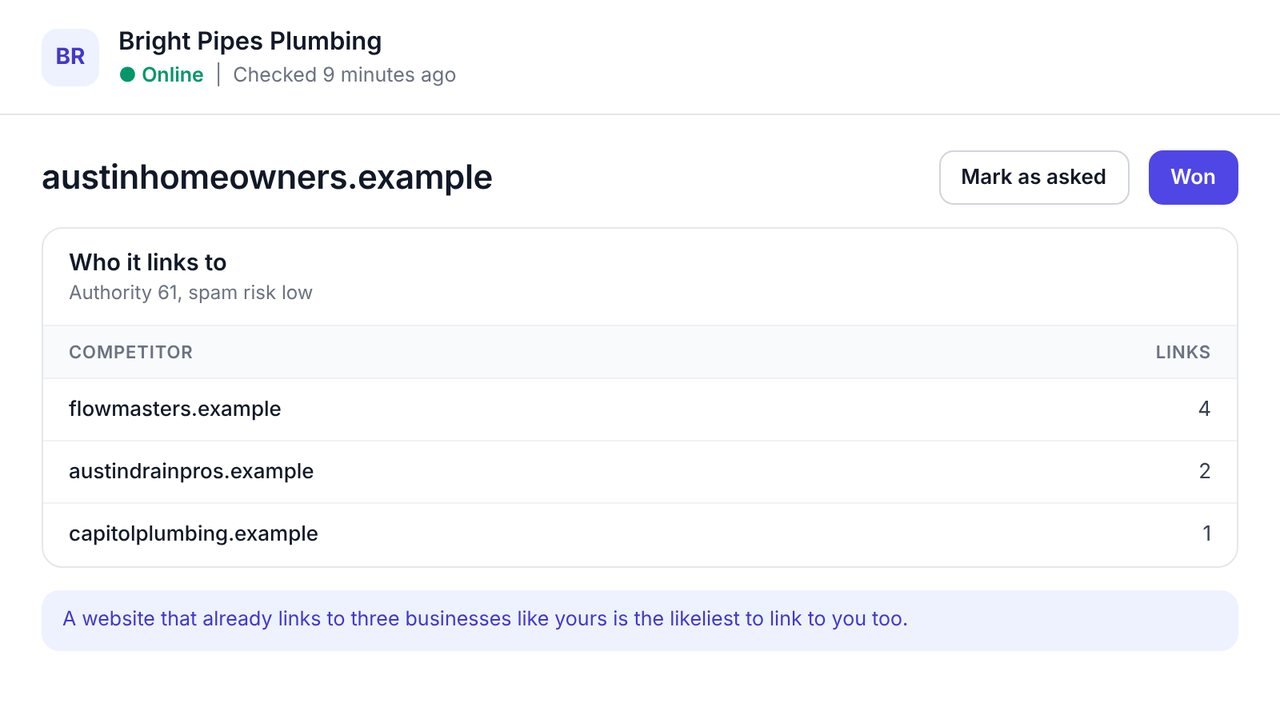
Mark each website asked, won or not a fit, one at a time or in bulk. The marks are kept through every later look and recorded in the Activity feed.
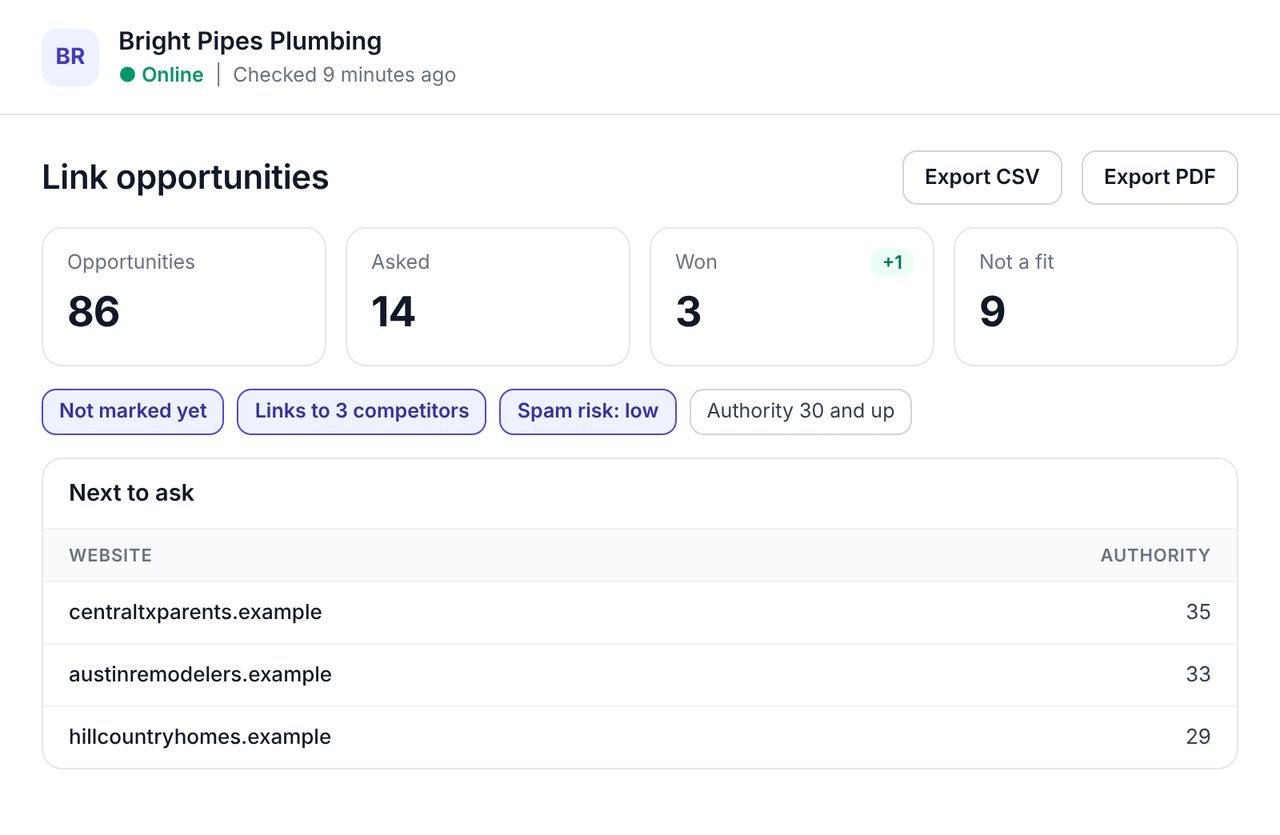
When a website on the list starts linking to you, it is marked Links to you now, so you see the outreach paying off. Filter to the websites not marked yet, linking to the most competitors, with a low spam risk, and you have your next ten emails.
Finding prospects is half the job. These parts cover the other half.
Your tracked competitors are chosen for you; change them any time.
Each website shows which competitors it links to, and how often.
Spend your time on the websites worth a link.
Asked, won, not a fit, kept through every later look.
A website that has started linking to you is marked for you.
A CSV with your brand and the filters on screen, and a PDF of the same rows.
A simple order works for most local and service businesses.
| Prospect | Why it is a good bet | How to approach it |
|---|---|---|
| Links to three or four competitors | It has shown, more than once, that it links to businesses like yours. | Ask to be listed or mentioned beside them. |
| A local directory or chamber | It lists local businesses as its whole purpose. | Join or submit your listing. |
| A local news or community site | It writes about local businesses and events. | Offer a story, a tip or an expert comment. |
| A trade association or supplier | It links to members and customers. | Ask about a member or customer listing. |
| High spam risk | A link from it may do more harm than good. | Mark it not a fit and move on. |
You need the website connected to WPCentrify and a few competitors in mind, or tracked already.
Pick two to four competitors; your tracked ones are chosen for you.
WPCentrify lists every website linking to two or more of them and not to you.
Not marked yet, linking to the most competitors, with good authority and low spam risk.
Contact each website, then mark it asked, won or not a fit.
Your marks are kept, and websites that now link to you are marked.
The websites on this list already link to businesses like yours, so the question is not whether they link to your trade but why they would add you.
Before building new links, win back the ones you already have with the broken backlink checker, and see which searches your competitors win with the keyword gap.
What people ask before they turn it on.
A backlink gap analysis finds the websites that link to your competitors but not to you. Because they already link to businesses like yours, they are the most likely to link to you too.
Yes. Link intersect is another name for the same idea: the websites where your competitors' backlinks overlap and yours are missing.
Two to four. Your tracked competitors are chosen for you, and you can change them.
A website linking to all four of your competitors is rare, so that list is short. Websites linking to any two of them are far more numerous and still good prospects.
They are not opportunities: they already link to you. Leaving them out keeps the list to websites worth asking.
Spam risk is an estimate of how likely a website is to be low quality. A link from a high risk website is rarely worth asking for.
No. It finds the prospects and keeps track of who you asked, who said yes and who was not a fit. You do the outreach.
Yes. Asked, won and not a fit are kept through every later look and recorded in the Activity feed.
Each look uses AI credits from your workspace balance. Reading, marking, filtering and exporting are free. Each plan includes AI credit every month: $1 on Solo, $10 on Studio, $30 on Agency and $75 on Scale, and you can buy more in $15 packs.
Links won, lost and spammy
Read moreWin back links to missing pages
Read moreThe searches competitors win
Read moreSee every tool in one place: WordPress SEO tools for every site you manage.
Connect a site, choose two competitors and work through the list.
Plan prices to be revealed. Keep your data, export any time.