Audit SEO across every WordPress site you manage, then fix it
WPCentrify crawls every WordPress site you manage each week, checks every day that Google can reach it, and ranks your sites worst first. Then you fix what it finds from the same screen, without logging into each site.
Free during early access.
Updated
What is a WordPress SEO audit?
A WordPress SEO audit checks whether Google can reach, read and show a site's pages, and lists what to fix in order of importance. It covers the things search engines trip over: pages hidden by a setting or a tag, broken links, missing titles and descriptions, duplicate titles, images with no description and pages nothing links to.
WPCentrify runs that audit on every WordPress site you manage, from one dashboard. It works alongside whichever SEO plugin each site uses, and every finding comes with a way to fix it on the live site. If you only need to edit titles and descriptions, see on-page SEO management; for every SEO tool in one place, see WordPress SEO tools.
WPCentrify SEO audit at a glance
- A weekly crawl of up to 1,000 pages per site, with 30 checks on every page.
- A daily outside check that answers 12 plain questions about whether Google can find the site.
- A score out of 100 for every site: minus 25 per critical finding, 10 per warning and 3 per note.
- Findings sorted into Fix now, Improve and Tidy up, each with an effort estimate.
- Fix from the finding: edit the page, write titles with AI, fix the link or add a redirect.
- One SEO policy of eight switches applied to every site.
- An email the day a site starts hiding from search engines.
- Works with Yoast SEO, Rank Math, All in One SEO, SEOPress, The SEO Framework, Slim SEO, or no SEO plugin.
Which of your sites needs attention first?
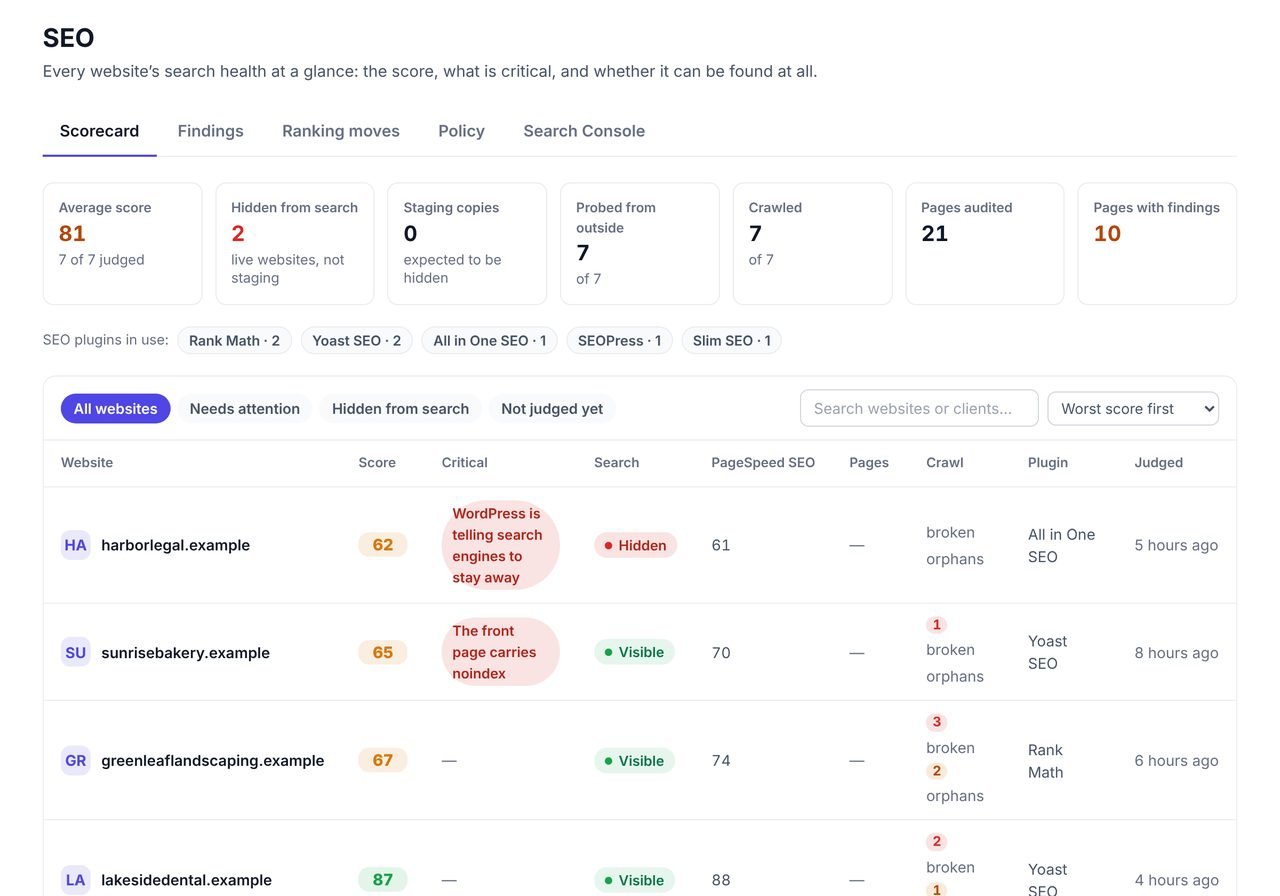
The SEO page opens on a scorecard of every site you manage, worst first, so the site that is losing visitors today is at the top of the list.
Each row shows the site's SEO score, how many critical findings it has, whether search engines can see it, the Lighthouse SEO score for its home page, how many pages were crawled and which SEO plugin it runs. Switch to Findings to see one problem across every site at once, for example every site with no sitemap.
- A score out of 100 for every site, worst first
- Search visibility at a glance: a site hiding from Google is impossible to miss
- Findings grouped across sites, so one fix pattern covers many clients
- Works with any SEO plugin, or none
Can Google find each site? 12 questions we check every day
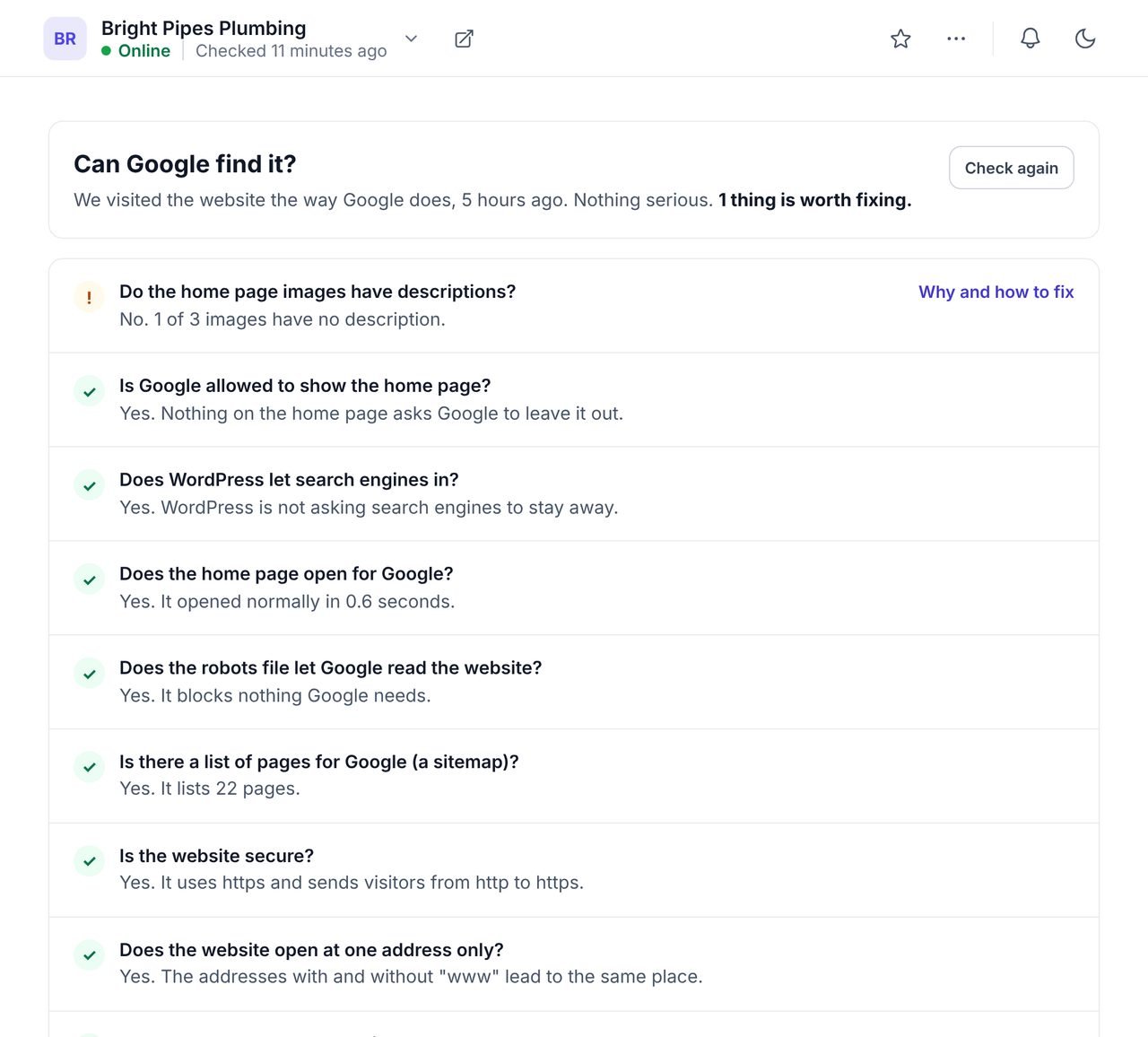
Once a day WPCentrify looks at each site from outside, the way Google arrives, and answers these questions in plain words. A question we could not check is left out rather than guessed.
- Is Google allowed to show the home page?
- Does WordPress let search engines in?
- Does the home page open for Google?
- Does the robots file let Google read the website?
- Is there a list of pages for Google (a sitemap)?
- Is the website secure?
- Does the website open at one address only?
- Does a page that does not exist say so?
- Does the home page have a title and description?
- Does it work on a phone?
- Do the home page images have descriptions?
- Is Google told who this website belongs to?
The same check reports which AI crawlers each site refuses. Google explains how robots meta tags and the robots.txt file control what it may show.
What the page crawl checks on every page
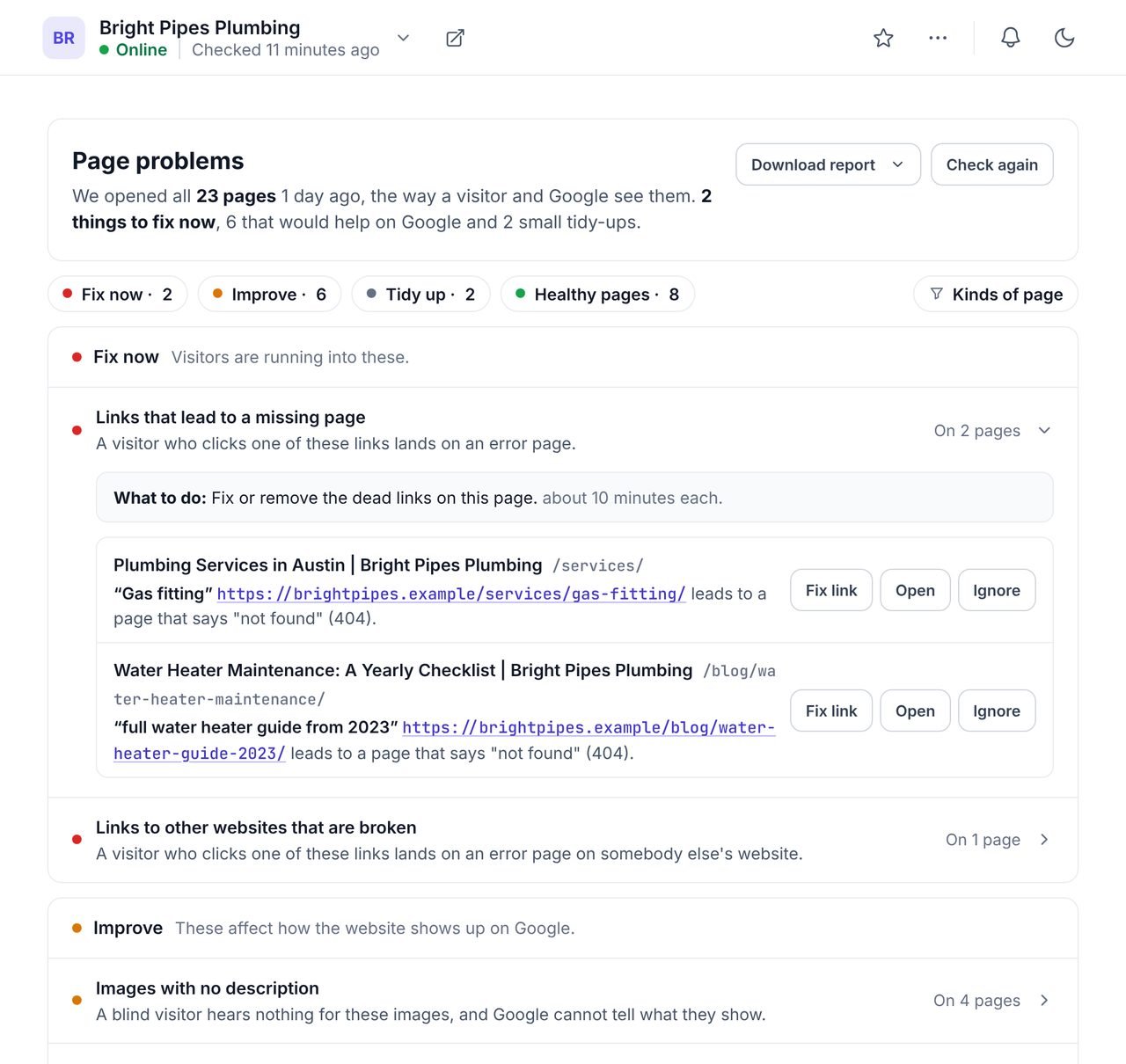
Each week WPCentrify reads up to 1,000 pages of every site and runs 30 checks on each one. Problems are sorted into three piles by who they hurt, with the pages and an effort estimate for each.
| Pile | What is in it |
|---|---|
| Fix now | Visitors hit these today: pages that show a server error, pages that say "not found", pages that turn visitors away, links that lead to a missing page, and links to other websites that are broken. |
| Improve | These cost you in Google: pages told not to show in search, pages with no title or description, titles shared by several pages, missing main headings, images with no description, insecure files, pages no other page links to, structured data Google cannot read, pages not set up for phones and more. |
| Tidy up | Optional polish, never shown as a warning: links to an older form of an address, headings that skip a level, more than one main heading, missing sharing previews, very thin pages and language versions with no default. |
Every page also gets a verdict on whether Google can index it, with the reason in words.
From a finding to a fix, without opening wp-admin
An audit is only worth the fixes it leads to. Most findings carry a button that fixes them from the same screen, on the live WordPress site:
- Edit page opens the page in the content editor at the field that needs work, such as the title, the description or the search engine switch. Changes are written into the site's SEO plugin.
- Write with AI drafts three titles or descriptions from the page's own text, checked for length and duplicates. See the AI meta title and description generator.
- Fix link changes a broken link where it sits, rewrites the sentence around it or adds a redirect, with undo. See the broken link checker.
- Add a link to a page nothing links to, chosen from the pages most likely to mention it. See internal linking.
- Describe images fills missing alt text from file names, titles or AI. See the AI alt text generator.
Not every finding is a mistake. Press "Ignore" and that finding stays hidden on that page after every crawl. It comes back only if the problem grows. You can also leave whole kinds of page out of the audit, such as landing pages you keep out of Google on purpose.
One SEO policy for every site you manage
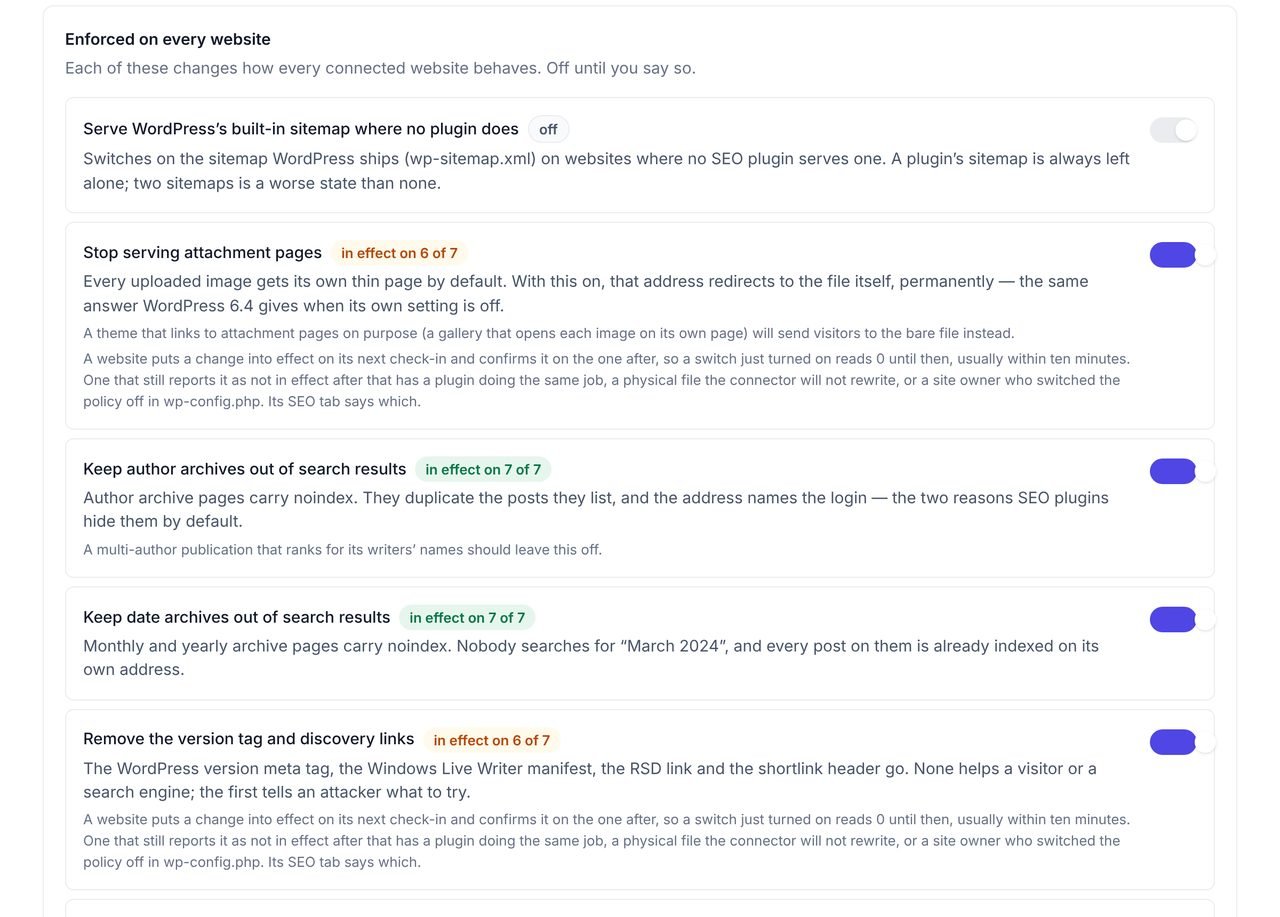
Instead of setting the same eight things on every site by hand, you turn each one on once for the workspace and every connected site follows.
- Serve WordPress's built-in sitemap where no SEO plugin already does
- Stop serving attachment pages, the thin page WordPress makes for every image
- Keep author archives out of search results
- Keep date archives out of search results
- Remove the WordPress version tag and discovery links from the page head
- Point robots.txt at the sitemap
- Refuse AI training crawlers in robots.txt (see AI crawler control)
- Tell Bing and the other IndexNow search engines when pages change
Each switch is off until you turn it on, and the screen shows how many sites it is in effect on. Where an SEO plugin already does the job, such as Yoast's sitemap, WPCentrify stands down on that site rather than doing it twice. A site owner can switch the policy off on their own site with one line in wp-config.php.
A growth check that turns the audit into a plan
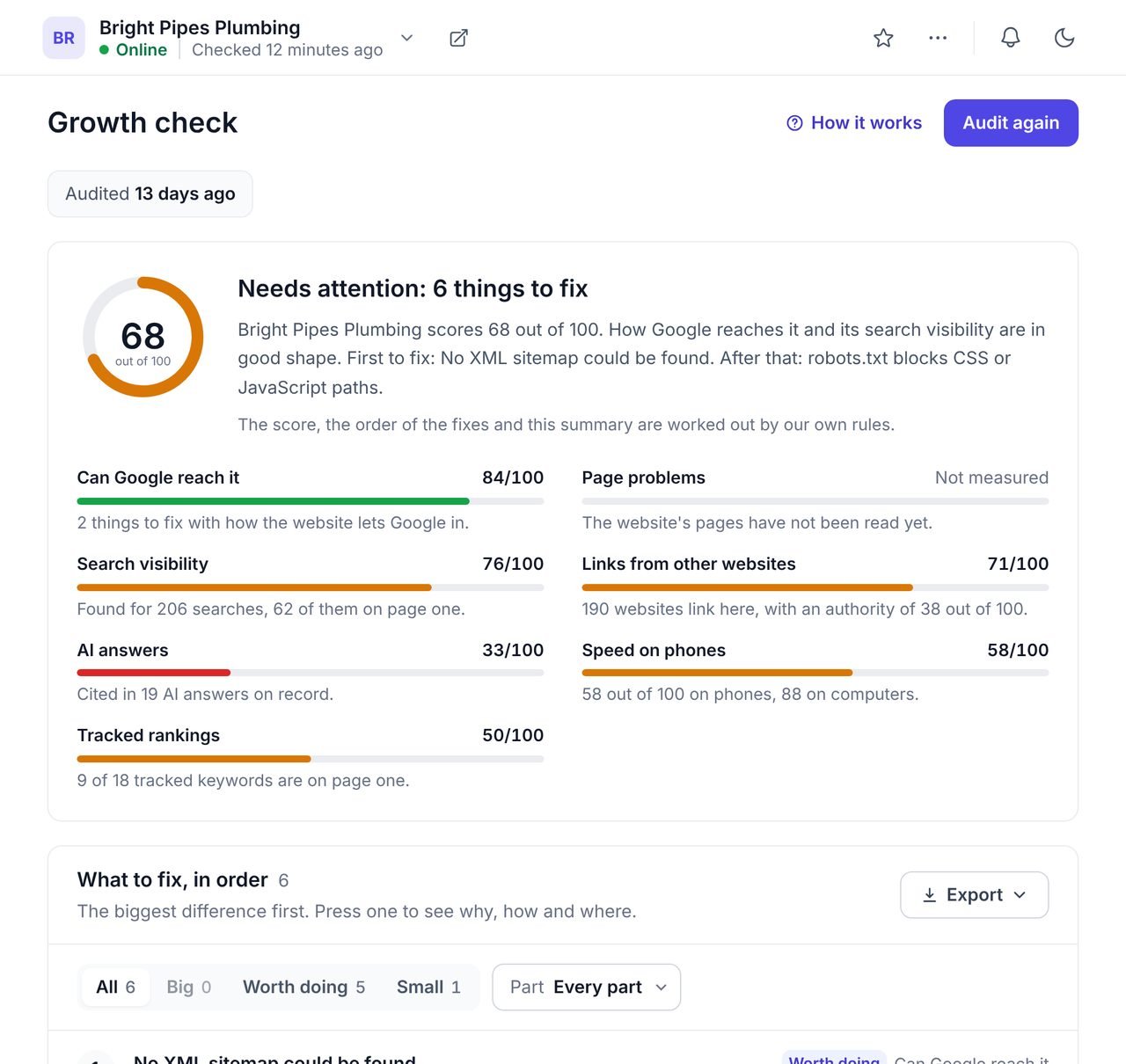
The growth check gives each site one score out of 100 for search growth and up to 12 fixes in the order to do them, each with why it matters and how.
It weighs seven parts: whether Google can reach the site (25), page problems (20), search visibility (15), links from other websites (15), AI answers (10), speed on phones (10) and tracked rankings (5). A part with nothing to measure is left out of the score rather than counted as zero. The scores and the order are worked out by rules; AI only writes the short summary at the top.
The growth check uses AI credits from your workspace balance.
What this SEO audit does not do
- It does not run JavaScript. The crawler reads the HTML each page sends. Content that only appears after scripts run is not checked.
- Lighthouse runs on the home page only. The page crawl covers the rest of the site.
- It does not submit sitemaps to Google. It can serve WordPress's own sitemap and point robots.txt at it; submitting to Search Console is done in Search Console.
- It does not promise rankings. It finds what stops Google from reading and showing your pages, which is the part you control.
WPCentrify, an SEO plugin audit or a desktop crawler?
Three ways to audit WordPress SEO, and what each one is good at.
| WPCentrify | SEO plugin audit | Desktop SEO crawler | |
|---|---|---|---|
| Sites covered | Every site you manage, in one list | One site, inside its own wp-admin | One site per crawl |
| How often | Weekly crawl and a daily outside check, on their own | When someone opens it | When someone runs it |
| Fixing | Fix from the finding: edit, AI titles, link fix, redirect | Fix inside that site | Export a list, fix by hand |
| One policy for all sites | Yes, eight switches | No | No |
| Alert when a site hides from Google | Yes, by email | No | No |
| JavaScript rendering | No | Varies | Often yes |
Questions about WordPress SEO audits
What people ask before they turn it on.
The most common reasons are a "Discourage search engines from indexing this site" setting left on after launch, a noindex tag on the page, a robots.txt rule that blocks Google, a home page that returns an error, or a new site Google has not found yet. WPCentrify checks the first four every day for every site you manage and emails you the day a site starts hiding from search engines.
Run a full page crawl at least once a week and check that Google can reach the home page every day. Sites change every time someone publishes, updates a plugin or edits a menu, so a yearly audit misses most problems. WPCentrify crawls each site weekly and runs its outside check daily, so you do not have to remember.
Yes. The audit reads each page the way Google receives it, so it works whatever SEO plugin a site runs. When you fix a title or description from WPCentrify, the change is written into the plugin that site already uses: Yoast SEO, Rank Math, All in One SEO, SEOPress, The SEO Framework or Slim SEO.
Every site starts at 100. Each critical finding takes off 25 points, each warning 10 and each note 3, and the score never goes below 0. The score is there to rank your sites worst first. The findings under it tell you what to fix.
No. Lighthouse runs a short list of checks on one page, which WPCentrify shows for the home page. The audit score comes from the daily outside check and a crawl of up to 1,000 pages per site, so it catches problems on pages Lighthouse never opens.
No. The crawler reads pages one after another with a pause between requests, the way a polite search engine does, and runs once a week. You can also leave parts of a site out of the crawl, such as a large archive.
Yes. Page problems downloads as a CSV and saves as a PDF report written in plain English, with your own brand on it if you use white label. Rankings and other search figures can also go into the monthly client report.
No. The crawler reads the HTML each page sends, which is what most WordPress sites rely on. Content that only appears after scripts run in the browser is not checked.
Related AI and SEO tools
Broken link checker
Every broken link and 404 on every site, fixed in place with undo
Read moreAI meta titles and descriptions
Three checked options per field, written into the SEO plugin each site uses
Read moreInternal linking
Link suggestions you approve, and the orphan pages to fix first
Read moreSee every tool in one place: WordPress SEO tools for every site you manage.
Audit every site you manage this week
Connect a site and the first crawl and outside check run on their own. Your sites are ranked worst first by the time you come back.
Free during early access. Keep your data, export any time.