They rank, you do not
Usually a page the site does not have yet. Plan one for the searches that suit the business.
WPCentrify finds the websites each site you manage competes with on Google, then lists the searches they rank for where the site does not, scored by how worth winning each one is. A short note says where to start.
Free during early access. Finding competitors and comparing use AI credits.
Updated
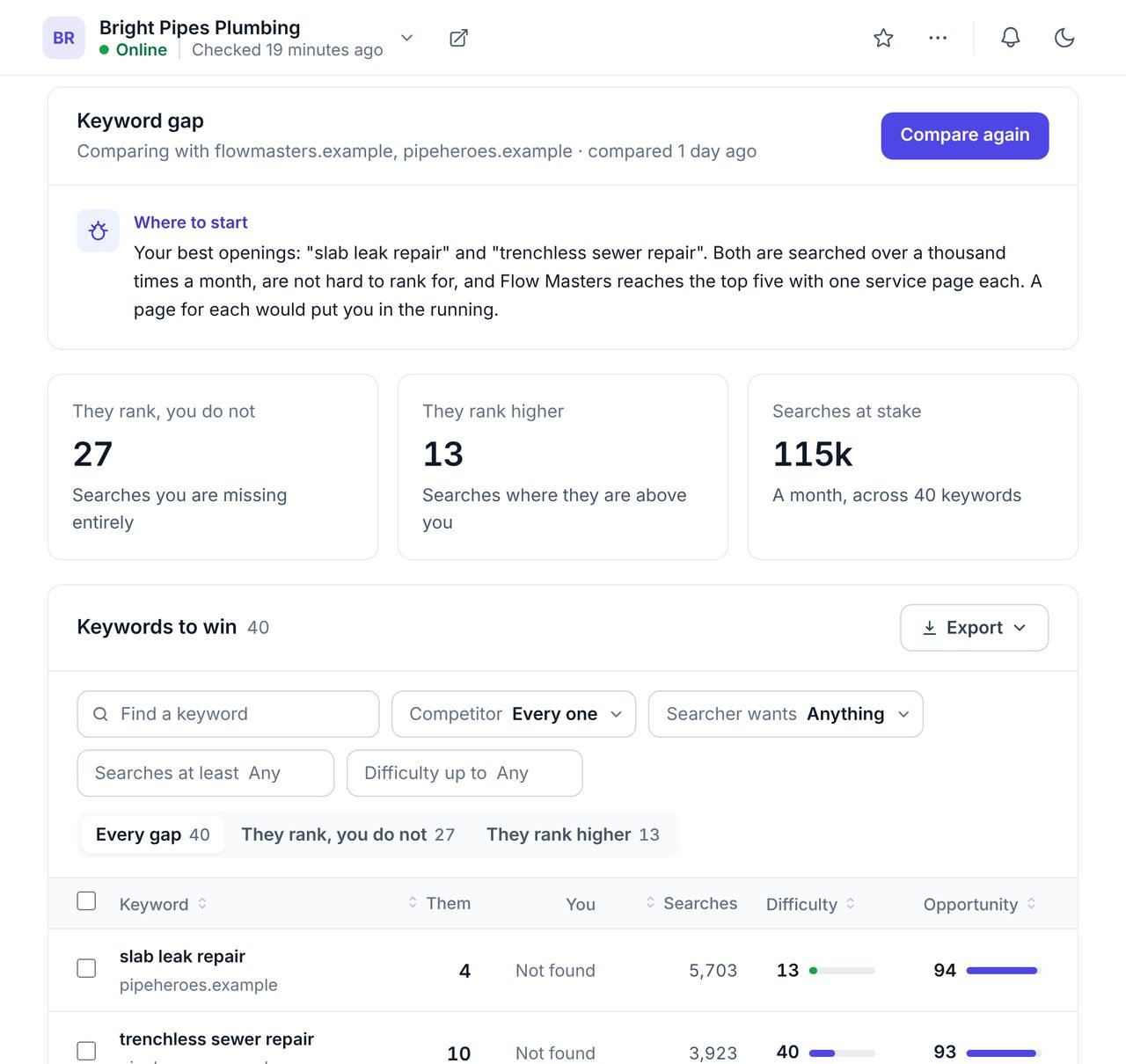
A keyword gap is the set of searches a competitor ranks for on Google where your website does not appear, or appears lower. Closing it is often the quickest way to win new search traffic, because the competitor has already proved those searches bring visitors.
WPCentrify finds each site's search competitors from its real rankings, compares the site with up to three of them, and scores every gap keyword from 0 to 100 so the best openings come first. It works for every WordPress site you manage, with no plugin.
WPCentrify finds the websites that rank for the same searches as the site you manage, in the country you choose, and shows how strong each one is.
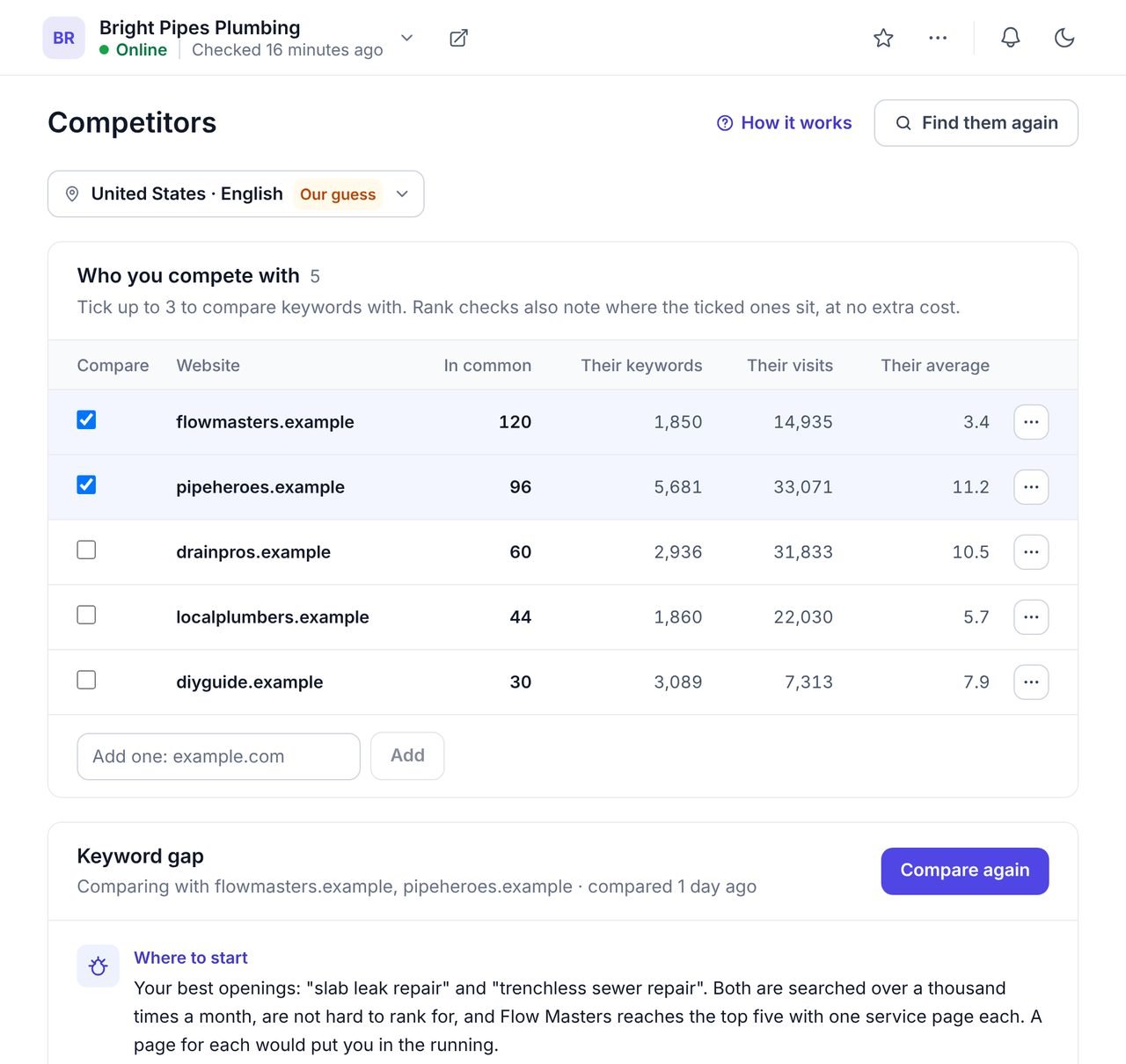
The business a client names as its rival is often not the one taking its clicks. A national directory, a blog or a company two towns away may rank above it for its best services. Each competitor shows how many searches it has in common with the site, how many it ranks for in total, its estimated Google visits and its average position. Tick up to three to compare.
The keyword gap lists every search a chosen competitor ranks for where the site is not found, and every search where they rank higher.
Each row shows the competitor's position, the site's own position or "Not found", how often the search is made each month, how hard it would be, and an opportunity score from 0 to 100. Above the list, a short note written with AI says where to start, in plain English, from the best rows in the list.
Open Competitors on the site and press Find. WPCentrify lists the websites that rank for the same searches.
Choose the rivals worth comparing with. Add one by its address if it is missing.
The gap lists every search they win that the site does not, and every search where they rank higher.
The highest scores are searched often, possible to rank for, and won by a competitor today.
Write a page with a content brief, or improve the page that already covers it, then track it.
Two kinds of row, and they call for different work.
Usually a page the site does not have yet. Plan one for the searches that suit the business.
Usually a page that exists but is thinner, older or less linked than theirs. Improve it first.
You will not out-rank Yelp everywhere. Make sure the business is listed there, and win the long searches.
A competitor may rank for things the client does not sell. Leave those out with the filters.
The monthly searches across the gap: a quick way to show a client the size of the prize.
Export the gap as a PDF for the meeting, or share the openings with whoever writes.
Keyword research starts from a subject and finds every way people search for it. The keyword gap starts from the competitors and finds what they already win. The rank tracker then watches the searches you chose, so you can see the gap close. To compare how many websites link to each competitor, see backlink monitoring; to compare how often AI answers cite them, see AI search visibility.
What people ask before they turn it on.
A keyword gap analysis compares the searches a website ranks for on Google with the searches its competitors rank for, and lists the ones where a competitor shows up and the website does not, or ranks higher.
From the keywords the site already ranks for: the websites that appear for the most of the same searches are its search competitors, up to 20 of them. You can add any website yourself, and hide one that is not a real rival.
Not always. A directory or a national guide can compete for the same searches without selling anything. That is why you choose which ones to compare with, up to three at a time.
A score from 0 to 100 for how worth going after a keyword is: searched often, not too hard to rank for, and won by a competitor today. Sort by it to see the best openings first.
It is written with AI from the three best rows of the gap, and the AI is given only their numbers: searches, difficulty and positions. When AI is not available, the note simply lists those openings.
It shows how many keywords each competitor ranks for, an estimate of their monthly visits from Google, and their average position, so you can see who is strongest in the market.
Finding competitors and comparing use AI credits from your workspace balance. Ticking, adding, hiding and reading the gap are free, and the gap is kept, so filtering, sorting and exporting it cost nothing. WPCentrify is free during early access, and plans will be announced with pricing.
Connect a site, find its competitors and compare with the strongest three.
Free during early access. Keep your data, export any time.