AI Overview with every rank check
Nothing extra to press: each rank check reads the AI Overview for the keyword as well as the position.
Ranking first no longer means being seen first. WPCentrify checks Google's AI answer for each keyword you track and shows whether it cites your website, and every website it cites instead.
Included on Studio and up, or with Search Growth Starter on Solo. Rank checks and AI Mode checks use AI credits.
Updated
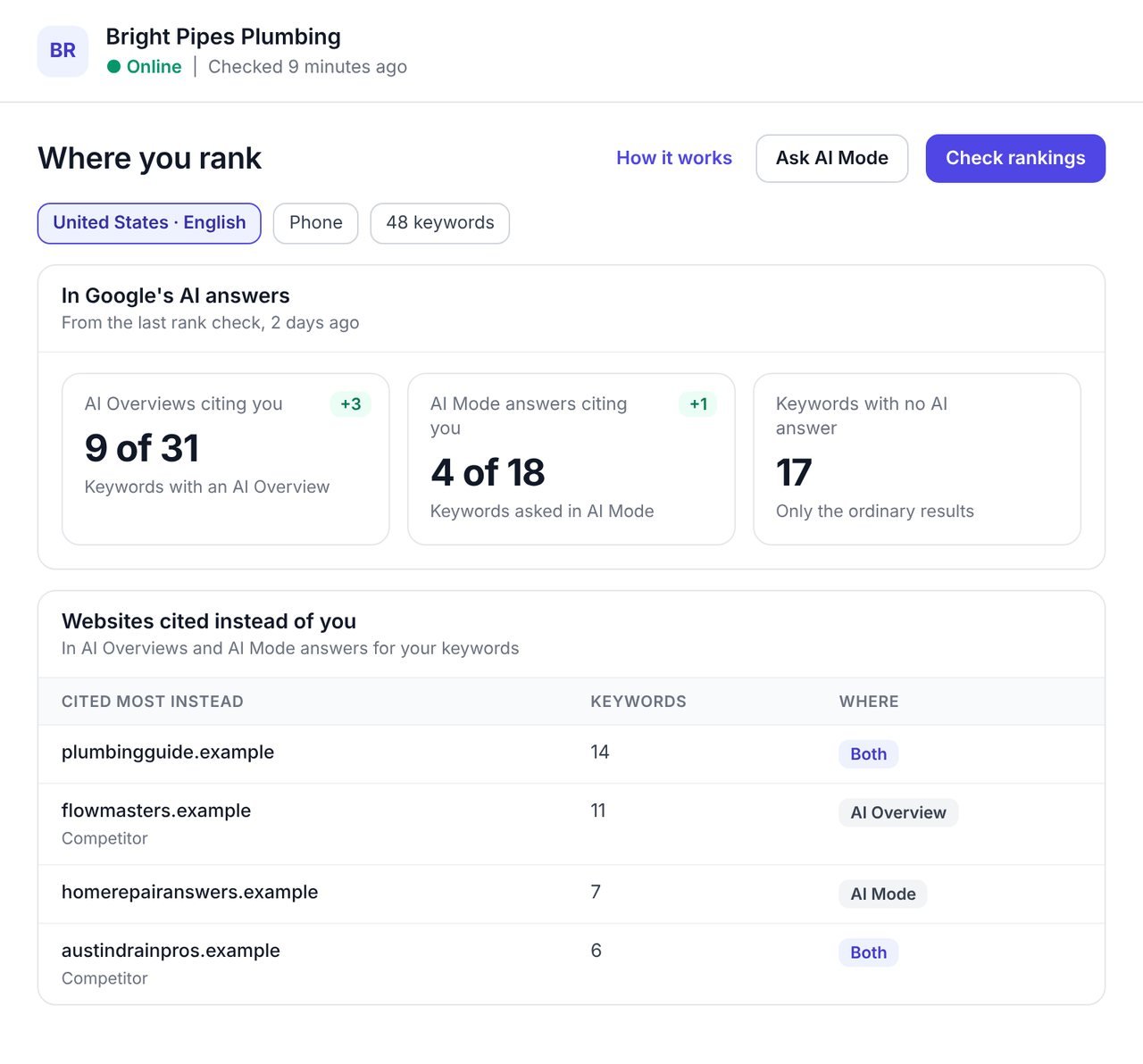
An AI Overview tracker checks the searches you care about for Google's AI Overview, the AI-written answer shown above the ordinary results, and records whether it cites your website and which websites it cites instead.
WPCentrify reads the AI Overview every time it checks your rankings, so you see your position and your place in Google's AI answer side by side, for every WordPress site you manage. It also asks Google's AI Mode when you want to know what Google says in its fuller AI answers.
Most rank trackers stop at a yes or no for the AI Overview. WPCentrify keeps the websites Google cites, in Google's order, with their pages, so you can see exactly who is taking the attention you used to get from ranking first.
Google says there are no special optimizations needed to appear in AI Overviews or AI Mode: a page must be indexed and eligible to show with a snippet. That makes the gap between your ranking and your AI citations the thing worth watching.
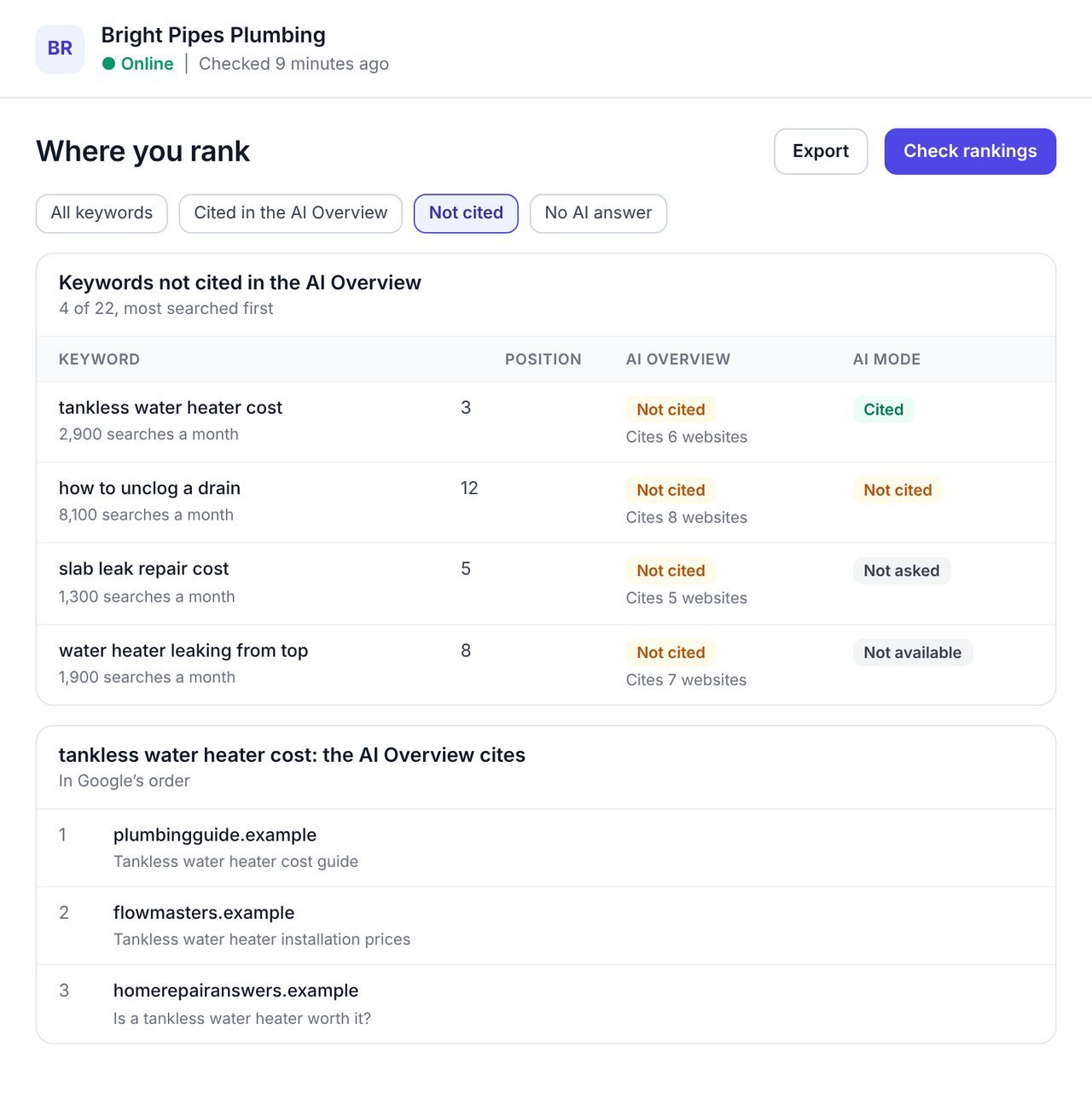
The keyword list gains an AI Overview column and an AI Mode column, so a keyword where you rank third but the AI answer cites three other websites stands out at once.
Filter the list to the keywords where you are not cited and start with the most searched. Press a keyword to see the websites its AI Overview cites, in the order Google shows them, with the page and its title.
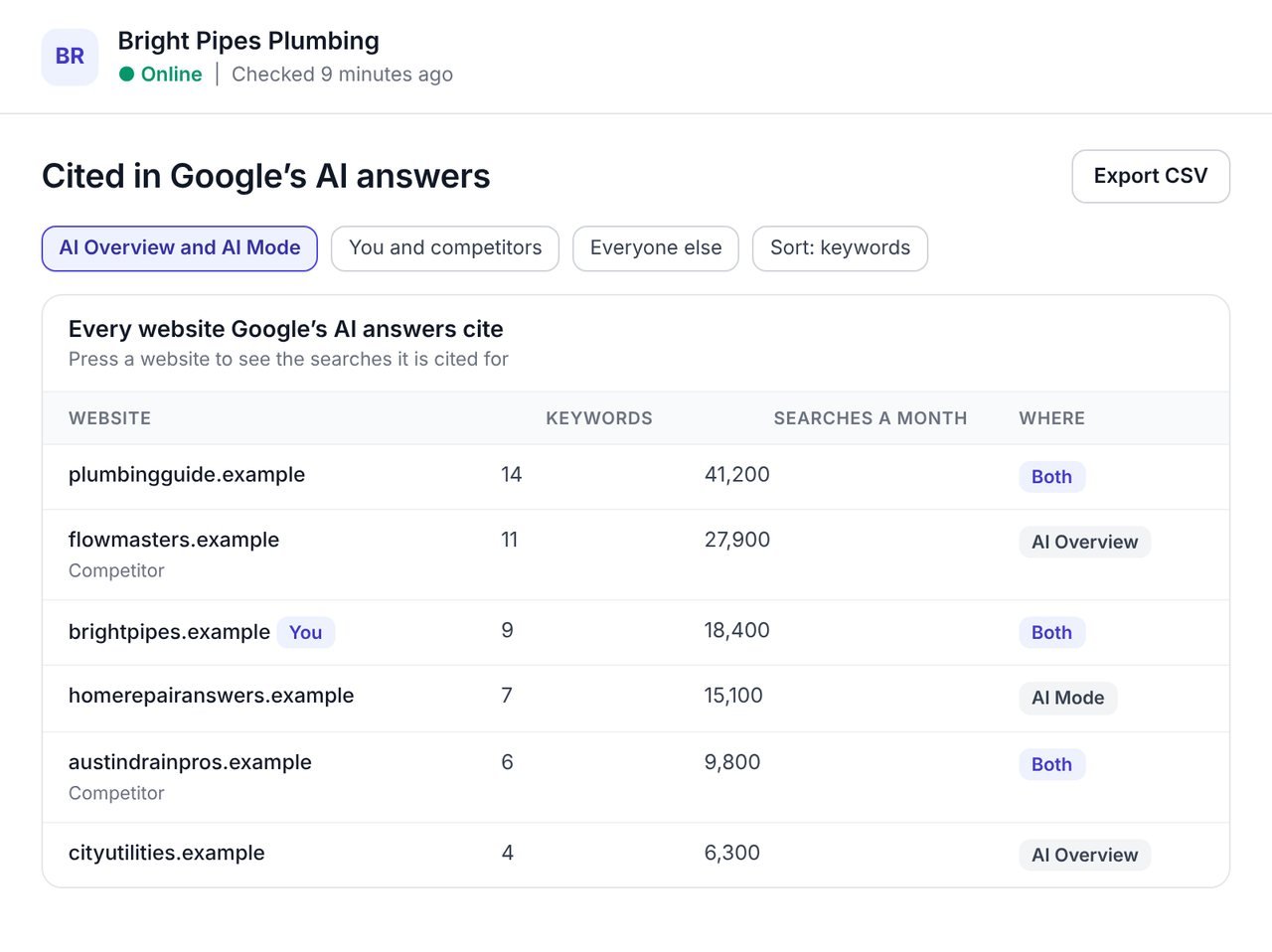
One list shows every website cited across your keywords, in AI Overviews, AI Mode or both, so you can see which competitors and which guides Google leans on.
Show you and your competitors, or everyone else. Sort by the number of keywords, by the searches behind them or by name, and press a website to see the searches it is cited for. That is the shortest route to knowing what to write next.
The AI answer now sits above the result your client is paying you to improve. These are the parts that make it reportable.
Nothing extra to press: each rank check reads the AI Overview for the keyword as well as the position.
Ask AI Mode for your most searched keywords, or the ones you tick, up to 100 at a time.
Every website the AI answer cites, not only whether you are among them.
A search AI Mode will not answer in that language says not available, never not cited.
Cited, not cited or no AI answer, so the gaps are one press away.
A CSV with who each answer cites, and a rankings PDF that ends with the AI section, under your brand.
Google now answers the same search in three places. Each needs its own measure, because a page can do well in one and be absent from another.
| Where Google answers | What it is | What WPCentrify records |
|---|---|---|
| The ordinary results | The list of links people have always seen. | Your position, by city and device, checked daily or weekly. |
| AI Overview | An AI-written summary above the results for some searches, with links to the websites it drew on. | Whether it appears, whether it cites you, and up to ten websites it cites, in order. |
| AI Mode | Google's fuller AI answer, for questions that need more reasoning or comparison. | Whether it cites you and the websites it cites, when you ask it. |
You need a website connected to WPCentrify and the keywords you want to rank for.
Add the searches you care about in Where you rank, or bring them in from Keyword ideas.
Run a rank check. WPCentrify records your position and the AI Overview for each keyword.
Press Ask AI Mode to put your most searched keywords, or the ones you tick, to Google's AI Mode.
The In Google's AI answers card shows how many AI answers cite you and who is cited most instead.
Filter to keywords where you are not cited and improve those pages first, then check again.
Nobody can promise an AI Overview citation, and Google says there is no special markup or file that earns one. What the pages it cites tend to share is plain.
To see whether assistants beyond Google name your business, use AI brand visibility for ChatGPT, Claude, Gemini and Perplexity.
What people ask before they turn it on.
An AI Overview tracker checks your keywords for Google's AI Overview, the AI-written answer above the ordinary results, and records whether it cites your website and which websites it cites instead. WPCentrify does this with every rank check, for every WordPress site you manage.
Yes. Press Ask AI Mode to put your most searched keywords, or the ones you tick, to Google's AI Mode, up to 100 at a time. AI Mode results are kept apart from AI Overview results so you can see each.
Not necessarily. The websites an AI Overview cites are not always the ones ranking at the top, which is why WPCentrify shows your position and your AI citation side by side.
Yes. For each keyword you see up to ten websites the AI Overview cites, in Google's order, with the page and its title, and one list shows every cited website across all your keywords.
It means AI Mode would not answer that search in that language. WPCentrify says not available rather than not cited, so a gap in Google's coverage is never counted against you.
Google includes clicks from AI Overviews and AI Mode in the Search Console Performance report under the Web search type, but it does not show them apart from ordinary results. A tracker shows which searches have an AI answer and who it cites.
Make sure the page can be indexed and shown with a snippet, answer the question in the first sentence under a question heading, cover what the cited pages cover, and earn links from respected websites. Then check again to see whether it moved.
Yes. The CSV lists who each AI answer cites, and the rankings PDF ends with the AI section, under your own brand with White label or under WPCentrify's.
Rank checks and AI Mode checks use AI credits from your workspace balance, and a results page already read that day is reused at no extra cost. Reading, filtering and exporting are free. Each plan includes AI credit every month: $1 on Solo, $10 on Studio, $30 on Agency and $75 on Scale, and you can buy more in $15 packs.
Google rankings by city and device, daily or weekly
Read moreSee if ChatGPT, Claude, Gemini and Perplexity name you
Read moreFind the pages AI answers can quote
Read moreSee every tool in one place: WordPress SEO tools for every site you manage.
Connect a site, check its rankings and read the AI section. The keywords where you are not cited are where to start.
Plan prices to be revealed. Keep your data, export any time.