How to add a WordPress cookie consent banner that really blocks trackers
A banner on the screen is not the same as consent. Here is how to add a cookie consent banner to WordPress, finish the setup most people skip, and prove in five minutes that it holds trackers back.
The short answer
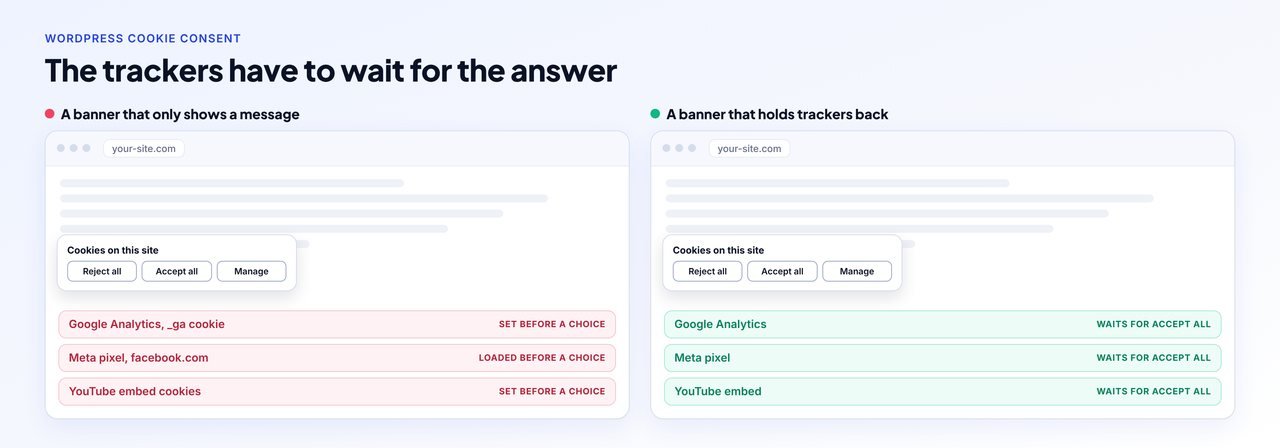
To add a cookie consent banner to WordPress, list what your site loads, install a consent tool, finish its setup (scan, categories, blocking), set Accept all and Reject all with equal weight, connect Google Consent Mode v2, then test in a private window that no tracking cookies appear before you click. Most guides stop at installing a plugin, but on our test site no plugin held anything back until its setup was finished.
- List what your site loads. Write down every tracker and embed on the site: analytics, advertising pixels, chat widgets, call tracking, YouTube or Maps embeds and anything pasted into the header. A browser private window and the Network tab show what loads on a first visit.
- Choose how the banner will run. Pick a WordPress plugin, a hosted consent service added with a header script, or a management platform that runs the banner across many sites. Check the free plan limits and where consent records are stored before you commit.
- Install it and finish the setup. Activate the tool, then finish its setup: run the cookie scan, confirm the categories, and switch blocking on. Most tools need this step finished before they block anything.
- Set the banner wording and buttons. Show Accept all and Reject all with the same weight on the first layer, add a way to choose by category, and link your cookie policy and privacy policy. Do not pre-tick any category except strictly necessary.
- Connect Google Consent Mode v2. If you use Google Analytics or Google Ads, switch on Consent Mode v2 in the tool so Google tags get the visitor's choice. Choose basic mode unless you have decided advanced mode is right for you.
- Clear caches and test in a fresh browser. Empty every page cache and your CDN, open the site in a private window, and check in DevTools that no tracking cookies or tracker requests appear before you click, after Reject all, and only after Accept all.
Disclosure: WPCentrify is our product and one of the tools mentioned. Facts about other tools come from each vendor's own pages, checked 8 November 2026. This guide is general information, not legal advice.
Do you need a cookie banner on your WordPress site?
Probably, if your site uses analytics, advertising pixels, embedded videos, maps or chat, and people from the EU, UK or other places with consent rules visit it. The EU ePrivacy rules say storing or reading information on a visitor's device needs their consent unless it is strictly necessary for a service they asked for. The UK regulator says the same, and adds that refusing must be as easy as accepting.
A quick way to decide:
| Your site | Banner needed? |
|---|---|
| Only WordPress itself, no analytics, no embeds, no pixels | Often not. WordPress's own cookies are mostly for logged-in users and commenters who opt in. |
| Google Analytics, Google Ads or a tag manager | Yes, for visitors where consent rules apply |
| Meta, TikTok, LinkedIn or other ad pixels | Yes |
| YouTube, Vimeo or Google Maps embeds | Usually yes, because the embed sets its own cookies |
| Live chat, call tracking or heatmaps | Usually yes, unless the tool sets nothing on the device |
| Visitors in California and you sell or share personal information | You need an opt-out route and should respect Global Privacy Control |
This is general information, not legal advice. Laws differ by country and state, and a lawyer can tell you what applies to your business.
Which cookies come from WordPress, and which come from your plugins?
WordPress itself sets very little for an ordinary visitor. According to the WordPress handbook, it sets login cookies for people who sign in and commenter cookies for people who leave a comment. Since WordPress 4.9.6, commenters choose whether their details are saved in a cookie. Almost everything else comes from what you added:
| Source | Cookies you will often see | Needs consent? |
|---|---|---|
| WordPress login | wordpress_logged_in_*, wordpress_sec_* | No, strictly necessary for signing in |
| WordPress comments | comment_author_* | Only set when the commenter opts in |
| Google Analytics 4 | _ga, _ga_* | Yes |
| Google Ads and conversion linker | _gcl_au | Yes |
| Meta pixel | _fbp, and fr on facebook.com | Yes |
| Microsoft Clarity | _clck, _clsk | Yes |
| YouTube embeds | YSC, VISITOR_INFO1_LIVE on youtube.com | Yes |
| WooCommerce cart and session | woocommerce_cart_hash, wp_woocommerce_session_* | No, needed for the cart to work |
If you paste tracking code into your theme header, that code sets cookies on every page whether or not a banner is showing. Our guide to adding tracking code to WordPress covers where that code usually lives.
What is the difference between a cookie notice and cookie consent?
A cookie notice tells people the site uses cookies. Cookie consent asks first and waits. With consent, analytics and advertising cookies stay blocked until the visitor accepts them, and a visitor who rejects them never gets them. A notice that says "by using this site you agree" while the trackers load anyway is a notice, not consent.
What does a compliant cookie banner need?
Regulators in the EU and UK agree on most of the basics. The European Data Protection Board's cookie banner report, the French regulator CNIL and the UK ICO all point the same way:
- Nothing non-essential runs before the visitor chooses. Analytics, pixels and embeds wait.
- Reject all is as easy as Accept all. Same layer, same weight, one click each.
- No pre-ticked boxes. The EU Court of Justice ruled in Planet49 that a pre-ticked box is not consent.
- Choices by category, such as analytics and marketing, behind a "manage" button.
- Closing the banner is not consent. A visitor who closes it has not said yes.
- A way to change your mind, such as a small button on every page that reopens the choices. Withdrawing must be as easy as giving consent.
- A record of each answer. GDPR Article 7(1) says you must be able to show that someone consented.
- Links to your cookie policy and privacy policy.
How to add a cookie consent banner to WordPress, step by step
These six steps work whatever tool you choose.
- List what your site loads. Write down every tracker and embed on the site: analytics, advertising pixels, chat widgets, call tracking, YouTube or Maps embeds and anything pasted into the header. A browser private window and the Network tab show what loads on a first visit.
- Choose how the banner will run. Pick a WordPress plugin, a hosted consent service added with a header script, or a management platform that runs the banner across many sites. Check the free plan limits and where consent records are stored before you commit.
- Install it and finish the setup. Activate the tool, then finish its setup: run the cookie scan, confirm the categories, and switch blocking on. Most tools need this step finished before they block anything.
- Set the banner wording and buttons. Show Accept all and Reject all with the same weight on the first layer, add a way to choose by category, and link your cookie policy and privacy policy. Do not pre-tick any category except strictly necessary.
- Connect Google Consent Mode v2. If you use Google Analytics or Google Ads, switch on Consent Mode v2 in the tool so Google tags get the visitor's choice. Choose basic mode unless you have decided advanced mode is right for you.
- Clear caches and test in a fresh browser. Empty every page cache and your CDN, open the site in a private window, and check in DevTools that no tracking cookies or tracker requests appear before you click, after Reject all, and only after Accept all.
Which kind of tool should you choose?
| Approach | How it works | Good for | Watch for |
|---|---|---|---|
| WordPress plugin | Installed from the plugin directory and set up in wp-admin | One site, and people who want settings inside WordPress | Free plan limits, and whether scans or records run in the vendor's cloud |
| Hosted consent service | A script from the vendor added to your header, managed in the vendor's web app | Sites on several platforms, not only WordPress | Pageview limits, per-domain pricing, and the script loading before your trackers |
| Management platform | The banner runs on each site from a dashboard you also use for other site work | Anyone running many WordPress sites | Whether it is a Google-certified CMP if you need one for ads |
If you want a shortlist of tools, our comparison of the best cookie consent plugins for WordPress looks at nine of them.
How do you test that your cookie banner really blocks trackers?
A banner on the screen proves only that the banner loaded. To check blocking, look at what the browser stores and sends. It takes about five minutes:
- Empty your caches. Clear your caching plugin, your host's cache and any CDN, so you test the current page.
- Open a private window so no earlier choice is remembered.
- Open DevTools before the page loads (F12, or right-click and Inspect). Keep the Network tab open, then load your homepage.
- Do not click the banner. In the Network tab, search for
google-analytics,googletagmanager,facebook,clarityandyoutube. In Application, open Cookies and look for the names in the table above. - Click Reject all, reload, and check again. Nothing new should appear.
- Open a new private window, click Accept all, and check that the trackers now load. If they do not, your banner is blocking too much.
Two things are allowed before consent: strictly necessary cookies, such as the cookie that remembers the visitor's choice, and, if you chose advanced Consent Mode, cookieless pings to Google. Anything else that appears before a choice is a tracker running without consent.
What we saw when we tested on a real WordPress site
On 8 November 2026 we built a test site on WordPress 7.1.4 with the Twenty Twenty-Five theme. We pasted a Google Analytics 4 tag and a Meta pixel into the header, the way most people add them, and put a YouTube video on the homepage. Then we visited it as a first-time visitor in a fresh Chromium browser and recorded every request and cookie.
With no consent tool, all three loaded on the first visit and set their cookies, including _ga and YouTube's cookies.
Next we tried several popular free consent plugins straight after activating them, before running their setup. In that state none of them held the trackers back. That is expected, because each one asks you to finish a setup first, such as a cookie scan, a wizard or connecting an account, and we did not configure other vendors' tools for this test. The lesson is simple. Installing a consent plugin is not the same as blocking. Finish the setup, then run the test above.
Then we ran WPCentrify's banner with the settings our dashboard uses by default:
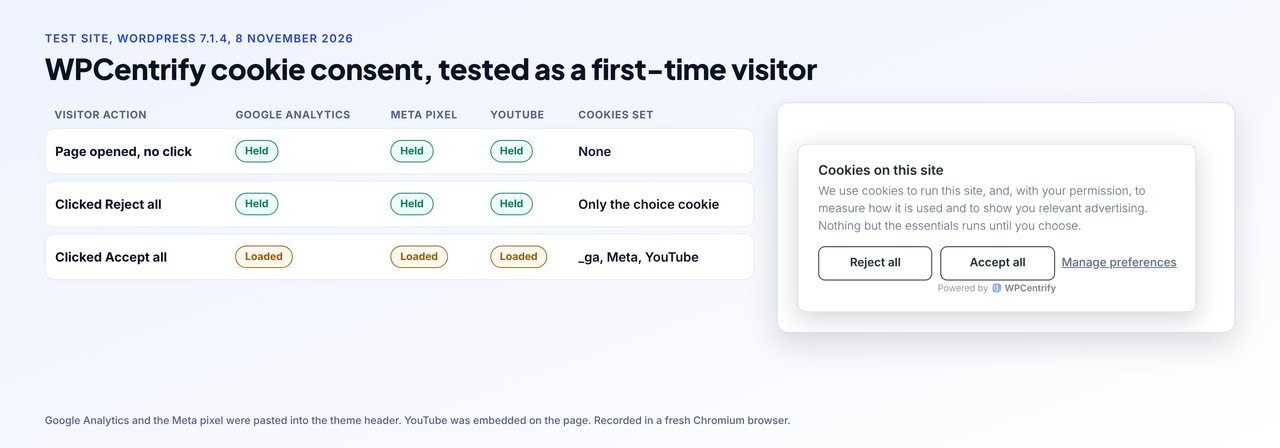
| Visitor action | Google Analytics | Meta pixel | YouTube embed | Cookies set |
|---|---|---|---|---|
| Page opened, no click | Held | Held | Held | None |
| Clicked Reject all | Held | Held | Held | Only the choice cookie (wpc_consent) |
| Clicked Accept all | Loaded | Loaded | Loaded | _ga, _ga_*, Meta and YouTube cookies |
This is one test on one site, run by us on our own product, so treat it as an example of the method rather than a ranking. You can repeat the same test on your site in five minutes.
Why does a cookie banner show but not block?
When a banner appears but trackers still load, it is usually one of these:
| Cause | What is happening | Fix |
|---|---|---|
| Setup not finished | The tool has not scanned the site or blocking is switched off | Finish the scan or wizard and switch blocking on |
| Code pasted into the header | The tracker is inline code with no file address, so a tool that matches script addresses misses it | Use a tool that recognizes inline code, or move the tag into the tool's own tag settings |
| A tag manager fires the tags | Google Tag Manager loads the tracker after the page is built | Add consent conditions in Tag Manager, or use Consent Mode with blocking |
| A cached page | Your caching plugin or CDN still serves the page from before the banner | Empty every cache, then test again |
| A speed plugin delays scripts | Delay or combine JavaScript settings change the order scripts run in, so the banner loads after the trackers | Exclude the consent script from delay and combine settings |
| Two consent tools | An old plugin and a new one both run, and they disagree | Keep one consent tool active, never two |
| A plugin sets cookies itself | Some plugins set cookies on the server, before any banner script runs | Check the plugin's settings for a consent option, or replace it |
Speed plugins matter here because the banner must load first. If you also want a faster site, our guide to improving Core Web Vitals on WordPress covers delaying scripts safely.
What is Google Consent Mode v2, and should you choose basic or advanced?
Google Consent Mode lets your banner tell Google tags whether the visitor said yes. Since March 2024 Google has required consent signals from EEA visitors for its ad personalization and measurement features. Google describes two modes in its Consent Mode help page:
| Basic mode | Advanced mode | |
|---|---|---|
| Before the visitor chooses | Google tags do not load | Google tags load and wait |
| If the visitor rejects | No data goes to Google, not even the consent status | Tags send cookieless pings |
| Data for Google's modeling | Less | More |
| Good for | A cautious setup | Sites that have decided cookieless pings are acceptable |
Consent Mode is a signal to Google only. It does not block trackers from Meta, Microsoft, TikTok or anyone else, so you still need a banner that holds those back.
Do you have to honor Global Privacy Control?
Global Privacy Control (GPC) is a browser setting that tells websites the person does not want their data sold or shared. Under the California regulations, a business that sells or shares personal information must treat a valid signal like GPC as an opt-out request. In 2022 California's Attorney General settled with Sephora for $1.2 million, partly for not processing GPC opt-outs. If you have California visitors, choose a tool that respects GPC automatically.
What records of consent should you keep?
Keep enough to show what someone agreed to and when. A useful record holds the time, the choices made, which version of the banner and policy was showing, and a shortened IP address rather than the full one. There is no single legal retention period for every case, so keep records at least as long as you rely on the consent and agree the exact period with whoever handles your privacy compliance.
Do you need to ask again when your banner or trackers change?
Yes, when you add new trackers or change what visitors are agreeing to. An earlier yes was given to a different question. Most consent tools can ask returning visitors again when you change the policy version.
What happens to cookies set before a visitor said no?
Blocking stops new cookies being set. It does not remove cookies already on the device from before the banner was installed or from an earlier yes. A good tool deletes your site's own tracker cookies when a visitor rejects. No script can delete another company's cookies, such as those set on facebook.com or youtube.com, because browsers do not allow it.
What do free cookie consent plans really include?
Free plans differ a lot, and some stop showing the banner when you pass a limit. These are each vendor's own published terms, checked on 8 November 2026:
| Tool | Free plan, as the vendor states it | When the limit is reached, per the vendor |
|---|---|---|
| CookieYes | 5,000 pageviews a month (websites on the free plan before 1 July 2025 keep 15,000), one free plan per account | The banner stops showing until the count resets next month or you upgrade |
| WPLP Cookie Consent | 1 site, 20,000 banner pageviews a month | The banner stops showing until the next month starts |
| iubenda | 5,000 pageviews a month | The banner is deactivated for the month |
| Termly | 10,000 banner views a month | The banner is deactivated until the following month |
| Cookie Compliance (Hu-manity) | 1,000 visits per 30 days when connected to a free account | Automatic blocking and consent records stop until the next cycle |
| Complianz | Free plugin with no pageview limits; the wizard scan covers up to 50 posts | No pageview limit stated |
| WPConsent | Free plugin with no pageview caps | No pageview limit stated |
| Cookiebot | 1 domain with up to 50 subpages | Larger sites need a paid plan sized to their page count |
Prices and limits change. Check each vendor's page before you choose, and tell us if anything here is out of date.
Do you need a cookie policy and a privacy policy too?
Yes, in most cases. The banner should link to a cookie policy that lists what the site uses, and to a privacy policy that explains what you do with personal data. WordPress has a built-in privacy policy helper under Settings, Privacy, which creates a draft page with suggested text. Many consent tools also generate a cookie policy. Generated text is a starting point, not legal advice, so have it reviewed.
How do you manage cookie consent across many WordPress sites?
Doing it site by site means one plugin, one setup and one set of records per site, and the settings drift apart over time. Our story of fixing cookie consent on 30+ client sites shows how that goes wrong.
WPCentrify, the WordPress management tool we build, runs WordPress cookie consent on every site you connect, from one dashboard. Here is what it does, in plain terms:
- Holds analytics, advertising and embed trackers until the visitor chooses, including code pasted into the theme header, as the test above shows.
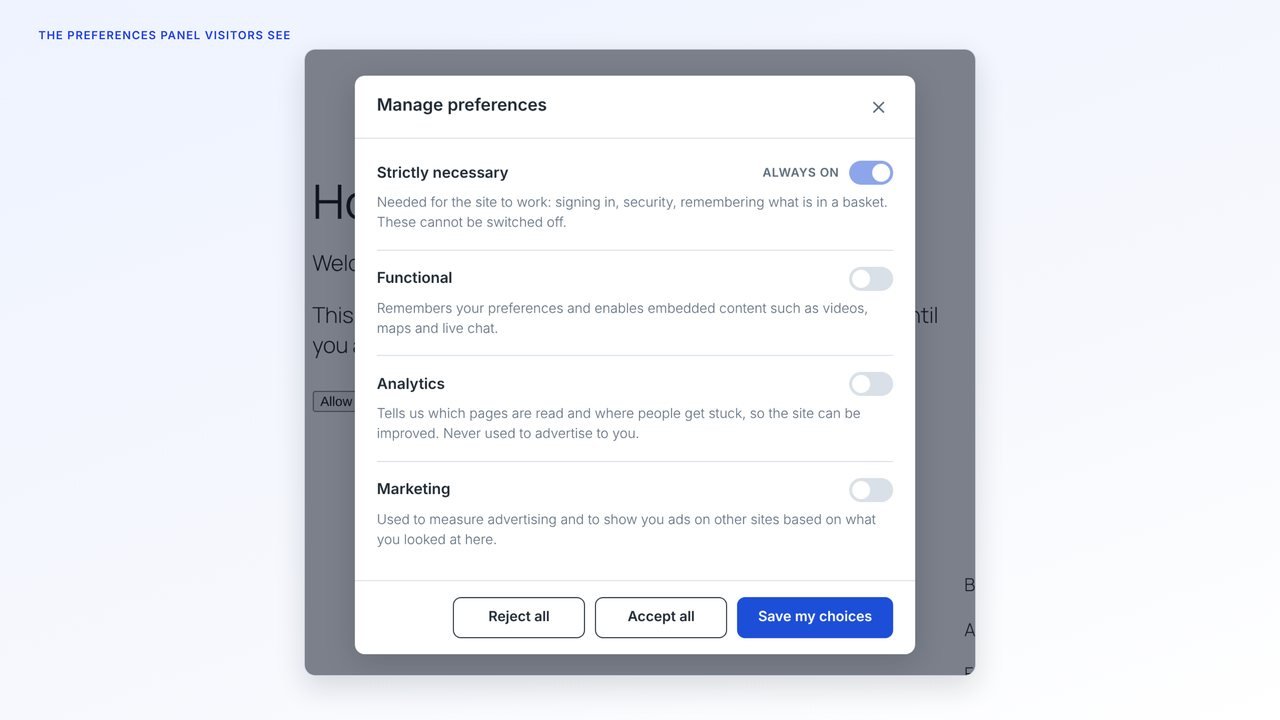
- Shows Reject all beside Accept all with the same weight, a panel to choose by category, and a small button on every page to change the choice later.
- Sends Google Consent Mode v2 signals, in basic mode unless you choose advanced for a site.
- Respects Global Privacy Control.
- Records each answer with the banner wording and policy version that were showing.
- Lists the third parties each site loads, so you can decide what each one is.
- Writes the privacy policy, cookie policy and terms of use pages from templates, without overwriting a page you already have unless you choose to.
- Stands down if another consent plugin is active, so a site never shows two banners.
What it is not: WPCentrify is not a Google-certified CMP and does not support the IAB Transparency and Consent Framework. Google requires a certified CMP for AdSense, Ad Manager and AdMob publishers serving personalized ads in the EEA, UK and Switzerland, so a site in that position should use a certified tool. Cookie consent is included on the Agency and Scale plans and is a $15 a month add-on on Solo and Studio. See pricing for details.
Switching from another consent tool?
If you are moving away from a tool you already use, our comparisons cover what to check first: CookieYes alternatives, Complianz alternatives and WP Legal Pages alternatives.
Sources
All checked 8 November 2026: ePrivacy Directive; GDPR; Planet49 judgment; ICO consent guidance; EDPB cookie banner report; CNIL; Google Consent Mode; Google certified CMPs; California CCPA regulations; WordPress cookies; and each vendor's pricing or plugin page linked in the free plans table.
Questions about WordPress cookie consent banners
You need one if the site sets cookies or loads trackers that are not strictly necessary, such as Google Analytics, advertising pixels or YouTube embeds, and people in the EU, UK or another place with consent rules visit it. A site that sets only strictly necessary cookies may not need one. This is general information, not legal advice.
Yes, but mostly for logged-in users and commenters. WordPress sets login cookies for people who sign in, and commenter cookies only when a commenter ticks the box to save their details, which WordPress has asked for since version 4.9.6. Most tracking cookies on a WordPress site come from plugins, themes, embeds and code added to the header.
Open the site in a private window, open DevTools, and look at the Application tab for cookies and the Network tab for requests before you click anything. If you see cookies like _ga, _fbp or _gcl_au, or requests to google-analytics.com or facebook.com, before you accept, the banner is not blocking them.
Under the EU ePrivacy rules and the UK rules, non-essential cookies need consent before they are set. A banner that shows a message while trackers load anyway does not ask first, so it does not meet that rule.
A cookie notice tells visitors that the site uses cookies. Cookie consent asks first and waits for the answer, holding non-essential cookies and trackers back until the visitor accepts them.
No. Consent Mode tells Google tags what they may do. It does not block trackers from other companies such as Meta, Microsoft Clarity or Hotjar, so you still need a banner that holds those back.
In basic mode Google tags do not load until the visitor chooses. In advanced mode Google tags load straight away and send cookieless pings while consent is denied. Basic is the cautious choice; advanced gives Google more data for modeling. Decide with whoever is responsible for your privacy compliance.
Because visitors who reject or ignore the banner are no longer measured with cookies. That is the banner working. Google Analytics can model some of that traffic when Consent Mode is set up, but the raw numbers will be lower than before.
In California, businesses that sell or share personal information must treat a valid opt-out preference signal such as Global Privacy Control as a request to opt out. Many consent tools can respect GPC automatically. Check whether your tool does and whether the law applies to you.
They can close it, but closing it should not count as consent. Until a visitor accepts, non-essential cookies should stay blocked.
If you add new trackers or change what visitors are agreeing to, ask again. Their earlier answer was given to a different question. Many tools let you renew consent when the policy version changes.
A well-built banner adds one small script and some styling. Problems usually come from heavy vendor lists, banners that load late, or a banner fighting with a speed plugin. Test your PageSpeed score before and after.
Related reading
Best cookie consent plugins for WordPress
Nine tools compared on blocking, records, Consent Mode and price.
Read the comparisonCookieYes alternatives for WordPress
What to check before you switch, and which tools fit which reason.
Read the guideWordPress cookie consent in WPCentrify
One banner setup, one consent log and one view across every site you run.
See the featureMore on this topic: Complianz alternatives, WP Legal Pages alternatives, cookie consent on 30+ sites and how WPCentrify handles GDPR
Run cookie consent on every site from one dashboard
Hold trackers until visitors choose, keep a record of every answer, and see what each site loads, without a plugin to set up on every install.
Included on Agency and Scale. A $15 a month add-on on Solo and Studio.