The best WP Legal Pages alternatives for privacy policies and cookie banners
WP Legal Pages, now listed as WPLP, covers legal pages and a cookie banner. If you need different documents, one tool instead of two, or only half the job, here are eight alternatives, with every fact taken from the vendor's own page.
The short answer
The best WP Legal Pages alternative depends on whether you need legal pages only, or legal pages and a cookie banner. For legal pages only, start with WordPress's built-in privacy policy guide or TermsFeed AutoTerms. For pages and a banner together, look at Complianz, iubenda, Termly, CookieYes or WPConsent. For many WordPress sites run from one dashboard, WPCentrify writes the pages and runs the banner. Keep your existing page addresses when you switch.
Disclosure: WPCentrify is our product and one of the tools listed. Every fact about another tool comes from that vendor's own pages, checked 8 November 2026 and linked beside it. We did not run paid trials of other tools, and we do not use affiliate links.
What WP Legal Pages is now
On WordPress.org the plugins now appear as WPLP Legal Pages and WPLP Cookie Consent. Legal Pages creates policy pages from templates and connects to the WPLP web app. Cookie Consent shows a banner, blocks scripts and keeps consent logs in your own database, with the web app optional and cookie scans run by WPLP's scanning service.
- Free legal pages: a privacy policy, terms of use, a DMCA notice and a CCPA notice.
- Paid legal pages: more than 30 templates, including a GDPR cookie policy, an Impressum, terms and conditions and an EULA, in several languages.
- Free cookie banner: 1 site and 20,000 banner pageviews a month, with script blocking, consent logs, Google Consent Mode v2 and Global Privacy Control.
- Paid plans: both plugins list the same plans by number of sites, and the Legal Pages listing gives the Agency plan as $168 a year for 25 sites.
Source: WPLP Legal Pages on WordPress.org, WPLP Cookie Consent on WordPress.org, WPLP pricing, checked 8 November 2026.
What WPLP does well
WPLP covers both halves of the job, the documents and the banner, from one vendor, and its 25-site plan works out at under $7 a site a year. The free cookie banner allows more pageviews than several other free plans, and its consent logs stay in your own database. If that combination fits, it is a reasonable choice.
Why people look for an alternative
- The free documents. A cookie policy is one of the paid templates, so a free setup has a banner that may have no cookie policy to link to.
- Two plugins. Legal pages and cookie consent are separate plugins, and Legal Pages connects to an account in the WPLP web app.
- The free banner limit. Past 20,000 banner pageviews a month, WPLP says the banner stops showing until the next month.
- Only one part needed. Some people want only legal pages, or only a banner, and prefer a tool that does that one thing.
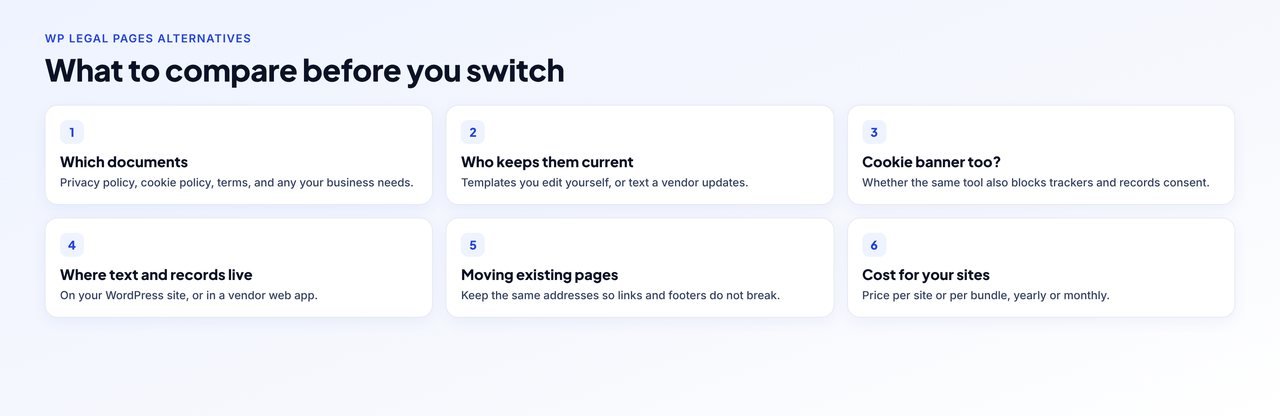
What to check before you switch
- Which documents you need. Most sites need a privacy policy and, with a banner, a cookie policy. Shops and services often add terms.
- Who keeps them current. Templates you edit yourself, or text a vendor updates when laws change.
- A banner too? Whether the same tool blocks trackers and records consent, or you will run two tools.
- Where the text and records live. Published into WordPress, or held in a vendor's web app.
- Moving your pages. Keep the same addresses so footers and banners do not break.
- Cost for all your sites.
WP Legal Pages alternatives compared
What each vendor says it offers, checked 8 November 2026.
| Tool | Legal documents, as stated by the vendor | Cookie banner | Where the pages live | Price |
|---|---|---|---|---|
| WPLP (for reference) | Free: privacy policy, terms of use, DMCA, CCPA notice. Paid: 30+ templates | Yes, separate plugin | Your WordPress site, with the WPLP web app | Free, or $168 a year for 25 sites |
| WordPress privacy guide | Privacy policy draft with suggested text | No | Your WordPress site | Free, built in |
| TermsFeed AutoTerms | Privacy policy, terms and conditions, cookies policy, return policy, disclaimer, EULA | Basic cookie consent kit | Your WordPress site | Core features free, per the plugin listing |
| Complianz | Cookie policy free; terms in a separate free plugin; more documents on premium | Yes | Your WordPress site | Free, or from $59 a year |
| iubenda | Privacy and cookie policy; terms on Advanced and up | Yes | iubenda, embedded or linked | Free plan, or from €4.99 a month billed yearly |
| Termly | Policy generators for privacy policies and terms | Yes | Termly, embedded or linked | Free plan, or from $10 a month per site billed yearly |
| CookieYes | Privacy and cookie policy generators on every plan | Yes | Your WordPress site, generated by the plugin | Free plan, or from $10 a month per domain |
| WPConsent | Cookie policy generator in the free plugin | Yes | Your WordPress site | Free, or from $99 a year list price |
| WPCentrify | Privacy policy, cookie policy, terms of use; HIPAA notice for US clinics | Yes | Your WordPress sites | Agency and Scale, or a $15 a month add-on |
The 8 best WP Legal Pages alternatives
Grouped by what you need: legal pages only, or legal pages with a banner. Not ranked.
If you only need legal pages
1. WordPress's built-in privacy policy guide, the free starting point
Before installing anything, look at what WordPress already gives you. It is the simplest way to get a privacy policy draft.
- What it is: WordPress's own privacy tools, under Settings, Privacy. They create a draft privacy policy page with suggested text and a guide to what to cover.
- Cost: free, built in, nothing to install.
- Good to know: the suggested text is a starting point that you edit yourself, and it does not include a cookie banner or terms of use.
Source: WordPress Settings, Privacy screen, checked 8 November 2026.
2. TermsFeed AutoTerms, for free legal pages inside WordPress
If you mainly need documents, AutoTerms creates them inside WordPress and its listing says its core features are free. It also has a basic cookie consent kit if a simple notice is enough.
- What it is: a plugin that creates legal pages inside WordPress, including a privacy policy, terms and conditions, a cookies policy, a return policy, a disclaimer and an EULA.
- Cost: the plugin listing says its core features are free.
- Cookie banner: it also has a basic Cookie Consent kit that shows a notice with I Agree and I Decline buttons and holds vendor scripts until the visitor agrees.
- Good to know: it has more than 70,000 active installs on WordPress.org.
Source: TermsFeed AutoTerms on WordPress.org, checked 8 November 2026.
If you want legal pages and a cookie banner
3. Complianz, for a free banner with a cookie policy
Complianz writes a cookie policy in its free plugin, which pairs naturally with its banner, and offers terms and conditions as a separate free plugin.
- Free plan: a free plugin with no pageview limits. It blocks third-party cookies and embeds, and the setup wizard scans up to 50 posts.
- Paid plans: $59 a year for 1 site, $179 for 5 sites and $399 for 25 sites.
- On the premium plans: records of consent, Google Consent Mode v2, Global Privacy Control and IAB TCF, according to its pricing page and WordPress.org listing. Complianz is a Google-certified CMP (ID 332).
- Good to know: it runs on your own WordPress site, and Complianz offers terms and conditions as a separate free plugin.
Source: Complianz pricing, Complianz on WordPress.org, checked 8 November 2026.
4. iubenda, for policies maintained by the vendor
iubenda generates privacy and cookie policies and keeps the text maintained, alongside its banner.
- Free plan: 5,000 pageviews a month, with Google Consent Mode v2 included. iubenda says the banner is deactivated for the rest of the month once the limit is passed, and the free privacy policy covers up to 3 third-party services.
- Paid plans: Essentials from €4.99 a month billed yearly for one site, with higher plans for more pageviews.
- On the paid plans: IAB TCF. Google Consent Mode v2 is on every plan, including Free. iubenda is a Google-certified CMP (ID 123). Terms and conditions are on the Advanced plan and up.
- Good to know: it pairs the banner with policy generators maintained by iubenda.
Source: iubenda pricing, iubenda free plan limits, checked 8 November 2026.
5. Termly, for policy generators with a banner
Termly pairs a banner with generators for privacy policies and terms.
- Free plan: 1 policy and 10,000 banner views a month. Termly says the banner is deactivated until the following month once the limit is reached.
- Paid plans: Starter $10 a month per website billed yearly ($14 billed monthly), with higher plans above it and custom pricing for agencies.
- Plan by plan: the automatic script blocker is on every plan. Consent logs, advanced Consent Mode and IAB TCF are on Pro+ and up. Termly is a Google-certified CMP (ID 412).
- Good to know: it includes policy generators for privacy policies and terms.
Source: Termly pricing, Termly on WordPress.org, checked 8 November 2026.
6. CookieYes, for policy generators on every plan
CookieYes includes privacy policy and cookie policy generators on every plan, alongside its banner.
- Free plan: 5,000 pageviews a month (websites already on the free plan before 1 July 2025 keep 15,000), and one free plan per account. CookieYes says that once the monthly limit is reached the banner stops showing until the pageview count resets the next month or you upgrade.
- Paid plans: Basic $10 a month or $100 a year, Pro $25 a month or $250 a year, Ultimate $55 a month or $550 a year, each per domain. CookieYes runs a partner program with discounts of up to 50%.
- Included on every plan: Google Consent Mode v2 and a consent log. Global Privacy Control and IAB TCF are on Pro and up.
- Good to know: CookieYes is a Google-certified CMP. The plugin can run on its own or connect to the CookieYes web app, and its scanning and consent logs run in CookieYes's cloud.
Source: CookieYes pricing, CookieYes pageview quota, checked 8 November 2026.
7. WPConsent, for a free banner with a cookie policy generator
WPConsent includes a cookie policy generator in its free plugin, beside the banner.
- Free plan: a free plugin with a banner, automatic script blocking, a cookie scanner, Google Consent Mode v2, Global Privacy Control and a cookie policy generator, with no pageview caps.
- Paid plans: list prices of $99 a year for 1 site, $199 for 5 sites and $399 for 25 sites. The first year is often discounted.
- On the paid plans: consent logs and IAB TCF, from the Basic plan up.
- Good to know: settings and data stay in your WordPress site.
Source: WPConsent pricing, WPConsent on WordPress.org, checked 8 November 2026.
8. WPCentrify, for legal pages and a banner across many sites
WPCentrify writes a privacy policy, cookie policy and terms of use from templates filled with each business's details, plus a HIPAA Notice of Privacy Practices for US clinics. Pages are created as drafts unless you choose to publish, and an existing page is never replaced unless you tick it. The same dashboard runs the cookie banner on each site.
- What it is: the WordPress management tool we build. Cookie consent runs on every WordPress site you connect, from one dashboard, with no consent plugin to set up on each site.
- What it does: holds analytics, advertising and embed trackers until the visitor chooses, including code pasted into the theme header. It shows Reject all beside Accept all with the same weight, sends Google Consent Mode v2 signals (basic by default), respects Global Privacy Control and records each answer with the banner version that was showing.
- Pricing: included on the Agency and Scale plans, and a $15 a month add-on on Solo and Studio. Plan prices are still to be revealed.
- Not for everyone: WPCentrify is not a Google-certified CMP and does not support IAB TCF, so a site serving personalized ads through AdSense or Ad Manager in the EEA, UK or Switzerland should use a certified tool.
Source: WPCentrify cookie consent, WPCentrify pricing, checked 8 November 2026.
How to replace your legal pages without breaking links
- List the pages you have and where they are linked. Note every legal page, its address, and where it is linked: footer menus, the cookie banner, forms, checkout and WordPress's Settings, Privacy screen.
- Write the new text before removing anything. Generate or write the replacement privacy policy, cookie policy and terms with the new tool, and have them reviewed. Keep them as drafts for now.
- Replace content at the same addresses. Paste the new text into the existing pages so the addresses stay the same. If an address must change, add a 301 redirect from the old one.
- Point the banner and WordPress at the right pages. Update the policy links in your cookie banner and choose the privacy policy page under Settings, Privacy.
- Switch the cookie banner, then remove the old plugins. If you also used WPLP Cookie Consent, set up the new banner, turn the old one off so two never run at once, export your consent logs first, and then deactivate and delete both WPLP plugins.
- Clear caches and check every link. Empty your caches, then open each legal page and click every link to it from the footer, banner and forms in a private window.
If you also move your cookie banner, run the five-minute DevTools test afterwards to check that trackers wait for consent.
A note on legal advice
Every tool on this page fills in templates or offers guidance. None of them, ours included, is legal advice, and none can know everything about how your business uses data. Have the final text reviewed by someone qualified.
Something out of date?
Plans and prices change often. If you work for one of these companies, or you spot something that no longer matches a vendor's own page, tell us and we will check it and correct it. Here is how we research comparisons.
Sources
All checked 8 November 2026: WPLP Legal Pages, WPLP Cookie Consent, WPLP pricing, WordPress Settings, Privacy screen, TermsFeed AutoTerms, Complianz pricing, Complianz Terms and Conditions, iubenda pricing, Termly pricing, CookieYes pricing, WPConsent pricing.
Questions about WP Legal Pages alternatives
WPLP is the name now shown on WordPress.org for two plugins, WPLP Legal Pages and WPLP Cookie Consent. Legal Pages creates policy pages from templates and connects to the WPLP web app. Cookie Consent shows a consent banner and keeps consent records in your WordPress database, and connecting it to the web app is optional.
There is a free version. Its free legal pages cover a privacy policy, terms of use, a DMCA notice and a CCPA notice, according to the plugin listing. Paid plans add more than 30 templates, and the plugin listing gives the Agency plan as $168 a year for 25 sites, checked 8 November 2026.
Yes. The free plan covers 1 site and 20,000 banner pageviews a month, and WPLP says the banner stops showing until the next month starts once the limit is reached.
For legal pages only, WordPress's own privacy policy guide is free and built in, and the TermsFeed AutoTerms plugin says its core features are free, including a privacy policy, terms and conditions and a cookies policy. WordPress's guide has no cookie banner, and AutoTerms has only a basic cookie consent kit.
Not always. Complianz, iubenda, Termly, CookieYes and WPCentrify each offer a banner and policy pages, although which documents are included depends on the plan. Using one tool keeps the banner links and the policy text in step.
Not if you keep the same addresses. Replace the content of the existing pages instead of creating new ones, and add a 301 redirect for any address that must change.
They are a starting point. A generator fills in templates from your answers, but it cannot know everything about your business, so have the result reviewed by someone qualified. This is general information, not legal advice.
Yes, for sites on a WPCentrify plan with cookie consent. WPCentrify writes privacy policy, cookie policy and terms of use pages from templates filled with the business's details, and a HIPAA Notice of Privacy Practices for US clinics, as drafts by default. It never replaces an existing page unless you choose to, and it runs the cookie banner on the same sites.
WordPress's privacy guide, TermsFeed AutoTerms and WPCentrify publish the pages into your WordPress site. iubenda and Termly policies are generated in their web apps, with options to embed or link them.
Related reading
How to add a cookie consent banner to WordPress
Six steps, a five-minute test, and why a banner can show without blocking.
Read the guideCookieYes alternatives for WordPress
Eight tools matched to the reasons people leave CookieYes.
Read the comparisonComplianz alternatives for WordPress
What to check before leaving Complianz, and which tools fit which reason.
Read the comparisonMore on this topic: best cookie consent plugins for WordPress, WordPress cookie consent in WPCentrify and how WPCentrify handles GDPR
Run cookie consent on every site from one dashboard
Hold trackers until visitors choose, keep a record of every answer, and see what each site loads, without a consent plugin to set up on every install.
Included on Agency and Scale. A $15 a month add-on on Solo and Studio.