Why WordPress says Missed schedule, and how to fix WP-Cron for good
A post you scheduled for 9am is still sitting there at noon, marked Missed schedule in red. The post is fine. The task runner that should have published it, WP-Cron, did not run. Here is why that happens, how to publish the post now and how to make sure it never happens again.
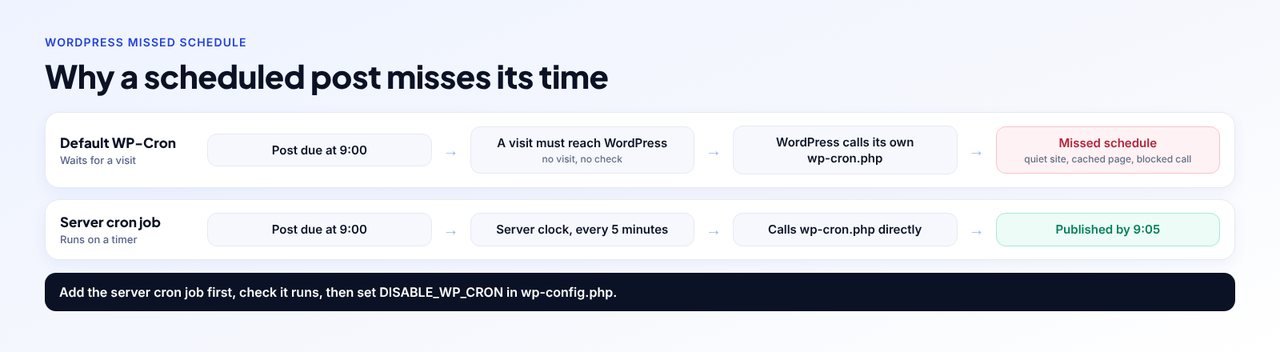
The short answer
Missed schedule means WP-Cron, the task runner that publishes scheduled posts, did not run on time. WP-Cron only runs when a visit reaches WordPress, so it misses on quiet sites, on sites where a page cache serves most visits and on sites that cannot make a request to themselves. Publish the stuck post with Quick Edit, then fix the cause: add a server cron job that calls wp-cron.php every 5 minutes, check it runs, and only then add define( 'DISABLE_WP_CRON', true ); to wp-config.php.
Disclosure: WPCentrify is our product. Everything said about how WordPress behaves comes from WordPress's own code and documentation, checked 7 November 2026.
What does Missed schedule mean in WordPress?
Missed schedule is the label WordPress puts on a scheduled post whose publish time has passed while the post is still waiting to go live. You see it in red in the Status column of the Posts list, in place of Scheduled.
When you schedule a post, WordPress saves it with the status "future" and books a one-off task for the publish time. That task is what actually publishes the post. WordPress shows Missed schedule from the first second after the publish time until the task has run, so the label is a symptom: the post is fine, but the task that should publish it has not run.
The task runner behind it is WP-Cron, and the same runner handles WordPress's update checks, automatic updates, the weekly Site Health check and the scheduled jobs of your plugins: backups, emails, imports and clean-ups. So a missed schedule is often the first visible sign that all of those are late too.
How does WP-Cron actually work?
WP-Cron is not a clock. It is a list of tasks with due times, checked when someone loads a page. On each request that reaches WordPress, it looks at the list. If something is due, it starts wp-cron.php in the background to run the due tasks. WordPress's own documentation puts it plainly: you cannot be sure exactly when a task will run, only that it will run eventually.
Here is what happens on a normal page load, taken from WordPress's own code:
- A visitor loads a page. Since WordPress 6.9, the check runs at the very end of the request, after the page has been built, so it slows the page less than it used to.
- WordPress looks for due tasks. If none are due, it does nothing.
- It sets a lock. A short-lived lock stops more than one run starting at once. By default WordPress starts at most one run a minute.
- It makes a request to its own wp-cron.php. This is a "loopback" request: the site calls its own address over HTTP, with a timeout of a hundredth of a second, and does not wait for the answer.
- wp-cron.php runs every due task in turn. Each task is removed from the list just before it runs, and a repeating task is booked again for its next time.
Every one of those steps can fail quietly, and nothing tells you when it does. That is why missed schedule tends to come back.
Why do scheduled posts miss their schedule?
These are the causes we see most, in the order worth checking:
| Cause | Why it stops WP-Cron | How to tell |
|---|---|---|
| Few visitors | No page loads means no checks, so nothing starts the task until someone visits. | Posts go live late on quiet days and at night, then catch up when traffic arrives |
| A full-page cache | Cached pages are served without starting WordPress, so most visits never reach the check. | Busy front end, but tasks still run late; worse after you turned caching up |
| The site cannot call itself | A firewall, a password on the site, a CDN or the network blocks the loopback request to wp-cron.php. | Site Health shows "Your site could not complete a loopback request" |
| DISABLE_WP_CRON set with nothing in its place | The constant stops page loads starting WP-Cron. Without a server cron job, nothing ever does. | The line is in wp-config.php and no cron job exists in the hosting panel |
| A task that crashes | Tasks run one after another in one request. A fatal error stops the run, so the tasks after it wait for the next run. | The PHP error log shows a fatal error from wp-cron.php |
| The wrong timezone | The post is published at the right time in the wrong zone. | Settings, General shows UTC or a city that is not yours |
Two of these deserve a closer look.
Caching makes it worse on exactly the sites that are fastest
A page cache (WP Rocket, LiteSpeed Cache, W3 Total Cache or a host's built-in cache) saves a finished copy of each page and serves it without running WordPress. That is the point: it is fast because WordPress does not start. But WP-Cron only starts when WordPress does. On a site where nine visits out of ten come from the cache, WP-Cron has a tenth of the chances to run, and at night it may have none.
A crashing task can take a post with it
WordPress removes a one-off task from the list just before running it. If PHP stops with a fatal error while that task runs, the task is already gone and is not tried again. A post whose publish task was caught in a crash can sit on Missed schedule until someone publishes it by hand. If posts go missing only sometimes, check the PHP error log for errors that mention wp-cron.php.
How do you check whether WP-Cron is working?
Start with Site Health. Go to Tools, then Site Health. WordPress checks its own list of tasks and reports one of three things:
| Site Health says | What it means |
|---|---|
| Scheduled events are running | Nothing on the list is overdue |
| A scheduled event is late | At least one task is overdue by up to 5 minutes (between 15 minutes and an hour if DISABLE_WP_CRON is set) |
| A scheduled event has failed | At least one task is more than 5 minutes overdue (more than an hour if DISABLE_WP_CRON is set) |
Site Health names the task. If it is publish_future_post, that is a scheduled post. If it is wp_version_check or wp_update_plugins, your update checks are late too.
Then look at the list itself. The free WP Crontrol plugin, active on more than 300,000 sites, lists every scheduled event, when it is next due and what runs it, and lets you run one by hand. If several events are hours overdue, WP-Cron is not running at all.
From the command line, WP-CLI has three commands worth knowing:
wp cron test
wp cron event list --fields=hook,next_run_relative
wp cron event run --due-now
wp cron test checks that WordPress can start WP-Cron over HTTP and warns if it cannot. If it fails, the problem is the loopback request; our guide to fixing "Your site could not complete a loopback request" goes through every cause. wp cron event list shows what is waiting, and wp cron event run --due-now runs everything overdue straight away.
How do you publish a missed schedule post right now?
You have three quick ways, none of which loses anything:
- Quick Edit. In Posts, hover over the post, choose Quick Edit, set Status to Published and update. The post keeps its date.
- Open the post. In the editor, set the publish date to now (or leave it) and press Publish.
- WP-CLI. Run
wp cron event run --due-nowto run every overdue task, which publishes every missed post at once and catches up the rest of the backlog.
That fixes today's post. The next one will miss too unless you fix what stops WP-Cron.
How do you fix WP-Cron for good with a server cron job?
The fix WordPress itself recommends is to let the server's own scheduler call wp-cron.php on a timer, so tasks run on time whether or not anyone visits. Every hosting panel has a scheduler: Cron Jobs in cPanel, Scheduled Tasks in Plesk, crontab on a VPS, and a cron or scheduled tasks screen at most managed WordPress hosts. Do it in this order:
- Publish the stuck post now. In Posts, open Quick Edit on the post marked Missed schedule and publish it, or run wp cron event run --due-now on the server to run every overdue task.
- Check that the site timezone is right. Go to Settings, then General, and make sure Timezone names your city, so scheduled times mean what you think they mean.
- Add a server cron job that calls WP-Cron. In cPanel Cron Jobs, Plesk Scheduled Tasks or crontab, run wp-cron.php every 5 minutes with a plain GET request, or run wp cron event run --due-now with WP-CLI.
- Confirm the cron job runs. Wait for two runs, then check that WP Crontrol or wp cron event list shows no overdue events and Site Health says scheduled events are running.
- Turn off the page-load trigger. Add define( 'DISABLE_WP_CRON', true ); to wp-config.php, above the line that says to stop editing, so WP-Cron runs only from your server cron.
- Test with a scheduled post. Schedule a draft a few minutes ahead and check that it publishes on time, then delete it.
The cron command to use
Any of these runs WP-Cron every 5 minutes. Replace the address and the path with your own. The first two call wp-cron.php over HTTP with a plain GET request; the third runs the due tasks directly with WP-CLI and does not need a loopback at all.
# With curl
*/5 * * * * curl -s -o /dev/null "https://example.com/wp-cron.php?doing_wp_cron"

# With wget
*/5 * * * * wget -q -O /dev/null "https://example.com/wp-cron.php?doing_wp_cron"

# With WP-CLI
*/5 * * * * cd /path/to/wordpress && wp cron event run --due-now --quiet
Three details trip people up:
- Use a GET request. wp-cron.php stops straight away when it receives POST data, so a cron command that posts to it runs nothing. curl and wget send GET by default, which is what you want.
- Add the cron job before you disable WP-Cron. DISABLE_WP_CRON only stops page loads starting it. Calling wp-cron.php directly still works with the constant set, which is exactly why this setup works, but with the constant set and no cron job, nothing runs at all.
- The WP-CLI form needs the right user. Run it as the same system user that owns the WordPress files, or tasks that write files (backups, image work) can fail with permission errors.
How often should it run?
Every 5 minutes is a sensible default and is what most hosts suggest. A shop with timed sales or a membership site with renewals may want every minute. More often costs more: each call starts WordPress once, even when nothing is due, so a cheap shared plan may not thank you for every minute on twenty sites.
Should you disable WP-Cron?
Disable the page-load trigger only when a server cron job replaces it. With that in place, turning it off is good practice: tasks run on time, and page loads no longer spend effort checking the list. Without it, disabling WP-Cron stops scheduled posts, update checks and plugin tasks completely.
| Your site | What to do |
|---|---|
| Quiet site, a few visits a day | Server cron job, then DISABLE_WP_CRON. Page loads are too rare to rely on |
| Busy site with a full-page cache | Server cron job, then DISABLE_WP_CRON. Most visits never reach WordPress |
| Busy site without a page cache | Page loads work, but a server cron job still makes timings predictable |
| Host already runs WP-Cron for you | Leave it as the host set it up, and check the interval with their support |
| Many sites on one server | One cron job per site, spread across the minutes so they do not all start at once |
Some managed hosts already turn the page-load trigger off and run WP-Cron from their own scheduler. If DISABLE_WP_CRON is set and you did not set it, ask your host before adding a second cron job.
What about ALTERNATE_WP_CRON?
ALTERNATE_WP_CRON is a fallback for servers where the loopback request cannot work and you cannot add a cron job. With define( 'ALTERNATE_WP_CRON', true ); in wp-config.php, WordPress runs due tasks by redirecting a visitor's page load to the same address with ?doing_wp_cron added and running the tasks in that request.
It works, but visitors can see the extra part in the address bar, and it still needs visitors. Use it as a last resort, and prefer a server cron job wherever your host allows one.
Do missed schedule plugins help?
Plugins built to catch missed posts look for overdue scheduled posts and publish them. They are a reasonable safety net, but most of them run their check when a page loads, which is the same moment WP-Cron runs. On a quiet or heavily cached site, they wait for a visitor just like WP-Cron does. Treat them as a backup, not the fix. If you add one, check that it is still maintained and tested with your version of WordPress.
Is your timezone set correctly?
WordPress schedules in the timezone chosen under Settings, then General. If it is set to UTC, a post you schedule for 9:00 goes live at 9:00 UTC, which may be the middle of your night or the afternoon before. Choose a city rather than a UTC offset, so daylight saving changes are handled for you, and re-check the publish time of anything already scheduled after you change it.
How do you catch missed schedules across many WordPress sites?
On one site, you notice a missed post because you were waiting for it. On twenty client sites, the first sign is usually a client asking why their announcement is not live. That is the job WPCentrify, the WordPress management tool, does for you.
- Missed posts flagged on every website. Content management lists the posts and pages of every website you connect, and when a website's post list is next synced, marks any post still waiting more than an hour after its scheduled time as "Scheduled to publish, but the time passed and it did not", so you can publish it from one screen.
- Uptime that does not depend on WP-Cron. WPCentrify uptime monitoring checks each website from outside, so a quiet site with a stuck WP-Cron is still checked on schedule and an outage is still caught.
- Updates that do not wait for a visitor. Updates from WPCentrify start from the request our dashboard sends, not from WP-Cron, so they begin in seconds on a quiet site too.
- A record of what ran. The activity log shows when a change was made by a scheduled task rather than by a person, which helps when something changes overnight and nobody remembers doing it.
To be clear about what it does not do: WPCentrify does not add the server cron job for you. That stays in your hosting panel. It tells you which websites have posts that did not go live, before your clients do.
Your WP-Cron checklist
- Stuck posts published with Quick Edit or wp cron event run --due-now
- Timezone set to your city under Settings, General
- Site Health checked for late or failed scheduled events
- Loopback request working, or a WP-CLI cron job that does not need one
- A server cron job calling wp-cron.php every 5 minutes with GET
- DISABLE_WP_CRON added only after the cron job runs
- A test post scheduled a few minutes ahead and seen to publish
- PHP error log checked for fatal errors from wp-cron.php
Sources
- Cron, WordPress Plugin Handbook
- Hooking WP-Cron into the system task scheduler, WordPress Plugin Handbook
- wp-includes/cron.php and wp-cron.php, WordPress source code
- Site Health screen, WordPress documentation
- wp cron test and wp cron event run, WP-CLI Commands
- WP Crontrol, WordPress.org plugin directory
All sources checked on 7 November 2026.
Questions about WordPress missed schedule and WP-Cron
It means a post was scheduled for a time that has passed and WordPress has not published it yet. WordPress publishes scheduled posts through WP-Cron, its built-in task runner, and the label appears when WP-Cron did not run at the right time.
Almost always because WP-Cron did not run. WP-Cron only starts when someone loads a page that reaches WordPress, so it fails on sites with few visitors, on sites where a page cache serves most visits, and on sites where the server cannot make a request to itself.
Open the post with Quick Edit in the Posts list and publish it, or edit it and press Publish. If you have WP-CLI, wp cron event run --due-now runs every overdue task, including the one that publishes the post.
No. WP-Cron is not a real clock. WordPress checks for due tasks when a page is loaded and starts them then, so with no visitors nothing runs. A server cron job that calls wp-cron.php on a timer fixes this.
Only after you have set up a server cron job that calls it. Disabling WP-Cron with DISABLE_WP_CRON stops WordPress starting it on page loads; without a replacement, scheduled posts, update checks and plugin tasks stop running altogether.
Every 5 minutes suits most sites. Busy shops and membership sites often use every minute. WordPress handles overlapping calls itself, and each call only runs the tasks that are due.
It can publish posts that were missed, but most of these plugins check on page loads, just like WP-Cron, so they share its weakness on quiet or heavily cached sites. A server cron job fixes the cause instead of the symptom.
It can. A full-page cache serves saved copies of pages without starting WordPress, so those visits never trigger WP-Cron. On a well-cached site with modest traffic, almost no visit reaches WordPress at all.
Open Tools, then Site Health. If scheduled events are late or failed, it says so. The WP Crontrol plugin lists every scheduled event and when it is due, and wp cron test checks from the command line that WordPress can start WP-Cron.
It can make posts go live at the wrong time. WordPress schedules in the timezone set under Settings, then General, so a site set to UTC publishes a post scheduled for 9am at 9am UTC, not 9am where you are.
Related reading
Loopback request failed
When WordPress cannot call its own address, WP-Cron cannot start. Every cause, from firewalls to passwords, and the fix.
Read the guideAn automated update failed
Automatic updates run on WP-Cron too. What the warning and the failure emails mean, and how to finish the update.
Read the guideContent management
Every post and page across every website you manage, with posts that missed their schedule flagged.
See the featureMore on this topic: WordPress automatic updates, how to monitor WordPress uptime and the WordPress maintenance checklist.
See every post that missed its schedule, on every website
Connect your websites to WPCentrify and see missed posts, uptime and updates for all of them on one screen.
Plan prices to be revealed. Start free on one website today.