Cookie Consent for WordPress Websites
Cookie consent for WordPress websites looks finished the moment a banner appears, and often it is not. WordPress itself sets almost no cookies for visitors. The analytics, ad pixels, videos and maps you add do, and in many countries they have to wait until a visitor says yes. This guide explains which rules apply to your website, what a working setup has to do, and how to keep it working on every site you run with WPCentrify.
The short answer
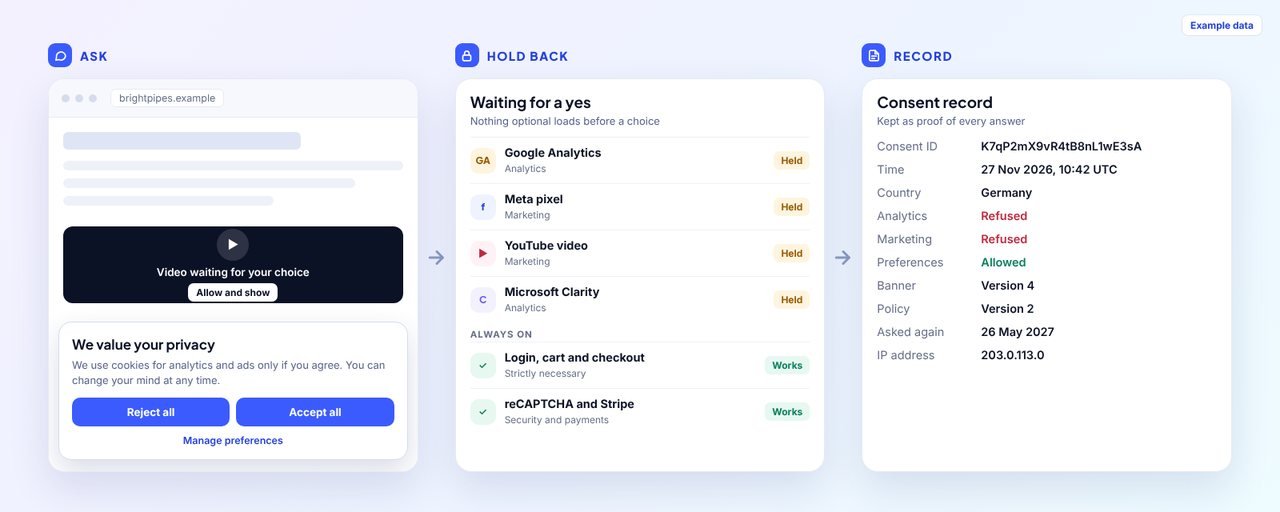
Cookie consent for WordPress websites means asking visitors before your site stores or reads anything on their device that it does not strictly need, holding analytics, advertising pixels and embedded videos back until they say yes, and keeping a record of every answer. WordPress does not do this on its own: it shows no banner and blocks nothing. If people from the EU, the UK or Switzerland visit and your site uses analytics, ads or embeds, you need a consent tool that blocks before a choice, puts Reject beside Accept and records each answer. Most US states use an opt-out model instead.
Disclosure: WPCentrify is our product and includes WordPress cookie consent. This guide is general information, not legal advice. Sources were checked on 27 November 2026.
What is cookie consent for WordPress websites?
Cookie consent for WordPress websites is the permission a visitor gives, or refuses, before a WordPress site stores or reads information on their device that it does not strictly need, such as analytics, advertising and embedded video cookies. In practice it is three things working together: a banner that asks, code that holds trackers back until the answer is yes, and a record of what each visitor chose.
The word "cookie" undersells it. The European rules behind most cookie banners cover any storing or reading of information on a visitor's device, so local storage, tracking pixels and the cookies an embedded YouTube video or Google Map sets all count. That is why a WordPress website can need cookie consent even when its own code sets nothing at all.
Cookie consent for WordPress at a glance
- WordPress core sets login cookies for people who sign in and comment cookies only when a commenter ticks the box. Almost everything else comes from plugins, themes and embeds.
- In the EU and the UK, optional cookies wait for a yes. In most US states, visitors can opt out instead.
- Rules follow your visitors, not your server or your company.
- Refusing has to be as easy as accepting: Reject all belongs beside Accept all.
- A banner that shows is not proof that anything is blocked. Test it.
- Google Consent Mode is a signal to Google's tags, not a blocker for every tracker.
- Keep a record of every answer, with the version of the banner the visitor saw.
- Visitors must be able to change their mind as easily as they agreed.
Regulators do check. In September 2025 France's regulator, the CNIL, fined Shein 150 million euros after finding that advertising cookies were placed on visitors' devices as soon as they arrived, before they had made a choice on the banner, and that new cookies were still placed after visitors pressed "Refuse all". Both of those failures are easy to reproduce on a WordPress website without anybody noticing.
Does your WordPress website need cookie consent?
Probably, if it uses anything beyond WordPress itself and people from places with consent rules visit it. The quickest way to decide is to look at what kind of website you run:
| Kind of WordPress website | What usually sets cookies | Consent needed where opt-in rules apply? |
|---|---|---|
| A blog or brochure site with no analytics, ads or embeds | WordPress itself: login cookies for you and your team, and comment cookies when a commenter opts in | Often not. A short cookie policy still tells visitors what is set. |
| A small business site with Google Analytics and a Google Map | Analytics cookies and the map embed | Yes, for the analytics and the map |
| A site that runs ads or ad tracking | AdSense, Google Ads conversion tags, the Meta pixel and similar | Yes. Personalized AdSense, Ad Manager and AdMob ads in the EEA, the UK and Switzerland also need a Google-certified consent tool. |
| A WooCommerce store | Cart and session cookies, plus analytics, pixels, reviews and chat widgets | Not for the cart and checkout. Yes for everything else. |
| A membership, course or booking site | Login and session cookies, payment forms, video embeds | Not for logins and payments. Yes for videos and tracking. |
| A clinic, law firm or other sensitive website | The same tools, but a visit itself can reveal something personal | Yes, and keep trackers to the minimum the business really uses |
Our step-by-step guide to which cookies WordPress sets and which come from plugins lists the cookie names you are most likely to find.
Which cookie consent rules apply to your WordPress website?
The rules that matter are the ones where your visitors live. A US company with European visitors meets European rules on those visits; a UK website with Californian visitors meets California's. This table summarizes the main models:
| Where visitors are | The model | What it means for your website |
|---|---|---|
| European Union and EEA | Opt-in | Storing or reading anything that is not strictly necessary needs consent first. Analytics, ad pixels and most embeds wait for a yes, refusing must be easy, and you must be able to show what people agreed to. |
| United Kingdom | Opt-in, with narrow exceptions | Advertising always needs consent. Analytics and appearance cookies can run without it under narrow conditions, including clear information and a simple, free way to object. |
| Switzerland | A right to refuse, opt-in for high-risk tracking | Visitors must always be able to reject non-essential cookies, and highly intrusive profiling needs express consent first. |
| California and other US states | Opt-out | Tell people what you collect and let them opt out of the sale or sharing of their data. California treats Global Privacy Control as a valid opt-out. |
| Quebec, Canada | Privacy by default | Law 25 requires technology that can identify, locate or profile a person to be off by default. How that applies to cookies is debated, so many websites treat tracking cookies as opt-in there. |
| Brazil | Consent recommended for optional cookies | The data protection authority's 2022 guidance, which is not binding, recommends consent for cookies such as advertising and a reject option as easy to use as accept. |
If your visitors come from several of these places, the simplest safe choice is to build the banner for the strictest of them: ask first, make refusing easy and keep records. Google adds a rule of its own: its EU user consent policy asks websites using its products to get consent from visitors in the EEA, the UK and Switzerland where the law requires it.
What does WordPress do for privacy on its own?
WordPress gained its privacy tools in version 4.9.6, released in May 2018. They help, but none of them is cookie consent:
- A privacy policy page. Under Settings, Privacy you can create or choose a privacy policy page, and WordPress suggests text and shows the link on the login and registration pages.
- A checkbox for comment cookies. Commenters choose whether their name, email and website are saved in a cookie for next time.
- Tools to export and erase personal data. Site owners can export or erase what WordPress holds about a person when they ask.
- The WP Consent API, as a plugin. A community plugin with 300,000+ active installations gives plugins a standard way to read a visitor's choices in five categories: functional, statistics-anonymous, statistics, preferences and marketing. It does not ask for consent itself.
What WordPress does not do is show a cookie banner, hold back scripts, block embeds or keep consent records. Every one of those comes from a plugin, a theme feature or a management platform. That gap is why cookie consent for WordPress websites is a decision you make, not a setting you switch on.
The five parts of cookie consent that works
Strip away the vendor names and every working setup does the same five things.
1. Tell visitors what you use
The banner gives a short, plain summary, and a cookie policy gives the detail: each cookie or service, why it is there, who provides it and how long it lasts.
2. Ask, with Reject as easy as Accept
Put Reject all on the first layer, at the same size and weight as Accept all. Boxes must not be ticked in advance, and scrolling or closing the banner is not a yes. The EU's top court ruled in the Planet49 case that a pre-ticked box is not valid consent.
3. Hold everything back until the answer
This is the part most banners get wrong. Trackers reach a WordPress site from plugins, from code pasted into the theme header and from tag managers that load more code later. All of them have to wait, along with embedded videos and maps. What keeps working is what visitors asked for: logins, carts, checkout, form submissions and security checks.
4. Keep a record of every answer
The GDPR says a business relying on consent must be able to show it was given. A useful record holds the time, the choices, which version of the banner and policy was showing and a shortened IP address rather than the full one.
5. Let visitors change their mind
Withdrawing consent must be as easy as giving it, so leave a small button or a footer link that reopens the choices. When somebody withdraws, stop the trackers and clear the cookies your own site set for them.
Cookie notice, consent plugin, CMP or Consent Mode?
Four terms get mixed up in almost every conversation about cookie consent for WordPress. They are different things:
| What it is | What it does | Holds trackers back? | Keeps records? |
|---|---|---|---|
| A cookie notice | A bar saying the site uses cookies, often with one OK button | No | No |
| A cookie consent plugin or tool | Asks, holds trackers back and records answers | Yes, if it blocks before a choice. Test it. | Usually |
| A Google-certified CMP with IAB TCF | A consent tool certified by Google that passes choices to ad vendors through a shared framework | Depends on the setup | Yes. Required for personalized AdSense, Ad Manager and AdMob ads in the EEA, the UK and Switzerland. |
| Google Consent Mode v2 | Tells Google's tags what the visitor chose | No. It is a signal, not a blocker. | No |
A cookie notice was common before the rules tightened and is not consent where opt-in rules apply. Consent Mode works beside a consent tool: it makes Google's tags behave correctly once the visitor has answered, but it does nothing about the Meta pixel, a chat widget or a YouTube embed. Our guide to Consent Mode v2 basic and advanced explains which to choose.
How to set up cookie consent on a WordPress website
You need a WordPress website, an hour, and access to the plugins and theme settings it runs.
- List everything your website loads. Open the site in a private window and look at the cookies and requests in your browser's developer tools. List every plugin, theme setting, tag manager tag, pixel and embed that sets cookies or calls another company's server.
- Decide which rules apply. Look at where your visitors come from, not where your server is. Visitors from the EU, the UK or Switzerland bring their rules with them; US state laws mostly ask for an opt-out.
- Remove what you do not use. Every tracker you take off the site is one less thing to ask about, one less script to load and one less line in your cookie policy.
- Choose a consent tool that blocks before a choice. Pick a tool that holds scripts, pixels and embeds back until the visitor agrees, puts Reject all beside Accept all at the same weight, and records every answer.
- Publish a cookie policy and a privacy policy. Explain which cookies and services you use, why, who provides them and how long they last, and link both pages from the banner.
- Test as a new visitor, then keep testing. In a fresh private window, check that nothing optional loads before a choice or after Reject all, and that it all loads after Accept all. Test again after every plugin, theme or caching change.
For the detailed version, with screenshots and the exact checks to run in your browser, follow our guide to adding a cookie consent banner to WordPress that really blocks trackers. If you are still choosing a tool, nine cookie consent plugins for WordPress are compared here, and our guide to where tracking code lives in WordPress helps with step one.
How do you keep cookie consent working after launch?
A banner that worked in the spring can be leaking by the autumn, because WordPress websites change. These are the moments to check it again:
| When this happens | What to do |
|---|---|
| You add a plugin, an embed or a tracking tag | Check what it sets, put it in the right category and ask visitors again if it adds a new purpose |
| A theme or page builder update | Check that header and footer code still waits behind the banner |
| You change a caching or speed plugin | Make sure the banner's script is not delayed or combined, and empty the page caches after any banner change |
| You change the banner wording or categories | Publish it as a new version and keep the old one, so each record matches the words its visitor saw |
| Answers get old | Ask again after a set period. There is no single legal period, so choose one and write it down. |
| A visitor asks what they agreed to | Find their record by date or consent ID and show them |
| Rules change somewhere you have visitors | Review the banner, the categories and the policy pages |
Caching deserves a special mention. A page cache keeps serving the old banner, or no banner, until it turns over, and speed plugins that delay JavaScript can load the banner after the trackers it should stop. Both make a correct setup look broken, and both are invisible unless you test as a new visitor.
Who is responsible for cookie consent on a client's website?
Under the GDPR, the organization that decides why and how personal data is used is the controller, and the responsibility sits with it. For a client's WordPress website that is usually the business that owns the site, not the agency or freelancer who built it. An agency that sets up and runs the consent tool on the client's instructions is usually acting on their behalf, and that belongs in a written data processing agreement.
In practice the arguments start when nobody wrote down who does what. Agree four things with each client: who chooses the trackers on the site, who approves the banner wording, who keeps the consent records, and who checks the site after changes. How WPCentrify itself handles the data it processes is on our GDPR page. This is general information; a lawyer can tell you how it applies to your contracts.
Cookie consent for every WordPress website you manage, with WPCentrify
Cookie consent for WordPress websites gets harder with every site you add: one plugin, one settings page, one set of records and one caching problem per website. WordPress cookie consent in WPCentrify runs from the same dashboard you use to manage multiple WordPress sites, through the WPCentrify plugin each site already has:
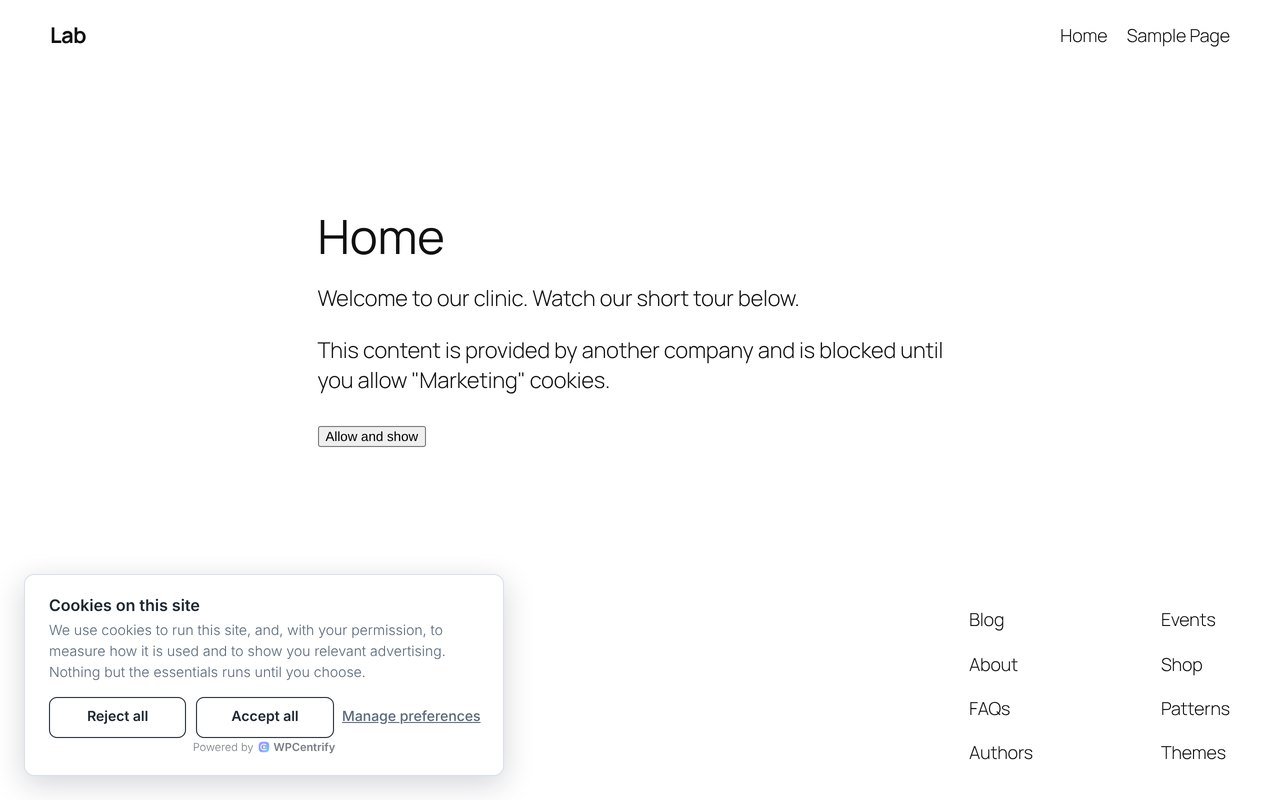
- Holds trackers until visitors choose. Code added by plugins, pasted into the theme or loaded later by a tag manager waits for the matching category. YouTube, Vimeo and Google Maps show an Allow and show button instead of loading.
- Keeps what visitors need working. Carts, logins and forms keep working, and reCAPTCHA, Cloudflare Turnstile and Stripe are never held back. A product the business relies on, such as call tracking, can be marked to always load, with the reason recorded.
- A fair banner. Reject all sits beside Accept all at the same weight, every optional category starts switched off, and a small button lets visitors change their mind later.
- Google Consent Mode v2 and Global Privacy Control. Consent Mode signals are sent with every choice, and Global Privacy Control is respected.
- A record of every answer. Each answer has a consent ID and keeps the time, the choices, the country, the banner and policy version, and a shortened IP address. Download a proof of consent for any answer, or export them all as a CSV.
- See what each site loads. Every third party found on the site is listed, so you can decide about each one, and a check of the live homepage, read from outside, shows whether its trackers wait for a choice.
- Handles caches and speed plugins. Page caches are emptied when the banner changes, and the consent script is kept out of the delay settings of WP Rocket, LiteSpeed Cache and Perfmatters.
- Policy pages written for you. A privacy policy, cookie policy and terms of use are written from the business's details, as drafts you review first.
- Works with other plugins. If another consent plugin is already active, WPCentrify steps aside rather than showing a second banner, and when the WP Consent API plugin is installed it passes each visitor's choice to it.
Answers last 180 days by default, adjustable from 1 to 365, and you can ask everyone again when you add trackers. Cookie consent and the policy pages are included on the Agency and Scale plans and are a $15 a month add-on on Solo and Studio. We tested it on a real WordPress site with Google Analytics, a Meta pixel and a YouTube video; see what was held back.
What cookie consent cannot do
- Make a website compliant on its own. You still need an accurate privacy policy, a reason for every piece of data you collect and agreements with the services you use.
- Delete other companies' cookies. Browsers do not let one website delete cookies set on another company's domain, such as facebook.com.
- Take back data already sent. If a pixel fired before the visitor chose, that data has already left the site. Blocking has to happen first.
- Replace a certified CMP for personalized Google ads. WPCentrify is not a Google-certified CMP and does not support IAB TCF, so publishers serving personalized AdSense, Ad Manager or AdMob ads in the EEA, the UK and Switzerland need a certified tool.
- Handle every US opt-out. WPCentrify respects Global Privacy Control but has no separate "Do Not Sell or Share" link flow.
A cookie consent checklist for WordPress websites
| Check | Done when |
|---|---|
| Know what the site loads | Every plugin, tag, pixel and embed that sets cookies is on a list |
| Know where visitors are | You know which of the rules above apply |
| Unused trackers removed | Nothing loads that nobody looks at |
| Blocking works | Nothing optional loads before a choice or after Reject all |
| Reject is as easy as Accept | Both are on the first layer, at the same weight |
| Nothing pre-ticked | Every optional category starts switched off |
| Policies linked | The banner links a cookie policy and a privacy policy |
| Records kept | Every answer is stored with the banner version |
| Changing your mind is easy | A button or footer link reopens the choices |
| Tested after changes | You test again after plugin, theme and caching changes |
Sources
- ePrivacy Directive, Article 5(3), EUR-Lex
- General Data Protection Regulation, Article 7, EUR-Lex
- Planet49, case C-673/17, Court of Justice of the European Union
- Report of the cookie banner taskforce, European Data Protection Board
- Cookies placed without consent: SHEIN fined 150 million euros, CNIL
- What are the exceptions?, UK Information Commissioner's Office
- Cookie guidelines, updated version, Swiss Federal Data Protection and Information Commissioner
- California Consumer Privacy Act and Global Privacy Control, California Attorney General
- Quebec's Law 25 and cookies, McCarthy Tetrault
- Guia orientativo: cookies e protecao de dados pessoais, ANPD (Brazil)
- EU user consent policy and consent management requirements for publishers, Google
- WordPress 4.9.6 privacy and maintenance release and Settings, Privacy screen, WordPress.org
- WP Consent API, WordPress.org plugin directory
Sources checked on 27 November 2026. Product details are from the WPCentrify cookie consent feature on the same date.
Questions about cookie consent for WordPress websites
It is asking visitors before a WordPress website stores or reads anything on their device that it does not strictly need, holding analytics, advertising pixels and embedded videos back until they agree, and keeping a record of each answer.
No. WordPress has a privacy policy page setting, a checkbox for comment cookies and tools to export and erase personal data, but it shows no cookie banner and blocks nothing. Cookie consent is added with a plugin or a platform such as WPCentrify.
It depends on where your visitors are, not where your server is. If people from the EU, the UK or Switzerland visit and your site uses analytics, ads or embeds, their rules apply to those visits. For US visitors, most state laws use an opt-out model, and California expects you to honor Global Privacy Control.
Mostly no. WordPress sets login cookies for people who sign in, which are strictly necessary, and comment cookies only when a commenter ticks the box to save their details. Consent is needed for what plugins, themes and embeds add.
No. Consent Mode tells Google's tags what a visitor chose, but it does not show a banner, hold back other trackers such as the Meta pixel or keep records. You still need a consent tool, and Consent Mode works alongside it.
Not where opt-in rules apply. European regulators treat a banner with no way to refuse as a problem, and the UK regulator says refusing must be as easy as accepting. Put Reject all beside Accept all, at the same size and weight.
There is no single legal period. Ask again when you add new purposes or trackers, and renew it regularly. In WPCentrify an answer lasts 180 days by default, and you can set anything from 1 to 365 days.
Regulators fine for it. In September 2025 France's regulator, the CNIL, fined Shein 150 million euros after advertising cookies were placed as soon as visitors arrived, before they chose, and new cookies were still placed after visitors refused.
Usually the business that owns the website, because it decides what the site collects and why. An agency that sets up the tool acts on the client's behalf, so agree in writing who chooses the trackers, approves the banner and keeps the records.
WPCentrify adds a consent banner to each connected WordPress site, holds analytics, ad pixels and embeds until visitors choose, sends Google Consent Mode v2 signals, respects Global Privacy Control and records every answer. It is included on Agency and Scale and is a $15 a month add-on on Solo and Studio.
Related reading
WordPress cookie consent
A banner per site that holds trackers until visitors choose, with a record of every answer.
See the featureAdd a cookie banner that blocks
The step-by-step setup, with the browser checks that prove nothing loads before a choice.
Read the how-toBest cookie consent plugins
Nine cookie consent plugins for WordPress compared on blocking, records, free plans and costs.
Read the comparisonMore on this topic: fixing cookie consent on 30+ WordPress sites, CookieYes alternatives, Complianz alternatives and WP Legal Pages alternatives.
Turn on cookie consent for every WordPress site you manage
Switch the banner on per site, hold trackers back until visitors choose, and keep a record of every answer in one dashboard.
Plan prices to be revealed. Start free on one website today.